
Fujifilm 16390110
Fujifilm X-M1 Compact System Digital Camera
Instruction Manual
Model: 16390110
Introduction
The Fujifilm X-M1 is a compact system digital camera designed to deliver high-quality images with ease of use. Featuring a 16.3 MP APS-C X-Trans CMOS sensor, it captures impressive detail and vibrant colors. Its intuitive controls and advanced features make it suitable for both enthusiasts and those new to interchangeable lens cameras.

Figure 1: Front view of the Fujifilm X-M1 camera body.
This manual provides essential information for setting up, operating, and maintaining your Fujifilm X-M1 camera. Please read it thoroughly to ensure optimal performance and longevity of your device.
Setup
1. Battery and Memory Card Installation
The Fujifilm X-M1 uses a Lithium Ion battery (included) and supports SD, SDHC, and SDXC memory cards.
- Open the battery/card compartment cover located on the bottom of the camera.
- Insert the battery with the correct orientation until it clicks into place.
- Insert the memory card into the slot until it clicks. Ensure the card is facing the correct way.
- Close the compartment cover securely.
2. Attaching a Lens
The X-M1 features a Fujifilm X-Mount. To attach a lens:
- Remove the body cap from the camera and the rear cap from the lens.
- Align the white mounting marks on the lens and camera body.
- Mount the lens by rotating it clockwise until it clicks into place.
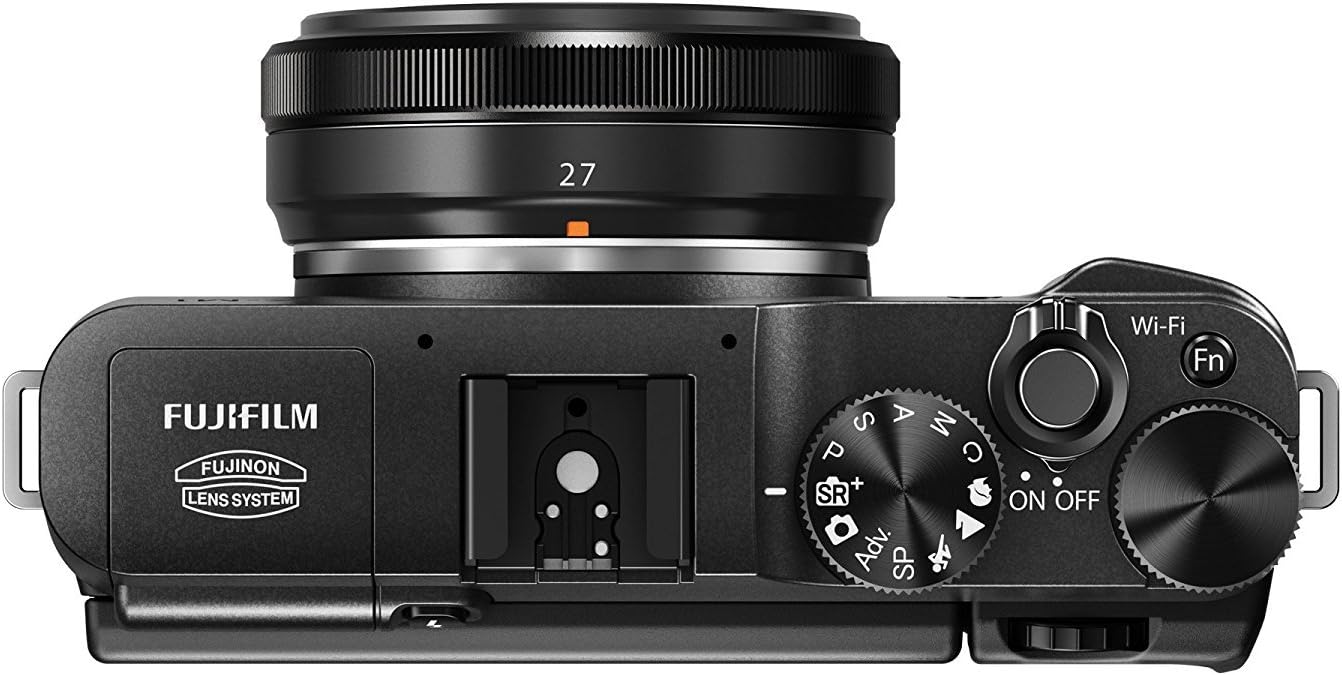
Figure 2: Top view of the Fujifilm X-M1, highlighting control layout.
3. Initial Power On and Basic Settings
After installing the battery and memory card, turn the camera ON using the power switch. You will be prompted to set the date, time, and language. Follow the on-screen instructions.
Operating the Camera
Shooting Modes
Rotate the Mode Dial on the top of the camera to select your desired shooting mode:
- Advanced SR AUTO: Automatically optimizes shutter speed, aperture, and other settings by recognizing 58 scene types.
- P (Program AE): Camera sets aperture and shutter speed for optimal exposure.
- S (Shutter-Priority AE): You set shutter speed, camera sets aperture.
- A (Aperture-Priority AE): You set aperture, camera sets shutter speed.
- M (Manual): You set both aperture and shutter speed.
- Advanced Filter: Apply artistic effects to your photos.
- SP (Scene Position): Choose from various scene modes for specific shooting conditions.
Focusing and Exposure
The X-M1 features a 49-point AF system. Use the command dials for quick adjustment of aperture, shutter speed, and exposure compensation. The tilting LCD allows for flexible framing, especially for high or low angle shots.

Figure 3: Fujifilm X-M1 in various color options with different lenses.
Wi-Fi Connectivity
The built-in Wi-Fi allows for easy transfer of photos to your smartphone or tablet. Press the Wi-Fi button (Fn button) on the top of the camera to initiate transfer after selecting images in playback mode.
Video Recording
Record Full HD 1080/30fps video using the dedicated one-touch Movie Recording Button.
Flash Usage
The X-M1 includes a built-in flash with Super Intelligent Flash technology, which automatically delivers the ideal amount of light. It also features a hot shoe for external flash units.

Figure 4: Fujifilm X-M1 with pop-up flash activated.
Playback Functions
Review your photos using various playback functions, including Focus Point Zoom to check sharpness, and "Red Eye Correction" for automatic in-camera adjustments.
Maintenance
Cleaning the Camera
- Use a soft, lint-free cloth to clean the camera body.
- For the LCD screen, use a specialized screen cleaning cloth.
- Avoid using harsh chemicals or abrasive materials.
- For sensor cleaning, it is recommended to consult a professional service.
Battery Care
- Charge the battery fully before first use.
- Store batteries in a cool, dry place when not in use.
- Do not expose batteries to extreme temperatures.
Storage
When storing the camera for extended periods, remove the battery and store the camera in a dry, dust-free environment, preferably with a desiccant to prevent mold and mildew.
Troubleshooting
| Problem | Possible Cause | Solution |
|---|---|---|
| Camera does not turn on. | Battery is dead or incorrectly inserted. | Charge the battery. Reinsert the battery correctly. |
| Images are blurry. | Incorrect focus, camera shake, or dirty lens. | Ensure proper focus. Use a faster shutter speed or tripod. Clean the lens. |
| Wi-Fi connection fails. | Incorrect settings or interference. | Check Wi-Fi settings on camera and device. Move closer to the device. |
| Memory card error. | Card not inserted correctly or corrupted. | Reinsert card. Try a different card. Format the card (will erase data). |
Specifications
- Sensor: 16.3 MP APS-C X-Trans CMOS sensor
- ISO Sensitivity: 200-6400 (expandable to 12800 and 24600)
- Video: 1080/30fps HD video (.MOV/H.264)
- Autofocus: 49-point AF
- Continuous Shooting: Up to 5.6 FPS
- LCD Screen: 3-inch tiltable LCD with 920,000 dots
- Connectivity: Built-in Wi-Fi
- Lens Mount: Fujifilm X-Mount
- File Formats: Raw, JPEG, and Raw+JPEG
- Memory Card: SD, SDHC, and SDXC
- Dimensions: 4.6 x 1.54 x 2.62 inches
- Weight: 11.7 ounces
- Battery: 1 Lithium Ion battery (included)
Warranty and Support
For detailed warranty information, please refer to the warranty card included with your product or visit the official Fujifilm website.
For comprehensive technical support, additional features, and detailed instructions, please refer to the official User Manual PDF available for download:
Download Official User Manual (PDF)
You can also visit the Fujifilm Store on Amazon for more product information and accessories.
Related documents16390110


Ask a question about this manual
Ask about setup, troubleshooting, compatibility, parts, safety, or missing instructions. Manuals+ will review the question and use this page’s manual context to help answer it.