
1. Product Overview
The Aldes T.Zen C3000 Control Keypad is designed for use with Aldes T.Zen 400 and T.Zen 4000 ventilation and heating systems. This keypad provides essential control functionalities, including specific integration for hot water management through connection to a B200 H2O storage tank.
This manual provides detailed instructions for the proper installation, operation, and maintenance of your C3000 control keypad to ensure optimal performance and longevity.
2. Safety Information
Please read all safety instructions carefully before installation or operation. Failure to follow these instructions may result in electric shock, fire, or damage to the product.
- Electrical Safety: The device operates on 230 Volts. All electrical work must be performed by a qualified electrician in accordance with local and national electrical codes.
- Installation: Ensure the main power supply is disconnected before beginning any installation or wiring procedures.
- Environment: Do not expose the keypad to water, excessive humidity, or extreme temperatures.
- Maintenance: Only perform maintenance tasks described in this manual. For complex repairs, contact qualified service personnel.
3. Package Contents
Verify that all items are present in the package:
- Aldes T.Zen C3000 Control Keypad
- Connection cable for B200 H2O storage tank
- Mounting hardware (screws, anchors)
4. Installation and Setup
4.1 Mounting the Keypad
The C3000 Control Keypad is designed for wall mounting. Choose a suitable location that is easily accessible, away from direct sunlight, heat sources, and drafts.
- Mark the desired mounting position on the wall.
- Drill pilot holes for the mounting screws.
- Secure the keypad base to the wall using the provided mounting hardware.
4.2 Electrical Connection
The keypad requires a 230 Volts wired electrical connection. Ensure power is OFF at the main circuit breaker before proceeding.
- Route the electrical wiring to the keypad's designated connection terminals.
- Connect the live, neutral, and ground wires according to the wiring diagram provided with your T.Zen system.
- Secure all connections firmly.
4.3 System and Storage Tank Connection
The C3000 keypad connects to your T.Zen 400/4000 central unit and the B200 H2O storage tank.
- Connect the keypad to the T.Zen 400/4000 central unit using the appropriate communication cable (not included with keypad, typically part of the T.Zen system).
- Connect the provided cable from the keypad to the B200 H2O storage tank. This connection is typically made at the top-left of the C3000 H2O central unit. Refer to the B200 H2O storage tank manual for specific connection points.
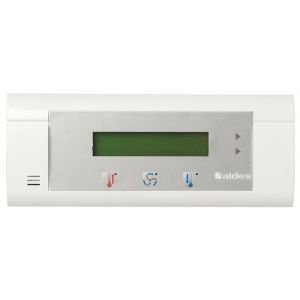
Figure 1: Aldes T.Zen C3000 Control Keypad. This image shows the rectangular form factor and digital display of the control unit, designed for wall mounting and integration with Aldes T.Zen systems.
5. Operation
The Aldes T.Zen C3000 Control Keypad features a digital display and push-button controls for managing your T.Zen system and hot water functions.
5.1 Basic Functions
- Digital Display: Shows current system status, temperature settings, and operational modes.
- Push-Button Controls: Used to navigate menus, adjust settings, and select operating modes.
5.2 Temperature Control
The keypad allows for temperature control for both heating and cooling functions, as well as specific settings for residential/commercial heating and hot water management. Refer to your T.Zen 400/4000 system's main manual for detailed programming and operational modes.
6. Maintenance
The Aldes T.Zen C3000 Control Keypad requires minimal maintenance to ensure continued reliable operation.
- Cleaning: Wipe the keypad surface with a soft, dry cloth. Do not use abrasive cleaners or solvents.
- Connections: Periodically check all wired connections to ensure they are secure.
- Software Updates: Any system software updates would typically be managed through the main T.Zen central unit. Consult your T.Zen system manual for details.
7. Troubleshooting
If you experience issues with your C3000 Control Keypad, consider the following basic troubleshooting steps:
- No Display/Power: Check the main power supply to the T.Zen system and ensure all electrical connections to the keypad are secure. Verify the circuit breaker has not tripped.
- Keypad Unresponsive: Ensure the keypad is properly connected to the T.Zen central unit. Try restarting the T.Zen system (refer to its manual for safe restart procedures).
- Incorrect Readings: If temperature or status readings appear incorrect, ensure the keypad is not exposed to direct heat or cold sources that could affect its internal sensors.
For persistent issues, consult the comprehensive troubleshooting guide in your T.Zen 400/4000 system manual or contact Aldes customer support.
8. Specifications
| Attribute | Specification |
|---|---|
| Manufacturer | ALDES |
| Model | C3000 |
| Shape | Rectangular |
| Voltage | 230 Volts |
| Display Style | Digital |
| Electrical Plug Type | Wall mount |
| Special Functions | Connection to storage tank (B200 H2O) |
| Usage | Residential/commercial heating, hot water |
| Included Components | Connection cable for B200 H2O storage tank |
| Connectivity Technology | Wired |
| Temperature Control Type | Heating and Cooling |
| Controller Type | Push-button |
9. Warranty and Support
Specific warranty information for the Aldes T.Zen C3000 Control Keypad is not provided in this document. For details regarding warranty coverage, terms, and conditions, please refer to the documentation included with your complete Aldes T.Zen system or contact Aldes customer support directly.
For technical support, spare parts, or service inquiries, please visit the official Aldes website or contact your local Aldes distributor.