
1. Introduction
This manual provides detailed instructions for the installation, operation, and maintenance of your BRITA A1000 filter cartridge, designed for use with the BRITA MyPure A1C water filtration system. The A1000 cartridge is engineered to reduce chlorine, limescale, and other impurities that can affect the taste and odor of tap water, providing cleaner, better-tasting water directly from your tap.
2. Product Overview
The BRITA A1000 filter cartridge is a key component of the MyPure A1C system, ensuring high-quality filtered water. It features a multi-stage filtration process to effectively reduce unwanted substances.

Figure 1: BRITA A1000 Filter Cartridge and its retail packaging. The cartridge is white and blue with an orange cap, designed for easy replacement.
Key Features:
- Chlorine Reduction: Significantly reduces chlorine for improved water taste.
- Limescale Reduction: Helps prevent limescale buildup in appliances.
- Impurity Filtration: Filters out other taste-altering impurities.
- Instantaneous Filtration: Provides filtered water on demand.
- BPA-Free: Constructed from BPA-free materials.
3. Installation Instructions
The BRITA A1000 filter cartridge is designed for straightforward installation within the MyPure A1C system, typically located under the sink.
Before You Begin:
- Ensure the main water supply to your tap is turned off.
- Have a towel or small basin ready to catch any residual water.
- Refer to your MyPure A1C system manual for specific housing details.
Steps for Cartridge Installation:
- Locate the Filter Housing: Identify the BRITA MyPure A1C filter housing unit, usually mounted under your kitchen sink.
- Remove Old Cartridge (if applicable): If replacing an old cartridge, twist the old cartridge counter-clockwise to unlock it from the housing. Pull it downwards to remove. Dispose of the old cartridge responsibly.
- Prepare New Cartridge: Remove the new BRITA A1000 cartridge from its packaging. Ensure the protective cap is removed from the top of the cartridge.
- Insert New Cartridge: Align the top of the new A1000 cartridge with the filter housing. Push it upwards into the housing and then twist clockwise until it locks securely into place. You should feel a click or resistance indicating it is properly seated.
- Check for Leaks: Slowly turn the main water supply back on. Check for any leaks around the filter housing and connections. If leaks occur, turn off the water, re-seat the cartridge, and re-check.
- Flush the System: Run filtered water from your tap for approximately 5-10 minutes to flush out any air bubbles and carbon fines from the new cartridge. The water may appear cloudy initially; this is normal and will clear.

Figure 2: An example of the BRITA A1000 filter cartridge installed under a kitchen sink, connected to the water supply lines and tap.
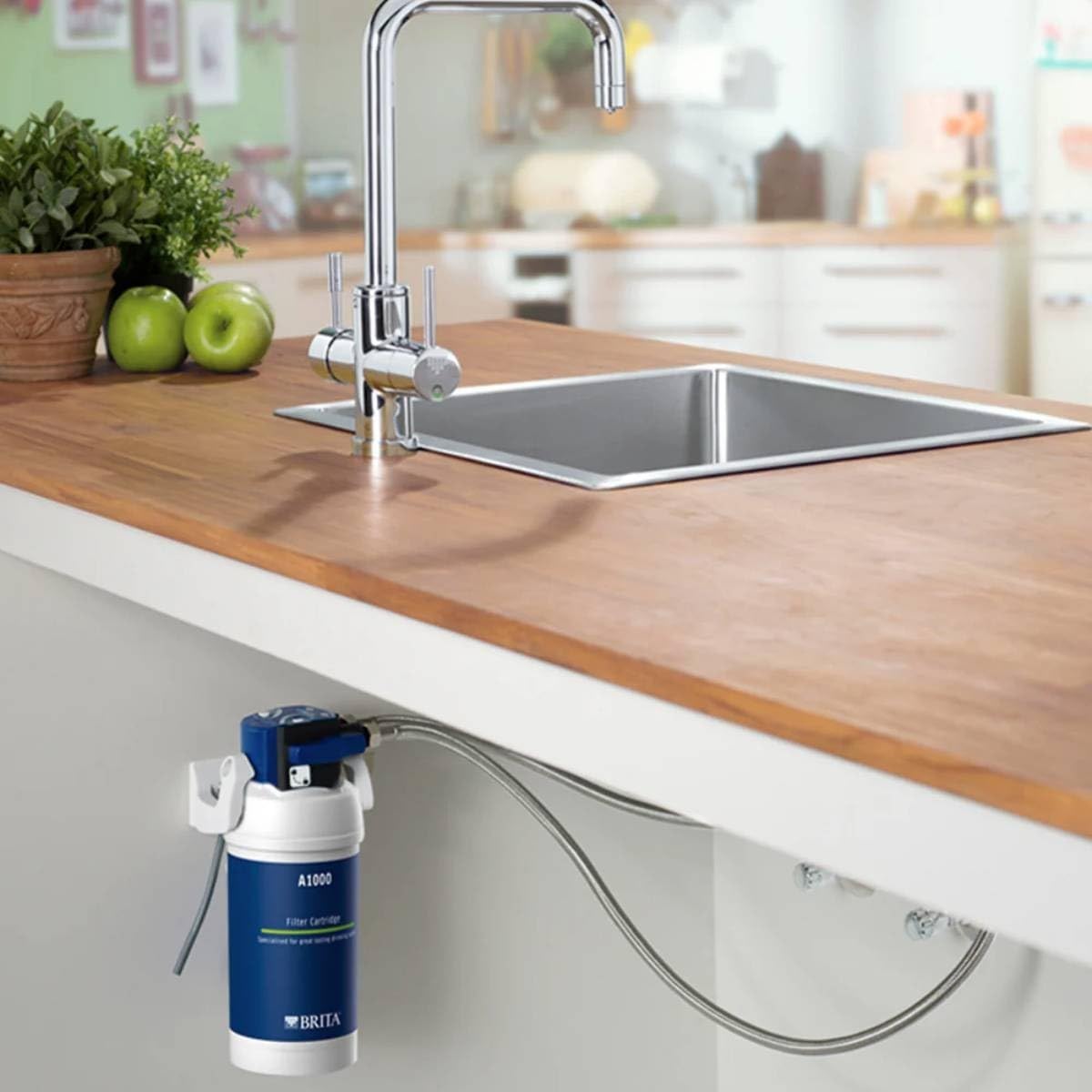
Figure 3: Another view of the BRITA A1000 filter system installed, showing the cartridge and associated plumbing beneath a countertop.
4. Operating Instructions
Once installed and flushed, the BRITA A1000 filter cartridge operates automatically with your MyPure A1C system.
- Filtered Water: To dispense filtered water, simply activate the dedicated filtered water tap or lever on your MyPure A1C system.
- Unfiltered Water: Your system may also provide unfiltered water through a separate tap or lever. Refer to your MyPure A1C system manual for specific operation details.
- Flow Rate: The filter provides instantaneous filtration, meaning water is filtered as it passes through the cartridge to your tap.
5. Maintenance
Regular maintenance, primarily cartridge replacement, is essential to ensure optimal performance and water quality.
Cartridge Replacement:
- The BRITA A1000 cartridge typically requires replacement every 6 to 12 months, depending on water hardness and usage.
- Your MyPure A1C system may include an indicator to signal when a cartridge change is due.
- Follow the "Installation Instructions" (Section 3) in reverse to remove the old cartridge, and then proceed with installing a new one.
Cleaning:
- Periodically check the exterior of the filter housing and connections for any dirt or buildup. Wipe clean with a damp cloth.
- Do not use harsh chemicals or abrasive cleaners on any part of the system.
6. Troubleshooting
If you experience issues with your BRITA A1000 filter cartridge or MyPure A1C system, refer to the following common problems and solutions.
| Problem | Possible Cause | Solution |
|---|---|---|
| Reduced Water Flow | Clogged filter cartridge; air in the system. | Replace the filter cartridge. Flush the system by running water for several minutes. |
| Unpleasant Taste/Odor | Expired filter cartridge; improper flushing after installation. | Replace the filter cartridge. Ensure proper flushing of the new cartridge. |
| Water Leaks | Cartridge not properly seated; loose connections. | Turn off water supply, re-seat the cartridge, and tighten connections. |
| Cloudy Water (initial) | Air bubbles or carbon fines from new cartridge. | This is normal. Continue flushing the system until water runs clear. |
If problems persist, please contact BRITA customer support.
7. Specifications
| Brand | BRITA |
| Model Number | S1424 |
| Product Dimensions (L x W x H) | 10 x 9.5 x 23 cm |
| Item Weight | 470 grams |
| Material | Carbon |
| External Test Certification | NSF |
| UPC | 798256201790 |
| International Article Code | 04006387051709 |
8. Warranty and Support
BRITA provides a 1-year availability for spare parts for this product. For specific warranty terms and conditions, please refer to the documentation provided with your complete MyPure A1C system or visit the official BRITA website.
Customer Support:
For technical assistance, troubleshooting beyond this manual, or to inquire about replacement parts, please contact BRITA customer support through their official channels.


