Introduction
The SCHLAGE Connect Century Touchscreen Deadbolt with Built-In Alarm and Handleset Grip with Latitude Lever offers advanced security and convenience for your home. This manual provides essential information for setup, operation, and maintenance of your new smart lock system.
This keyless deadbolt combines robust security features with modern technology, including a fingerprint-resistant touchscreen and Z-Wave connectivity for smart home integration. It is designed to provide the highest level of residential security, rated ANSI Grade 1.
Included Components
Your SCHLAGE Connect Century Touchscreen Deadbolt package includes the following items:
- Touch Screen Deadbolt
- 1 Backup Key
- 4 AA Batteries
- User Guide and Installation Instructions
- Century Handleset
- Latitude Lever with Century Trim

Figure 1: Overview of the SCHLAGE Connect Century Touchscreen Deadbolt and its included components.
Setup and Installation
Follow these steps to properly install your SCHLAGE Connect Century Touchscreen Deadbolt. No wiring is needed for installation.
- Prepare the Door: Ensure your door's backset is either 2 3/8 inches (60 mm) or 2 3/4 inches (70 mm) and the door thickness is between 1 3/8 inches to 1 3/4 inches.
- Install the Deadbolt Latch: Insert the deadbolt latch into the door edge. The deadbolt features a tapered bolt for smooth operation. If your door has a square plate hole, switch the rounded plate on the bolt to the square plate provided. Ensure the "TOP" marking on the latch mechanism faces upwards.
- Install the Exterior Keypad: Feed the wire and the flat peg from the exterior keypad through the door hole. Ensure the small notch on the flat peg is facing upwards.
- Secure the Interior Mounting Plate: Position the interior mounting plate against the door, aligning the flat peg and feeding the wire through the designated square hole on the bottom left. Secure it with the two longer bolts provided.
- Connect the Interior Assembly: Plug the wire from the exterior keypad into the corresponding port on the interior assembly. Orient the slot in the back of the interior assembly to match the flat peg.
- Attach the Interior Assembly: Slide the interior assembly onto the mounting plate, ensuring all components align. Secure it with the two smaller screws provided.
- Install Batteries: Remove the battery cover from the interior assembly. Insert the four AA batteries, ensuring correct polarity.
- Install Strike Plate: Replace your existing strike plate on the door frame with the larger strike plate provided for enhanced security. Use the longer screws to secure it into the door frame's stud.
Video 1: An animated guide demonstrating the installation process for the SCHLAGE Connect Touchscreen Deadbolt. This video visually explains how to assemble and mount the lock components onto your door.
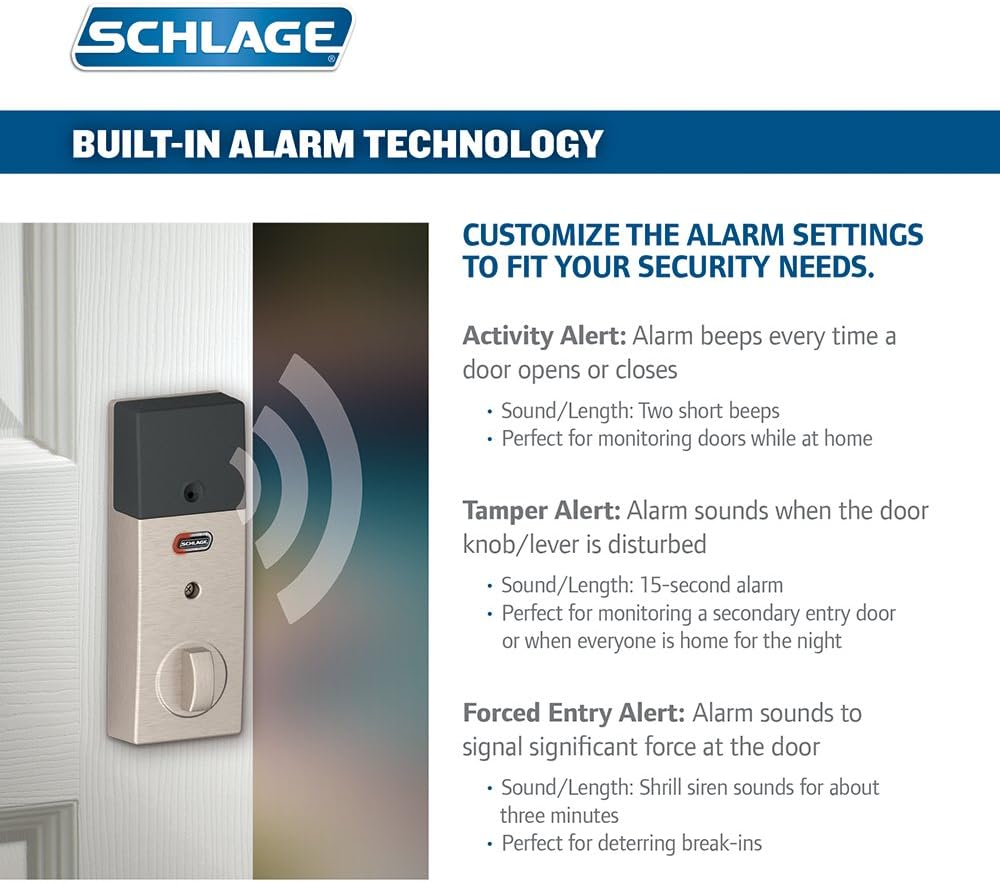
Figure 2: Key features of the SCHLAGE Connect Century Touchscreen Deadbolt, including Grade 1 Residential Security, Resistive Touchscreen, Built-in Alarm Technology, Strong Motorized Deadbolt, and Easy Installation.
Operating Instructions
Keyless Entry and Programming
The SCHLAGE Connect deadbolt offers convenient keyless entry and advanced programming options:
- Touchscreen Operation: The fingerprint-resistant touchscreen ensures that wear patterns remain undetectable, enhancing security. Simply enter your chosen 4-8 digit codes to unlock.
- User Codes: Program up to 30 unique user codes for family members or guests. Codes can be easily added or removed via the mobile app or directly on the lock.
- Auto-Lock Feature: Enable the auto-lock function to automatically lock the deadbolt after a set period (e.g., 30 seconds) when the door is closed.
- Lock and Leave: For immediate locking, simply press the SCHLAGE button on the keypad when exiting.
Built-in Alarm Technology
The deadbolt features a built-in audible alarm sensor with three selectable modes:
- Activity Alert: Beeps twice when the door opens or closes, ideal for monitoring activity when at home.
- Tamper Alert: Sounds a 15-second alarm if the door knob/lever is disturbed, perfect for secondary entry points.
- Forced Entry Alert: Triggers a shrill siren for about three minutes if significant force is detected at the door, acting as a deterrent.
Cycle between these modes by pressing a button on the lock's interior assembly.
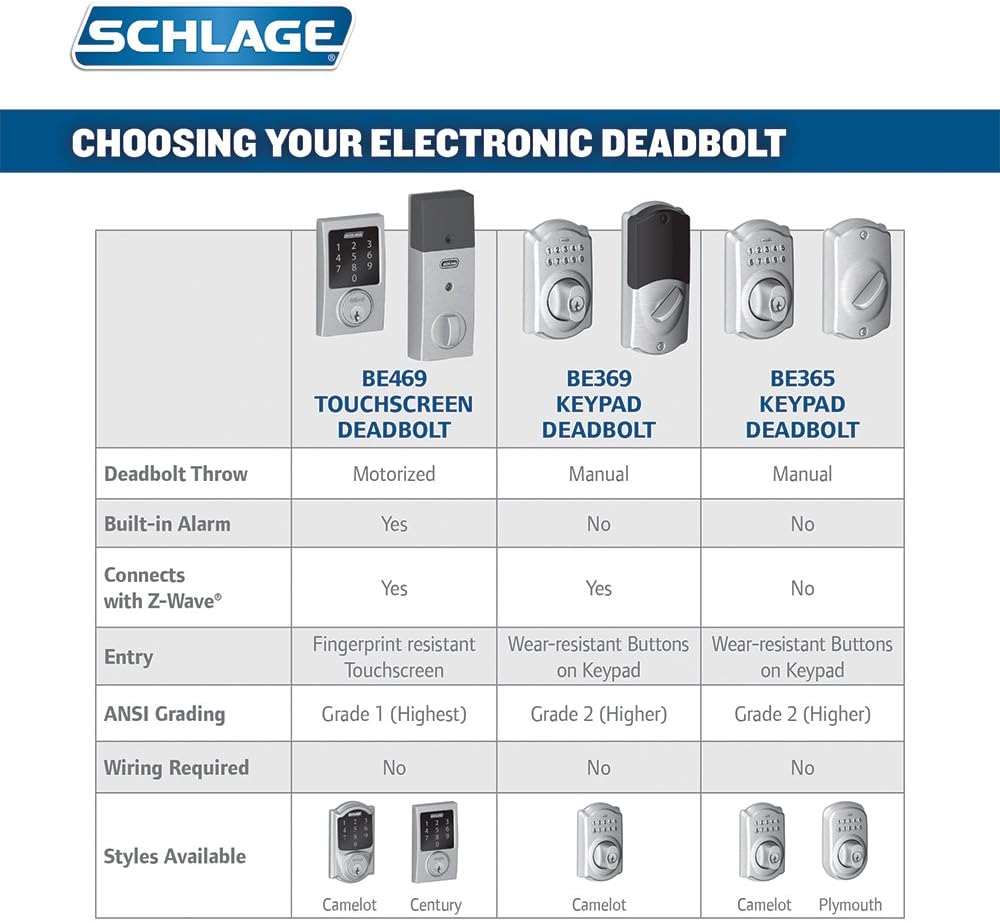
Figure 3: Details on the built-in alarm technology, including Activity, Tamper, and Forced Entry alert modes with their respective sounds and durations.
Smart Home Integration (Z-Wave)
The SCHLAGE Connect deadbolt utilizes Z-Wave technology to connect with compatible home automation systems (hub required, sold separately). This allows you to:
- Lock or unlock your door remotely via the web or smartphone.
- Program codes for house guests from anywhere.
- Receive text alerts when alarms are triggered or specific codes are entered.
- Integrate with Amazon Alexa for voice control (Alexa device and hub sold separately).

Figure 4: Illustration of self-monitored security features using the SCHLAGE Touchscreen Deadbolt with Z-Wave technology and a smartphone app.
Maintenance
To ensure optimal performance and longevity of your SCHLAGE Connect Century Touchscreen Deadbolt, regular maintenance is recommended:
- Battery Replacement: The deadbolt is powered by 4 AA alkaline batteries. The average battery life is approximately 8766 hours (about 1 year). Replace batteries promptly when the low battery indicator appears or when the lock pauses for 3-4 seconds before locking/unlocking.
- Cleaning: Use a soft, dry cloth to clean the touchscreen and other surfaces. Avoid abrasive cleaners or solvents that could damage the finish or electronic components.
- Firmware Updates: Periodically check for firmware updates through your connected smart home system or the SCHLAGE app to ensure your lock has the latest features and security enhancements.
Troubleshooting
If you encounter issues with your SCHLAGE Connect Century Touchscreen Deadbolt, consider the following common solutions:
- Lock Not Responding: Check the batteries and replace them if necessary. Ensure the battery compartment is securely closed.
- Programming Issues: If user codes are not setting correctly, try removing the batteries, holding the SCHLAGE button on the front of the device, and allowing it to run through its setup process again. Ensure quick presses for code entry, not long presses.
- Door Alignment: If the deadbolt struggles to extend or retract, check the door and frame alignment. The tapered bolt is designed to assist, but significant misalignment may require door adjustment.
- Touchscreen Visibility: The touchscreen illuminates when a button is pressed, aiding visibility in the dark.
- Z-Wave Connectivity: If experiencing issues with smart home integration, verify compatibility with your Z-Wave provider. Ensure your Wi-Fi signal is strong at the lock's location.
For further assistance, refer to the detailed user guide included with your product or contact SCHLAGE customer support.
Specifications
| Feature | Detail |
|---|---|
| Brand | SCHLAGE |
| Model Name | Schlage Connect |
| Item Model Number | FE469NX LAT 619 CEN |
| Lock Type | Deadbolt |
| Special Features | Alarm, Touchscreen |
| Security Rating | ANSI Grade 1 Highest Residential Security |
| Connectivity Protocol | Z-Wave |
| Controller Type | Amazon Alexa, Nexia, SmartThings, Vera |
| Power Source | 4 AA Alkaline Batteries |
| Average Battery Life | 8766 Hours |
| Door Thickness Range | 1 3/8 inch to 1 3/4 inch |
| Backset | Universal latches and deadbolts fit 2 3/8 inch (60 mm) or 2 3/4 inch (70 mm) backsets |
| Material | Nickel |
| Color | Satin Nickel |
| Item Weight | 6 Pounds |
| Product Dimensions | 4.5 x 5.13 x 21.13 inches |

Figure 5: Comparison table highlighting features of different SCHLAGE electronic deadbolts, including the BE469 Touchscreen Deadbolt.

Figure 6: Guide for determining door handing (left-handed vs. right-handed) for proper lever installation.
Figure 7: Bar chart illustrating the ANSI/BHMA security ratings for SCHLAGE Touchscreen Deadbolts, showing Grade 1 as the highest residential security.
Warranty and Support
The SCHLAGE Connect Century Touchscreen Deadbolt is backed by a Lifetime Limited mechanical and finish warranty and a 1-year electronics warranty. For warranty claims or technical support, please refer to the contact information provided in your included User Guide and Installation Instructions or visit the official SCHLAGE website.


