
1. Introduction
The Mobo Total Tot is a versatile three-wheeled cruiser designed for children aged 18 months to 5 years. It functions both as a parent-pushed ride and as a child-ridden tricycle, supporting the development of motor skills and hand-eye coordination. This manual provides essential information for the safe assembly, operation, and maintenance of your Mobo Total Tot.

Image 1: The Mobo Total Tot Three-Wheeled Cruiser in Ivory.
2. Safety Guidelines
Prioritizing safety is crucial when operating the Mobo Total Tot. Always ensure the child is supervised by an adult. Adhere to the following guidelines:
- Always ensure the child wears an approved safety helmet.
- Secure the child properly with the seat belt harness before use.
- Do not use the cruiser near stairs, steep inclines, swimming pools, or roadways.
- Ensure all bolts and fasteners are tightened before each use.
- The cruiser features a low center of gravity for enhanced stability, but caution should always be exercised.

Image 2: Illustrates the Mobo Total Tot's stable design with a low center of gravity, reducing the risk of tipping.
3. Assembly
The Mobo Total Tot requires assembly. All necessary tools are typically included with the product. Please refer to the separate assembly guide provided in the product packaging for detailed, step-by-step instructions to ensure correct and safe setup.
4. Initial Setup and Adjustments
4.1 Adjustable Frame
The cruiser features an adjustable frame designed to grow with your child. Locate the frame adjustment mechanism, typically a quick-release lever or bolt, and extend or retract the frame to ensure the child can comfortably reach the pedals.

Image 3: The extendable frame allows the cruiser to adjust for different child heights.
4.2 Parental Push Bar
The adjustable parental push bar can be easily attached to the rear of the cruiser. Adjust its height to a comfortable waist level for the adult pushing. This allows for comfortable control and guidance.
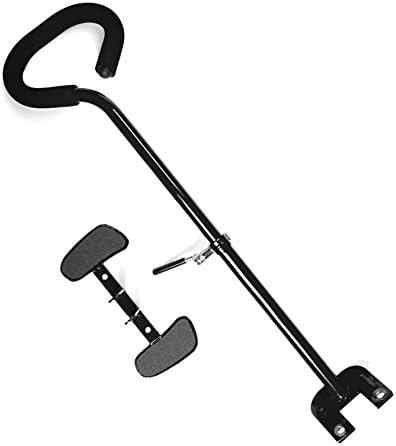
Image 4: The parental push bar and non-slip footrests for assisted riding.
4.3 Seat Belt Harness
The Mobo Seat Belt Harness provides maximum child safety. Ensure the straps are snug but comfortable around the child. The harness is easily removed when the child is ready to ride independently.

Image 5: The five-point seat belt harness for securing the child.
4.4 Non-Slip Foot Rests
When being pushed by an adult, the child can rest their feet on the non-slip footrests. This prevents their feet from interfering with the pedals, which are fixed-wheel and do not free-spin.
4.5 Safety Flag
A safety flag is included to enhance visibility during outdoor use. Attach the flag securely to the designated slot on the cruiser.

Image 6: The included safety flag for increased visibility.
5. Operating Instructions
5.1 Riding Independently
Once the child is ready, they can pedal the cruiser independently. The Mobo Total Tot features a single-speed, fixed-wheel, chainless drive system. The innovative rear-wheel steering system allows the child to steer by moving the handlebars left or right, which articulates the rear wheels.

Image 7: Diagram illustrating the innovative rear-wheel steering system.
5.2 Braking
The cruiser is equipped with a hand caliper brake. Instruct the child on how to use this brake effectively to control speed and stop safely.
5.3 Parental Push Mode
For younger children or when additional assistance is needed, an adult can use the parental push bar to guide the cruiser. Ensure the child's feet are on the non-slip footrests during this mode.

Image 8: A parent utilizing the push bar to guide the Mobo Total Tot.
5.4 Product Overview Video
Video 1: This video provides a general overview of the Mobo Tot cruiser's features, including its adjustable frame, steering, and safety components. While featuring a themed variant, the core functionalities are identical to the Mobo Total Tot.
6. Maintenance
Regular maintenance ensures the longevity and safe operation of your Mobo Total Tot.
- Cleaning: Wipe down the frame and seat with a damp cloth and mild soap. Avoid harsh chemicals.
- Tires: The cruiser features "Never Flat Tires," which do not require inflation. Inspect them periodically for wear or damage.
- Frame Adjustment: Periodically check and adjust the turnbuckles that align the rear wheels to ensure smooth pedaling and steering.
- Fasteners: Regularly check all bolts, nuts, and other fasteners to ensure they are securely tightened.
- Chainless Design: The chainless design eliminates the need for chain lubrication or maintenance.
7. Troubleshooting
- Difficulty Pedaling: If the child experiences difficulty pedaling, check the alignment of the rear wheels. The turnbuckles may require adjustment.
- Steering Issues: If steering feels unresponsive or pulls to one side, inspect the rear-wheel steering mechanism for any obstructions or loose connections.
- Loose Components: If any parts feel loose, refer to the assembly guide to identify and tighten the corresponding fasteners.
8. Specifications
| Feature | Detail |
|---|---|
| Model Name | Mobo Cruiser Total Tot "The Roll-to-Ride" Three Wheeled Cruiser |
| Model Number | Tri-703I |
| Color | Ivory |
| Material | Alloy Steel |
| Recommended Age | 18 Months - 5 Years Old |
| Drive System | Single Speed; Fixed-Wheel; Chainless |
| Steering | Rear Wheel Steering |
| Brake Type | Hand Caliper Brake |
| Front Tire Size | 12-Inch Never Flat |
| Rear Tire Size | 6.5-Inch Never Flat |
| Item Dimensions (LxWxH) | 33 x 20.5 x 16.5 inches |
| Item Weight | 17 Pounds |
| Included Components | Mobo Total Tot (Ivory) |
9. Warranty and Support
For warranty information regarding your Mobo Total Tot, please contact the seller directly. They can provide details on coverage and how to initiate a warranty claim.
For additional support, questions, or to purchase replacement parts, please visit the official Mobo website or contact their customer service department.