1. Introduction
This manual provides essential information for the safe and effective use of your T POWER 15V AC/DC Adapter. This power supply is designed to charge compatible lithium-ion battery packs and portable power stations. Please read this manual thoroughly before use and retain it for future reference.

Image 1.1: T POWER 15V AC/DC Adapter with its power cable. The adapter is black with a blue label indicating input/output specifications, and the cable features a standard DC barrel connector.
2. Compatibility
The T POWER 15V AC/DC Adapter is compatible with various portable power stations and battery packs requiring a 15V input. Verify your device's model number and power requirements before connecting the adapter.
Known Compatible Models:
- Powdeom Model OKD180 ES150A 11.1V 14Ah (3.7V 42000mAh / 43200mAh) 150W Portable Power Station Power Bank
- QSHAIN Adapter Model: YNQX30G150200UL (Shenzhen Qixin Electronics Co.,Ltd. 15.0V 2.0A 30.0W Switching Power Supply)
- Model: QK-1502000 QK1502000 (Shenzhen Qinc Electronics Co.)

Image 2.1: Example of a portable power station, such as the Powdeom OKD180, which is compatible with the T POWER 15V AC/DC Adapter.
3. Safety Features and Protections
Your T POWER adapter is designed with multiple safety features to protect both the charger and your connected device. It incorporates a built-in integrated microchip to prevent common malfunctions and prolong battery life.
- Over-Current Protection: Safeguards against excessive current flow.
- Over-Temperature Protection: Prevents overheating during operation.
- Over-Voltage Protection: Protects against voltage spikes.
- Short Circuit Protection: Automatically shuts down in case of a short circuit.
- Electrostatic Protection: Shields against electrostatic discharge.
- Magnetic Field Protection: Minimizes interference from magnetic fields.

Image 3.1: Visual representation of the T POWER adapter's superior safety features, including over-current, over-temp, over-voltage, and short circuit protection, along with quality certifications.

Image 3.2: Icons illustrating various safety protections integrated into the T POWER adapter, such as short circuit, overheating, overcurrent, electrostatic, magnetic field, and overvoltage protection.
4. Setup and Connection
- Verify Compatibility: Ensure your portable power station or device requires a 15V DC input and that the connector type matches the T POWER adapter's barrel connector.
- Connect to Device: Insert the DC barrel connector of the T POWER adapter firmly into the designated 15V DC input port on your portable power station.
- Connect to Power Outlet: Plug the AC prongs of the T POWER adapter into a standard AC 100V-240V wall outlet.
- Initiate Charging: Once connected, the charging process should begin automatically. Refer to your power station's manual for specific charging indicators on the device itself.
5. Operating Instructions
The T POWER adapter features an LED indicator to provide status updates during operation.
LED Indicator Display:
- Green light flashing: Indicates the device is currently charging.
- Green light solid: Indicates the device is fully charged.
- Red light flashes fast: Indicates a defective unit or connection issue.
- Red light flashes fast & slow: Indicates a temperature anomaly.
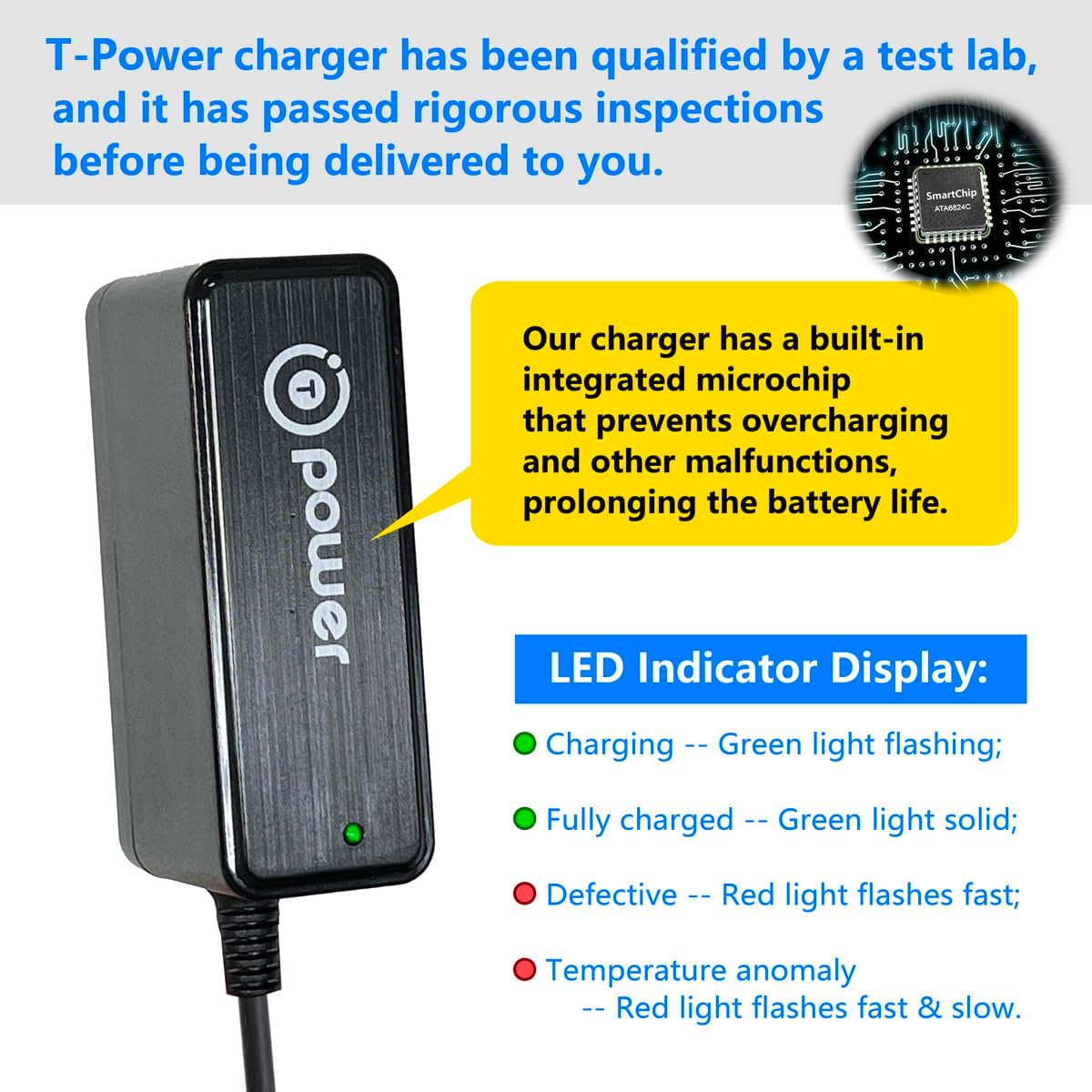
Image 5.1: Close-up of the T POWER charger showing the LED indicator and a diagram illustrating the internal microchip for intelligent charging control.
6. Maintenance
- Keep the adapter clean and free from dust and debris.
- Store the adapter in a cool, dry place when not in use.
- Avoid exposing the adapter to extreme temperatures or direct sunlight.
- Do not attempt to open or repair the adapter yourself. Refer to qualified personnel for service.
- The power cable is designed for durability, tested to withstand 10,000 bends. However, avoid sharp bends or excessive force on the cable.

Image 6.1: Illustration highlighting the durability of the T POWER adapter's cable, tested for 10,000 bends, and the use of high-quality materials for long-lasting performance.
7. Troubleshooting
- No Power/Charging:
- Ensure the adapter is securely plugged into both the wall outlet and the device.
- Check if the wall outlet is functional by plugging in another device.
- Verify that the device being charged is compatible with a 15V input.
- Red LED Indicator:
- If the red light flashes fast, it may indicate a defective unit or a connection issue. Disconnect and reconnect the adapter. If the issue persists, discontinue use.
- If the red light flashes fast and slow, it indicates a temperature anomaly. Disconnect the adapter and allow it to cool down in a well-ventilated area before attempting to use it again.
- Slow Charging:
- Ensure the device is not being used heavily during charging, which can slow down the process.
- Verify that the adapter's output (15V 2A) matches the recommended input for your device for optimal charging speed.
If troubleshooting steps do not resolve the issue, please contact T POWER customer support.
8. Specifications
| Feature | Specification |
|---|---|
| Model Number | TP-xV9 |
| Input Voltage Range | AC 100V - 240V |
| Output Voltage | DC 15V |
| Output Current | 2 Amps |
| Wattage | 30 Watts |
| Cable Length | 6.6 feet (approx. 2 meters) |
| Product Dimensions | 4 x 4 x 2 inches (approximate) |
| Item Weight | 4 ounces (approximate) |
| Included Components | AC Adapter |
9. Warranty and Support
Limited Manufacturer Warranty:
This T POWER product is covered by a 1-Year Limited Manufacturer Warranty from the date of purchase. This warranty covers defects in materials and workmanship under normal use. It does not cover damage caused by misuse, accident, unauthorized modification, or external causes.
30-Day Return Policy:
You may return your undamaged product and packaging within 30 days of purchase for a full refund for any reason.
Technical Support:
For technical assistance, warranty claims, or if you received a wrong or defective item, please contact T POWER customer support. Provide your product model number and a detailed description of the issue for prompt service.
You can visit the official T POWER store for more information: T POWER Store on Amazon


