
1. Introduction
Thank you for choosing the BergHOFF Portable Touch-Screen Induction Cooktop. This appliance is designed for efficient and safe cooking using induction technology. Please read this manual thoroughly before operating the cooktop to ensure proper use, maintenance, and to prevent injury or damage.
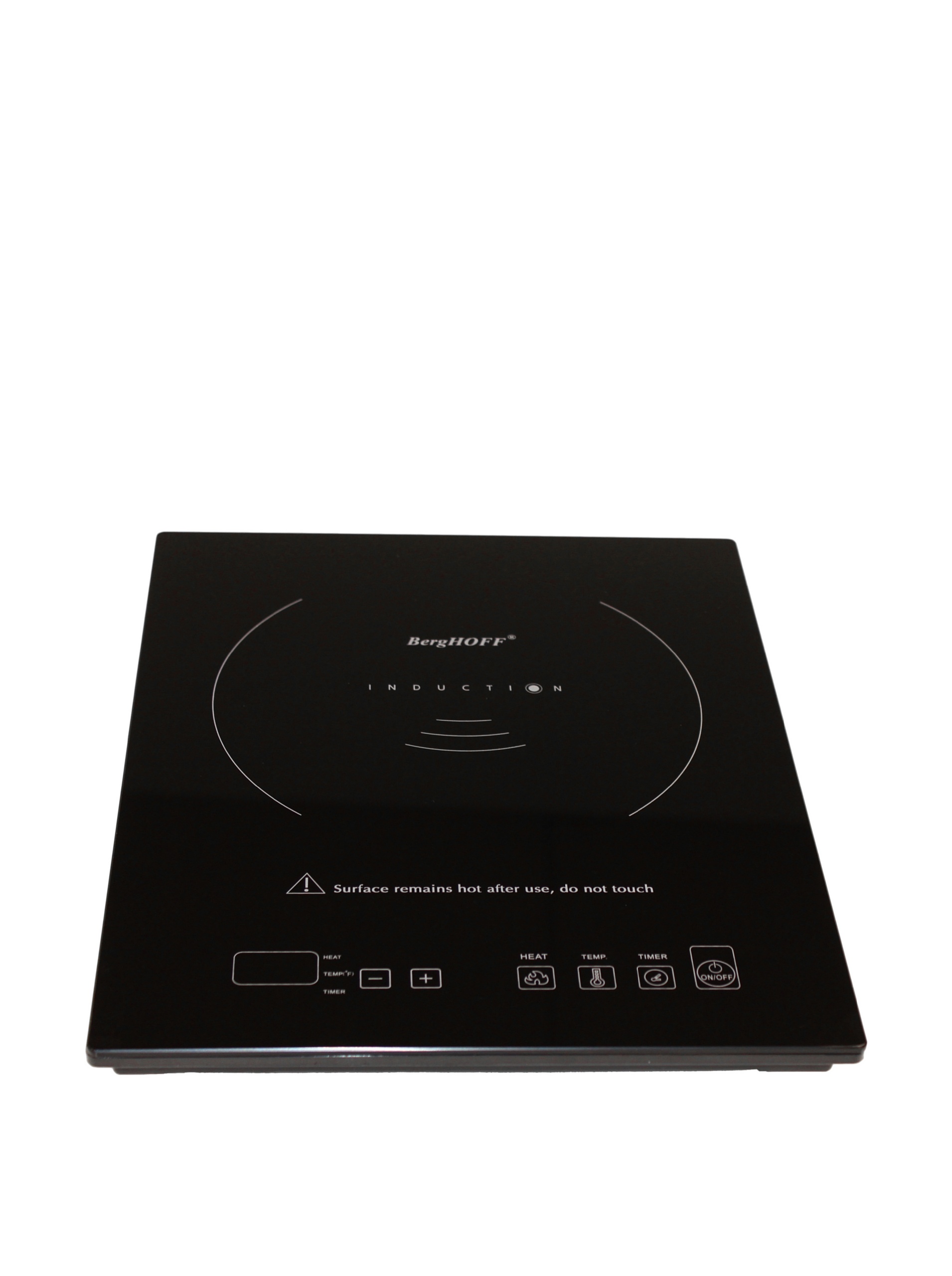
Image 1.1: BergHOFF Portable Touch-Screen Induction Cooktop. This image displays the cooktop's sleek black ceramic surface with the touch control panel visible at the front.
2. Important Safety Instructions
When using electrical appliances, basic safety precautions should always be followed to reduce the risk of fire, electric shock, and injury to persons, including the following:
- Read all instructions carefully before use.
- Do not touch hot surfaces. Use handles or knobs.
- To protect against electrical shock, do not immerse cord, plugs, or the appliance in water or other liquid.
- Close supervision is necessary when any appliance is used by or near children.
- Unplug from outlet when not in use and before cleaning. Allow to cool before putting on or taking off parts.
- Do not operate any appliance with a damaged cord or plug, or after the appliance malfunctions or has been damaged in any manner.
- The use of accessory attachments not recommended by the appliance manufacturer may cause injuries.
- Do not use outdoors.
- Do not let cord hang over edge of table or counter, or touch hot surfaces.
- Do not place on or near a hot gas or electric burner, or in a heated oven.
- Extreme caution must be used when moving an appliance containing hot oil or other hot liquids.
- Always attach plug to appliance first, then plug cord into the wall outlet. To disconnect, turn any control to “off,” then remove plug from wall outlet.
- Do not use appliance for other than intended use.
- This appliance generates heat during use. Proper precautions must be taken to prevent the risk of burns, fires, or other damage to persons or property.
- Persons with pacemakers or similar medical devices should consult their physician before using an induction cooktop.
- Only use induction-compatible cookware.
3. Setup
3.1 Unpacking
Carefully remove the cooktop from its packaging. Retain the packaging for future storage or transport. Inspect the appliance for any signs of damage. If damage is found, do not operate the cooktop and contact customer support.
3.2 Placement
- Place the cooktop on a dry, stable, heat-resistant, and non-metallic surface.
- Ensure there is adequate ventilation around the unit. Maintain at least 4 inches (10 cm) of clear space around all sides of the cooktop for proper airflow. Do not block the air intake or exhaust vents.
- Do not place the cooktop near heat sources, flammable materials, or other electrical appliances.
3.3 Power Connection
Plug the power cord into a standard electrical outlet. Ensure the outlet voltage matches the requirements specified on the cooktop's rating label.
3.4 Cookware Compatibility
Induction cooktops require cookware made of ferromagnetic materials. To check if your cookware is compatible, hold a magnet to the bottom of the pot or pan. If the magnet sticks, the cookware is suitable for induction cooking.
Compatible Cookware: Cast iron, enamel iron, stainless steel with a magnetic bottom, or flat-bottomed pots/pans with a diameter between 4.7 inches (12 cm) and 10.2 inches (26 cm).
Incompatible Cookware: Glass, ceramic, copper, aluminum, or non-magnetic stainless steel cookware.
4. Operating Instructions
4.1 Powering On/Off
- Place induction-compatible cookware with food on the center of the ceramic plate.
- Plug the cooktop into a power outlet. The unit will beep once, and the display will show "OFF".
- Touch the ON/OFF button to turn on the cooktop. The display will show "ON" and then switch to a default power level or temperature setting.
- To turn off, touch the ON/OFF button again. The display will show "OFF" and the unit will power down.
4.2 Touch-Screen Controls
The cooktop features a touch-sensitive control panel. Gently touch the icons to activate functions. The main controls typically include:
- ON/OFF: Powers the unit on or off.
- Function/Mode: Switches between power (wattage) and temperature settings.
- +/- (Up/Down Arrows): Adjusts power level, temperature, or timer settings.
- Timer: Activates and sets the cooking timer.
4.3 Adjusting Power and Temperature
- After turning on, the cooktop will typically default to a power setting. Use the +/- buttons to increase or decrease the power level (e.g., from 200W to 1800W).
- Touch the Function/Mode button to switch to temperature control. Use the +/- buttons to set the desired temperature (e.g., from 140°F to 460°F / 60°C to 238°C).
- The cooktop will automatically maintain the set temperature or power level.
4.4 Timer Function
- While the cooktop is operating, touch the Timer button. The display will show a default time or "00:00".
- Use the +/- buttons to set the desired cooking time (e.g., up to 180 minutes).
- Once the time is set, the timer will begin counting down. The cooktop will automatically turn off and beep when the timer expires.
- To cancel the timer, touch the Timer button again or turn off the cooktop.
5. Maintenance
5.1 Cleaning
- Always unplug the cooktop and allow it to cool completely before cleaning.
- Wipe the ceramic glass surface with a damp cloth and a mild detergent. For stubborn stains, use a non-abrasive ceramic cooktop cleaner.
- Do not use abrasive cleaners, scouring pads, or harsh chemicals, as these can scratch or damage the surface.
- Wipe the control panel and exterior housing with a soft, damp cloth. Ensure no water enters the internal components.
- Clean the air intake and exhaust vents regularly to prevent dust buildup, which can affect performance. Use a soft brush or vacuum cleaner.
- Never immerse the cooktop in water or any other liquid.
5.2 Storage
Ensure the cooktop is clean and completely dry before storing. Store it in its original packaging or a safe, dry place away from direct sunlight and moisture.
6. Troubleshooting
| Problem | Possible Cause | Solution |
|---|---|---|
| Cooktop does not turn on. | Not plugged in; power outage; faulty outlet. | Check power cord connection; check circuit breaker; try a different outlet. |
| No heating or "E0" error. | Incompatible cookware; no cookware on surface; cookware too small/large. | Use induction-compatible cookware; ensure cookware is centered and within size limits. |
| Cooktop shuts off during operation. | Overheating (vents blocked); timer expired; power fluctuation. | Ensure proper ventilation; check timer setting; unplug and replug after a few minutes. |
| Display shows other error codes (e.g., E1, E2). | Internal malfunction; sensor error. | Unplug the unit for 10 minutes, then plug it back in. If the error persists, contact customer support. |
If the problem persists after attempting these solutions, please contact BergHOFF customer support.
7. Specifications
- Model Number: 2214040
- Brand: Berghoff
- Color: Black
- Material: Manmade, Ceramic
- Special Feature: Touch-Screen Controls, Induction, Portable
- Heating Elements: 1
- Controls Type: Touch
- Included Components: 1 x Ceramic Cooktop
- Power Source: Induction
- Product Dimensions: 12 x 15 x 2.5 inches (30.5 x 38.1 x 6.35 cm)
- Item Weight: 7.2 pounds (3.27 kg)
- Manufacturer: BergHOFF
8. Warranty and Support
This BergHOFF product is covered by a limited manufacturer's warranty. Please refer to the warranty card included with your purchase for specific terms and conditions, including the warranty period and coverage details.
For technical assistance, troubleshooting beyond this manual, or warranty claims, please contact BergHOFF customer support. Contact information can typically be found on the BergHOFF official website or on the product packaging.
When contacting support, please have your product model number (2214040) and purchase date available.


