
Introduction
This manual provides comprehensive instructions for the installation, operation, maintenance, and troubleshooting of your EVGA GeForce GTX 780 SuperClocked graphics card. This high-performance graphics card is designed to deliver an enhanced visual experience for computing tasks and gaming.
The EVGA GeForce GTX 780 SuperClocked features 3GB GDDR5 memory, a 384-bit memory interface, and an ACX Cooler for efficient thermal management. It supports Microsoft DirectX 12 API (feature level 11_0) and offers multiple display outputs including DVI-I, DVI-D, HDMI, and DisplayPort.
Package Contents
Verify that all items are present in your product package:
- EVGA GeForce GTX 780 SuperClocked Graphics Card
- Driver CD / User Manual
- Power Adapters (if required for your system)
- DVI to VGA Adapter (if included)
- Promotional materials (stickers, posters)

Figure 1: Example of included accessories such as manuals, driver CD, and promotional stickers.

Figure 2: Power adapters and a DVI to VGA adapter, which may be included to facilitate connection to older monitors or power supplies.
Setup and Installation
System Requirements
- PCI Express-compliant motherboard with one or more x16 graphics slots.
- Minimum 600W or greater power supply with two 6-pin or 8-pin PCI Express power connectors (check your specific card's power requirements).
- Minimum 4GB system memory (8GB recommended).
- Microsoft Windows 10, 8, 7, Vista, or Linux operating system.
- CD-ROM/DVD-ROM drive or internet connection for driver installation.
Hardware Installation
- Power Off System: Turn off your computer and disconnect the power cable from the wall outlet.
- Open Case: Open your computer case. Refer to your computer's manual for specific instructions.
- Locate PCI Express Slot: Identify an available PCI Express x16 slot on your motherboard.
- Remove Slot Cover: Remove the metal slot cover from the back of the computer case corresponding to the chosen PCI Express slot.
- Insert Graphics Card: Carefully align the graphics card with the PCI Express slot and press it firmly until it is securely seated. Ensure the retention clip on the slot engages.
- Secure Card: Secure the graphics card to the computer case with the screw or retention mechanism.
- Connect Power: Connect the required 6-pin and/or 8-pin PCI Express power connectors from your power supply to the graphics card. Ensure all connections are firm.
- Close Case: Close your computer case and reconnect the power cable.
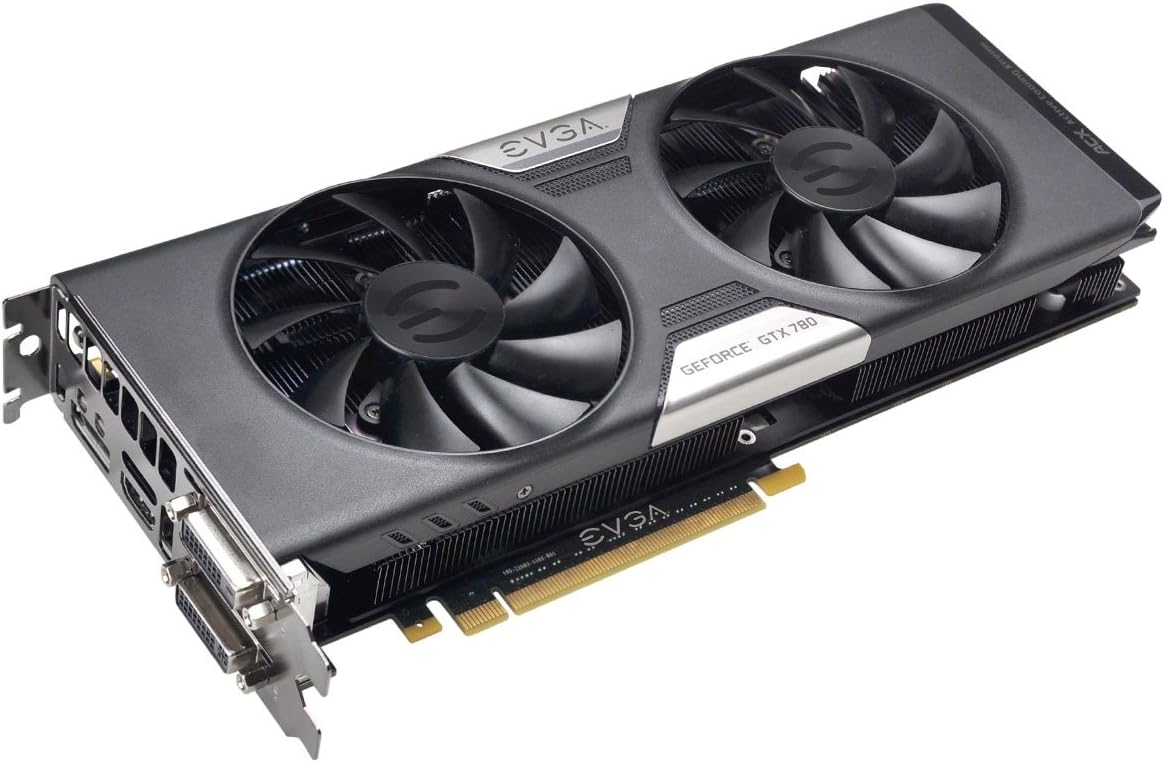
Figure 3: The EVGA GeForce GTX 780 SuperClocked graphics card, ready for installation into a PCI Express slot.
Driver Installation
- Power On System: Turn on your computer.
- Install Drivers:
- From CD: Insert the EVGA driver CD into your optical drive and follow the on-screen instructions.
- From Web: For the latest drivers, visit the official NVIDIA website (www.nvidia.com/drivers) or EVGA website (www.evga.com/support/download/). Select your product model and operating system, then download and run the installer.
- Restart: Restart your computer after the driver installation is complete.
Operating Instructions
Connecting Displays
Your EVGA GeForce GTX 780 SuperClocked graphics card supports multiple display configurations. Connect your monitor(s) to the available ports:
- DVI-I: Digital and Analog output. Can be used with a DVI to VGA adapter for analog monitors.
- DVI-D: Digital output only.
- HDMI: High-Definition Multimedia Interface for audio and video.
- DisplayPort (DP): High-performance digital display interface.

Figure 4: Display output ports on the graphics card, including DVI-I, DVI-D, HDMI, and DisplayPort.
After connecting your display(s), you may need to configure display settings within your operating system to set resolution, refresh rate, and multi-monitor arrangements.
Key Features and Technologies
- NVIDIA GeForce GTX 780 GPU: Powerful graphics processing unit for demanding applications.
- EVGA ACX Cooler: Advanced Cooling eXperience cooler with dual fans designed for improved airflow, lower temperatures, and quieter operation compared to reference designs.
- SuperClocked Performance: Factory overclocked for enhanced performance out of the box.
- 3GB GDDR5 Memory: High-speed memory for texture and frame buffer storage.
- NVIDIA GPU Boost 2.0: Dynamically maximizes clock speeds based on workload and temperature for optimal performance.
- NVIDIA SLI Ready: Supports multi-GPU configurations for scalable performance.
- Microsoft DirectX 12 API Support: Ensures compatibility with the latest graphics technologies.

Figure 5: The ACX Cooler with dual fans, designed for efficient heat dissipation.
Maintenance
Proper maintenance can extend the lifespan and ensure optimal performance of your graphics card.
- Keep Clean: Periodically clean dust from the graphics card's heatsink and fans using compressed air. Ensure the system is powered off and unplugged before cleaning. Avoid touching internal components directly.
- Driver Updates: Regularly check the NVIDIA or EVGA website for the latest graphics drivers. Keeping drivers updated can improve performance, stability, and compatibility with new software and games.
- System Airflow: Ensure your computer case has adequate airflow to prevent heat buildup, which can affect the graphics card's performance and longevity.
Troubleshooting
If you encounter issues with your graphics card, consider the following common troubleshooting steps:
- No Display Output:
- Ensure the monitor is correctly connected to the graphics card and powered on.
- Verify that the graphics card is fully seated in the PCI Express slot.
- Check that all required power connectors are securely attached to the graphics card.
- Test with a different display cable or monitor if possible.
- Driver Issues / Instability:
- Perform a clean installation of the latest graphics drivers from the NVIDIA or EVGA website.
- Ensure your operating system is up to date.
- Check for conflicts with other installed software.
- Overheating / Performance Throttling:
- Clean dust from the graphics card fans and heatsink.
- Ensure adequate airflow within your computer case.
- Monitor temperatures using third-party software (e.g., EVGA Precision X, MSI Afterburner).
- Artifacts / Visual Glitches:
- Update graphics drivers.
- Reduce graphics settings in applications or games.
- If the issue persists, it may indicate a hardware fault.
For further assistance, refer to the EVGA Support website or contact their technical support.
Specifications
| Feature | Detail |
|---|---|
| Model Number | 03G-P4-2784-KR |
| GPU | NVIDIA GeForce GTX 780 |
| Core Clock | 967 MHz (Base) |
| Video Memory | 3GB GDDR5 |
| Memory Interface | 384-bit |
| Memory Speed | 6008 MHz (Effective) |
| Max Resolution | 4096 x 2160 |
| Connectors | DVI-I, DVI-D, HDMI, DisplayPort |
| Interface | PCI Express 3.0 x16 |
| Cooling | EVGA ACX Cooler (Dual Fan) |
| SLI Support | Yes, SLI Ready |
| Dimensions (LxWxH) | 10.5 x 1.5 x 4.38 inches |
| Item Weight | 3 pounds |
Warranty and Support
For detailed warranty information, including terms, conditions, and registration procedures, please visit the official EVGA website. Warranty periods can vary by region and product, and registration may be required to activate or extend your warranty.
EVGA Support:
- Website: www.evga.com/support/
- Knowledge Base: Access FAQs, troubleshooting guides, and driver downloads.
- Technical Support: Contact EVGA's technical support team for personalized assistance.
It is recommended to register your product on the EVGA website after purchase to ensure access to full support and warranty benefits.


