
Introduction
This manual provides essential instructions for the safe and effective use of your Bosch PPW 7170 Body Analysis Scales. Please read this manual thoroughly before first use and keep it for future reference.
Safety Information
- Do not use if you have a pacemaker or other medical implant.
- Do not use on wet or slippery surfaces. Ensure the scale is placed on a firm, flat surface.
- Do not jump on the scale.
- Keep out of reach of children.
- The body analysis function is not suitable for pregnant women or professional athletes.
- The scale is for personal use only and not for medical diagnosis.
Package Contents
- Bosch PPW 7170 Body Analysis Scales
- 4 x AAA Batteries
- User Manual (this document)
Setup
1. Battery Installation
The Bosch PPW 7170 scales require 4 AAA batteries. These are included in the package.
- Turn the scale over to access the battery compartment on the underside.
- Open the battery compartment cover.
- Insert 4 AAA batteries, ensuring correct polarity (+/-).
- Close the battery compartment cover securely.

Image: Underside view of the Bosch PPW 7170 scales, highlighting the battery compartment location.
2. Initial Placement
Place the scale on a hard, flat, and stable surface. Uneven or soft surfaces (like carpet) can affect accuracy.
3. User Profile Setup
To utilize the body analysis functions, you must set up a user profile. The scale can store data for multiple users.
- Press the "SET" button to enter setup mode.
- Use the arrow buttons (◀ / ▶) to select a user number (e.g., USER 1). Press "SET" to confirm.
- Enter your gender, height, and age using the arrow buttons and "SET" to confirm each entry.
- Once all parameters are set, the scale will return to weighing mode.

Image: Top view of the Bosch PPW 7170 scales, showing the display during user profile setup with "USER" and arrow indicators.
Operating Instructions
1. Basic Weighing
- Step onto the scale barefoot and stand still.
- The display will show your weight.
- Step off the scale. The measurement will automatically save to the selected user profile.
2. Body Analysis Measurement
For body analysis (body fat, body water, muscle mass), ensure your feet are clean and make good contact with the metal electrodes on the scale surface.
- Select your user profile using the arrow buttons (◀ / ▶) if not already selected.
- Step onto the scale barefoot.
- The scale will first display your weight, then proceed to measure and display body fat percentage, body water percentage, and muscle mass percentage.
- The results will cycle on the display.
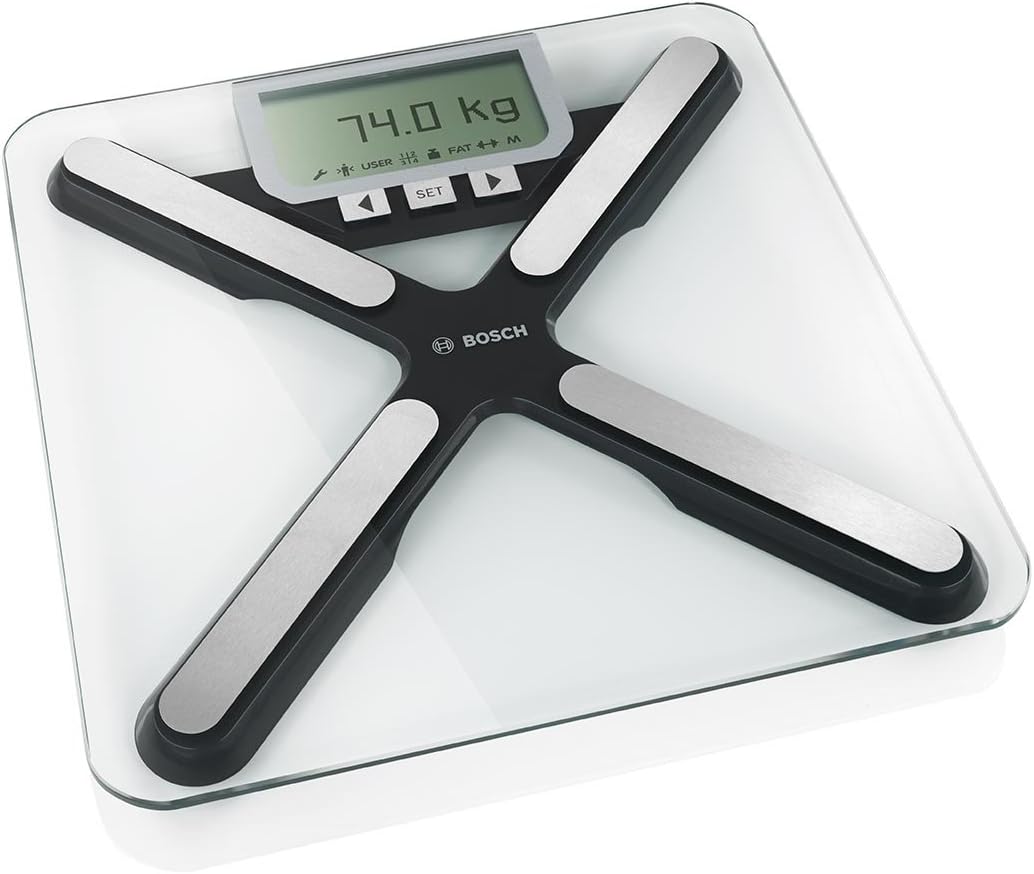
Image: Top view of the Bosch PPW 7170 scales, showing the digital display with a weight reading (e.g., 74.0 kg) and indicators for user, fat, and other metrics.
3. Switching Measurement Units
To switch between kilograms (kg) and pounds (lb), locate the unit switch button on the underside of the scale, usually near the battery compartment. Press it to toggle units.
Maintenance
- Cleaning: Wipe the scale surface with a damp cloth and mild detergent. Do not use abrasive cleaners or immerse the scale in water.
- Storage: Store the scale in a cool, dry place. Avoid extreme temperatures.
- Battery Replacement: When the battery indicator appears on the display, replace all 4 AAA batteries simultaneously.
Troubleshooting
| Problem | Possible Cause | Solution |
|---|---|---|
| "Lo" or no display | Low batteries | Replace all 4 AAA batteries. |
| Inaccurate readings | Scale on uneven surface; scale moved; initial calibration needed. | Place on a hard, flat surface. Step on and off quickly to calibrate, then weigh again. |
| "Err" or "OL" (Overload) | Weight exceeds maximum capacity. | Do not exceed the maximum weight capacity (refer to specifications). |
| Body analysis not working | Feet not making good contact with electrodes; user profile not set up; wet feet. | Ensure bare, clean, dry feet are on electrodes. Set up user profile. |
Specifications
- Model Number: PPW7170
- Manufacturer: Bosch
- Dimensions (L x W x H): 34.01 x 34.01 x 2.59 cm
- Weight: 2.28 kg
- Batteries: 4 x AAA (included)
- Units: 1 unit
- First Available Date: May 16, 2013
Warranty and Support
For warranty information and customer support, please refer to the warranty card included with your product or visit the official Bosch website. Keep your purchase receipt as proof of purchase.
Online Support: Bosch Service Contact (France)