1. Introduction
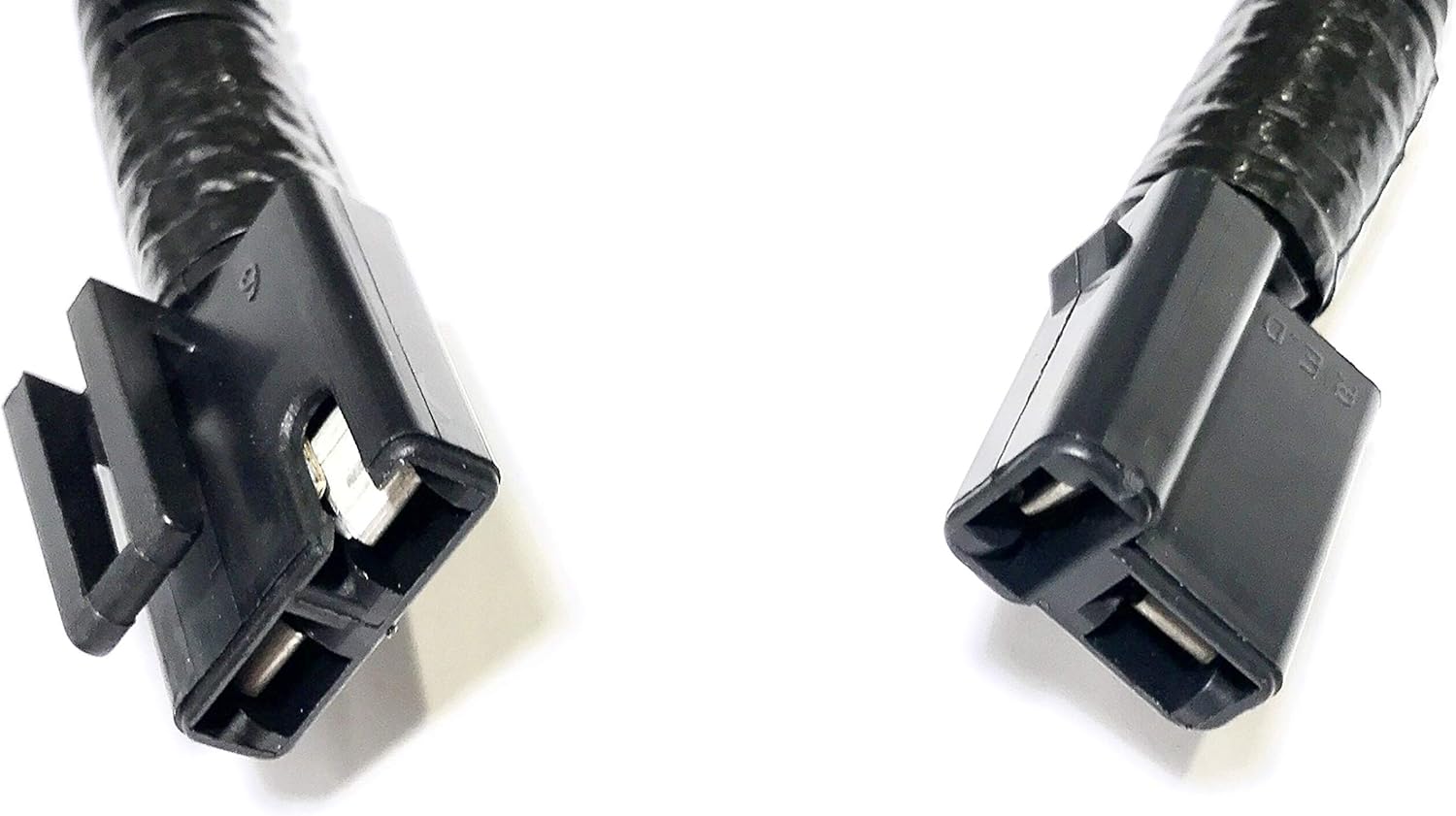
This manual provides essential information for the proper installation, operation, and maintenance of your HD Switch 109-9274 PTO Clutch Wiring Wire Harness. This harness is designed for specific lawn and garden equipment, ensuring reliable electrical connection for the Power Take-Off (PTO) clutch system. It features heavy-duty corrugated protection for wires and anti-corrosion treated connection terminals.
The HD Switch 109-9274 is compatible with various Exmark and Toro models, including Exmark Lazer Z, Staris S, and Toro Z Master, Grandstand Clutch models 109-9276, 109-9275, 103-3012, 142-3587, 135-5267, 130-1849, and 125-4673.

2. Safety Information
Always prioritize safety when working with electrical components and machinery. Failure to follow these safety guidelines may result in injury or damage to equipment.
- Disconnect Power: Before beginning any installation or maintenance, ensure the equipment's power source is completely disconnected. Remove the battery cable or spark plug wire to prevent accidental startup.
- Wear Protective Gear: Always wear appropriate personal protective equipment (PPE), including safety glasses and gloves.
- Inspect Components: Before installation, visually inspect the new harness for any signs of damage, such as frayed wires or cracked connectors.
- Professional Installation: If you are unsure about any step of the installation process, consult a qualified technician.
3. Package Contents
Your package should contain the following item:
- 1 x HD Switch 109-9274 PTO Clutch Wiring Wire Harness
4. Installation Instructions
Follow these steps to properly install the PTO Clutch Wiring Wire Harness:
- Prepare the Equipment: Ensure the equipment is turned off and the power source is disconnected as per the safety guidelines. Locate the existing PTO clutch wiring harness that needs replacement.
- Remove Old Harness: Carefully disconnect the old wiring harness from both the PTO clutch and the equipment's main wiring system. Note the routing of the old harness to ensure the new one is installed correctly.
- Inspect Connections: Before installing the new harness, inspect the mating connectors on your equipment for any corrosion, dirt, or damage. Clean or repair as necessary to ensure a secure and reliable connection.
- Connect New Harness: Connect one end of the new HD Switch 109-9274 harness to the PTO clutch. Ensure the connection is firm and fully seated.
- Connect to Equipment Wiring: Connect the other end of the new harness to the corresponding connector on the equipment's main wiring. Verify that both connections are secure and properly latched.
- Secure Wiring: Route the new harness along the same path as the original, using any existing clips or ties to secure it and prevent it from interfering with moving parts or being exposed to excessive heat or abrasion. The corrugated sleeve provides protection against environmental factors.
The following videos demonstrate general procedures for handling and connecting similar wiring harnesses, which may be helpful during installation:
Video 4.1: This video demonstrates the process of repairing or assembling a clutch wire harness connector kit, including inserting terminals and securing wires. It provides visual guidance on handling individual components of a wiring harness.
Video 4.2: This video illustrates the connection of a pigtail wire harness, showing how the connectors are joined and secured. It offers a visual reference for the final connection step of a PTO clutch harness.
5. Operating Instructions
Once the HD Switch 109-9274 PTO Clutch Wiring Wire Harness is correctly installed, its operation is integrated with your equipment's existing PTO system. The harness facilitates the electrical signal transmission required for the PTO clutch engagement and disengagement.
- Functionality: The harness ensures proper electrical continuity between the PTO clutch and the control system.
- Engagement: Engage the PTO clutch according to your equipment's manufacturer instructions. The harness will transmit the necessary power for activation.
- Disengagement: Disengage the PTO clutch as per your equipment's manufacturer instructions. The harness will facilitate the signal for deactivation.
Always refer to your equipment's primary operator's manual for specific PTO clutch operating procedures.
6. Maintenance
Regular inspection and basic maintenance will help prolong the life and ensure the reliability of your wiring harness.
- Visual Inspection: Periodically inspect the entire length of the harness for any signs of wear, cuts, abrasions, or heat damage. Pay close attention to areas near moving parts or heat sources.
- Connector Check: Ensure all electrical connections remain tight and free from corrosion. If corrosion is present, disconnect power, clean the terminals with an appropriate electrical contact cleaner, and re-secure.
- Secure Routing: Verify that the harness remains securely routed and fastened, preventing it from snagging or rubbing against other components.
- Cleaning: Keep the harness free from excessive dirt, debris, and moisture. Use a damp cloth to wipe it clean if necessary.
7. Troubleshooting
If you experience issues with your PTO clutch after installing the new harness, consider the following troubleshooting steps:
| Problem | Possible Cause | Solution |
|---|---|---|
| PTO clutch does not engage. | Loose or corroded connections. | Check all connections for tightness and cleanliness. Clean any corrosion. |
| PTO clutch engages intermittently. | Damaged wiring or intermittent connection. | Inspect the harness for visible damage. Ensure connections are fully seated. |
| No power to PTO clutch. | Blown fuse or faulty switch (not harness related). | Check equipment's fuse box and PTO engagement switch. Consult equipment manual. |
If troubleshooting does not resolve the issue, it is recommended to consult a qualified service technician or contact HD Switch customer support.
8. Specifications
- Product Dimensions: 10 x 6 x 1 inches
- Item Weight: 0.634 ounces
- Manufacturer: HD Switch
- ASIN: B00CSBR5CA
- Item Model Number: 109-9274
- Material: Corrugate (for wire protection)
- Connector Type: Specialized/Custom
9. Warranty and Support
For warranty information and customer support, please refer to the official HD Switch website or contact your authorized dealer. Keep your purchase receipt as proof of purchase.