
Introduction
This manual provides comprehensive instructions for the Redi-Remote replacement remote control, designed for seamless compatibility with Clarion units 3ZREM170027R3 and NX501. This remote is a custom-built replacement and is not an original Clarion product. It is engineered to perform all functions of the specific unit it is designed to control without requiring any programming.
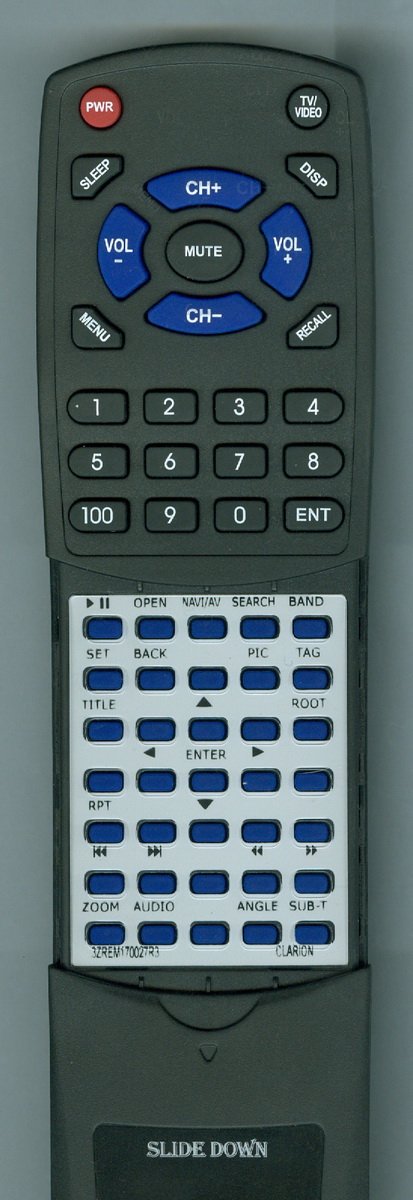
Image: The Redi-Remote replacement remote control, showing its standard layout and design.
Setup
Battery Installation
- Locate the battery compartment on the back of the remote control.
- Slide open the battery compartment cover.
- Insert four (4) AAA batteries, ensuring the positive (+) and negative (-) terminals align correctly with the markings inside the compartment. Four AAA batteries are included with the remote.
- Close the battery compartment cover securely.
Note: This Redi-Remote does not require any programming. It is ready for use immediately after battery installation.
Operating Instructions
The Redi-Remote is designed to control a single device: your Clarion 3ZREM170027R3 or NX501 unit. It operates using infrared (IR) technology, requiring a clear line of sight between the remote and the Clarion unit's IR receiver.
Basic Functions
- Power Button: Press to turn the Clarion unit on or off.
- Volume Up/Down: Adjust the audio output level.
- Source/Mode: Switch between different input sources or operating modes (e.g., Radio, CD, USB).
- Track/Tune: Navigate through tracks on media or tune radio stations.
- Menu/Setup: Access the unit's menu system for settings adjustments.
- Numeric Keypad: For direct input of numbers, such as radio frequencies or track numbers.
Sliding Cover
The remote features a sliding cover over the lower half of the buttons. Slide this cover down to reveal additional controls for advanced functions or numeric input.
Maintenance
Cleaning
To clean the remote, gently wipe its surface with a soft, dry cloth. For stubborn dirt, slightly dampen the cloth with water. Avoid using harsh chemicals, abrasive cleaners, or excessive moisture, as these can damage the remote's finish or internal components.
Battery Replacement
Replace batteries when the remote's performance degrades or it stops responding. Always replace all four AAA batteries at the same time with new ones. Do not mix old and new batteries or different types of batteries.
Troubleshooting
- Remote not responding:
- Ensure batteries are installed correctly with proper polarity.
- Replace old batteries with new ones.
- Check for any obstructions between the remote and the Clarion unit's IR receiver.
- Ensure you are within the effective range and pointing the remote directly at the unit.
- Certain buttons not working:
- Clean the remote's surface, especially around the unresponsive buttons, to remove any dirt or debris.
- If the issue persists after checking batteries and cleaning, the remote may require replacement.
If you continue to experience issues, please refer to the Warranty and Support section for contact information.
Specifications
- Model: RT3ZREM170027R3
- Compatibility: Clarion 3ZREM170027R3, Clarion NX501
- Dimensions: 7 x 2.5 x 1 inches (approximately)
- Weight: 4.5 ounces (approximately)
- Batteries: 4 x AAA (included)
- Connectivity Technology: Infrared (IR)
- Max Number of Supported Devices: 1
- Special Feature: No Programming Required
Warranty and Support
This Redi-Remote replacement remote control is provided by RemotesPro. For any concerns with the remote after purchase, please contact the seller directly. The product typically includes a 30-day return policy for refunds or replacements.
For specific warranty details or technical assistance, please reach out to the seller, RemotesPro, through your purchase platform.