
1. Introduction
This manual provides essential information for the safe and effective installation, operation, and maintenance of the Veris Hawkeye H909 Digital Current Sensor. Please read this manual thoroughly before attempting to install or operate the device. Retain this manual for future reference.
The Veris Hawkeye H909 is a digital current sensor designed for accurate measurement of electrical current in various industrial and commercial applications. Its robust design and wall-mount capability make it suitable for diverse environments.
2. Important Safety Information
WARNING: Risk of Electric Shock
- Installation and servicing must be performed by qualified personnel only.
- Disconnect all power to the circuit before installing or servicing the device.
- Ensure all wiring complies with local and national electrical codes.
- Do not operate the device if it appears damaged.
Failure to follow these instructions may result in serious injury or death.
3. Setup and Installation
The Hawkeye H909 is designed for wall mounting and features a clamp-on design for current sensing.
3.1 Mounting
- Select a suitable wall location near the conductor to be monitored, ensuring adequate space for wiring and access.
- Securely mount the sensor to the wall using appropriate fasteners through the designated mounting holes.
3.2 Wiring
The device utilizes a 2-pin connector and screw terminals for electrical connections.
- Power Disconnection: Ensure all power to the circuit is disconnected before proceeding with wiring.
- Current Sensing: Open the hinged clamp of the sensor and place it around the conductor whose current is to be measured. Ensure the clamp is fully closed and latched.
- Output Connection: Connect the sensor's output terminals (via the 2-pin connector and screw terminals) to your monitoring or control system. Refer to your system's documentation for specific input requirements. The sensor provides a Normally Open contact type.
- Power Restoration: Once all connections are secure and verified, restore power to the circuit.
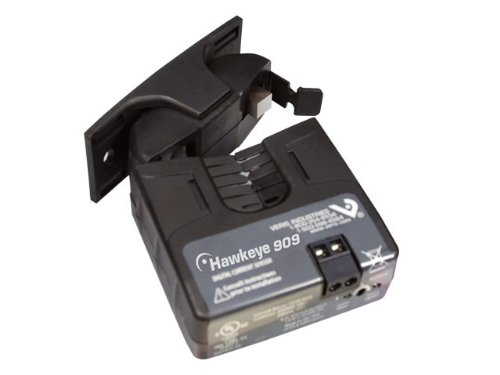
Figure 1: Veris Hawkeye H909 Digital Current Sensor. This image displays the black rectangular device with its hinged clamp open, ready to be installed around an electrical conductor for current measurement. It is designed for wall mounting and features a 2-pin connector and screw terminals for output connections.
4. Operating Instructions
The Veris Hawkeye H909 operates in an automatic mode, continuously monitoring the current in the conductor it is clamped around. It functions as a digital current sensor, providing a signal based on the detected current.
4.1 Current Monitoring
Once properly installed and powered, the sensor will automatically begin monitoring the current. The output signal will change state based on the presence or absence of current, or a predefined threshold, depending on the specific model variant and configuration.
4.2 Push Button Functionality (if applicable)
Some models may include a push button for testing or configuration purposes. If present, this button typically allows for:
- Test Mode: Briefly pressing the button may activate a test mode to verify sensor functionality.
- Threshold Adjustment: For models with adjustable thresholds, the button might be used in conjunction with other indicators to set current detection levels. Refer to specific product documentation for detailed instructions on using the push button.
5. Maintenance
The Veris Hawkeye H909 Digital Current Sensor is designed for minimal maintenance. Regular inspection is recommended to ensure optimal performance and safety.
- Cleaning: Periodically clean the exterior of the sensor with a soft, dry cloth. Do not use abrasive cleaners or solvents.
- Inspection: Annually inspect the wiring connections for tightness and signs of wear or damage. Ensure the sensor clamp remains securely closed around the conductor.
- Environmental Conditions: Ensure the operating environment remains within the specified temperature and humidity ranges to prevent damage.
6. Troubleshooting
If you experience issues with your Hawkeye H909 sensor, refer to the following common troubleshooting steps:
- No Output Signal:
- Verify that power is supplied to the circuit being monitored.
- Check all wiring connections for proper installation and secure contact.
- Ensure the sensor clamp is fully closed around the conductor.
- Confirm the monitoring system is correctly configured to receive the sensor's output.
- Incorrect Readings/Erratic Behavior:
- Ensure the conductor is properly centered within the sensor's clamp.
- Check for strong electromagnetic interference from nearby equipment.
- Verify the sensor is rated for the current levels being measured.
- Physical Damage: If the sensor shows signs of physical damage, discontinue use and replace the unit.
If these steps do not resolve the issue, contact Veris Industries technical support.
7. Specifications
| Feature | Detail |
|---|---|
| Model | Hawkeye H909 |
| Brand | Veris Industries |
| Operation Mode | Automatic |
| Actuator Type | Push Button (for configuration/test) |
| Number of Positions | 3 |
| Contact Type | Normally Open |
| Connector Type | 2 Pin |
| Terminal | Screw |
| Circuit Type | 3-way |
| Mounting Type | Wall Mount |
| Contact Material | Copper |
8. Warranty and Support
8.1 Warranty Information
Veris Industries products are manufactured to high-quality standards. For specific warranty terms and conditions, please refer to the official warranty statement provided with your product or visit the Veris Industries website.
8.2 Technical Support
For technical assistance, product inquiries, or to report issues, please contact Veris Industries directly:
- Website: www.veris.com
- Phone: Refer to the contact section on the official website for regional support numbers.

