
Redi-Remote RT483521837125
Redi-Remote Replacement Remote Control User Manual
For MAGNAVOX Models: 483521837125, VR9121AT01, VR9320AT23, VR9320AT21, VR9321
Introduction
This manual provides instructions for the Redi-Remote Replacement Remote Control, designed for specific MAGNAVOX units. Please read this manual thoroughly before use to ensure proper operation and longevity of your device.
Product Overview
The Redi-Remote replacement remote control is a dedicated device for controlling compatible MAGNAVOX units. It is not programmable for auxiliary devices.
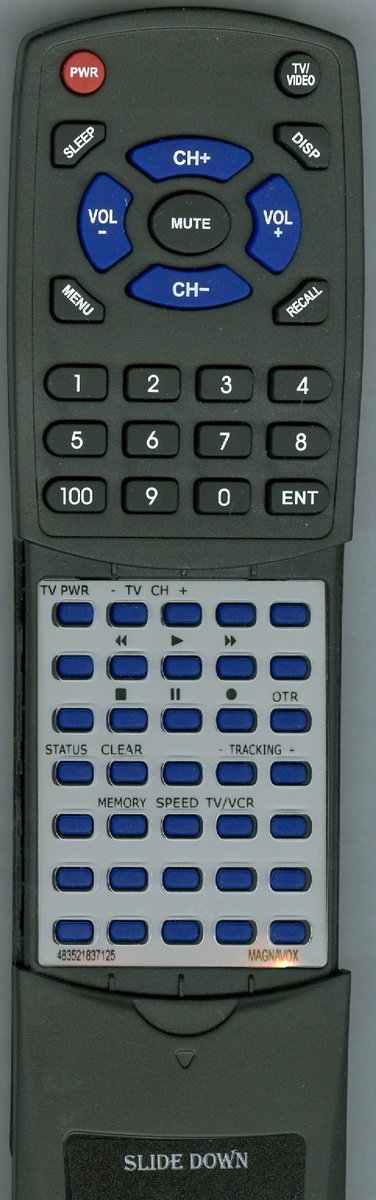
Figure 1: Redi-Remote Replacement Remote Control. This image shows the front view of the remote control, highlighting its buttons and general layout. Note the sliding cover at the bottom that conceals additional buttons.
The remote measures approximately 7.5 inches in length, 2.25 inches in width, and 0.75 inches in thickness. It operates using infrared technology.
Setup
1. Battery Installation
- Locate the battery compartment on the back of the remote control.
- Slide open the battery compartment cover.
- Insert four (4) AAA batteries, ensuring correct polarity (+ and -) as indicated inside the compartment.
- Close the battery compartment cover securely.
Note: Batteries are typically included with the remote control. Replace batteries when the remote's response becomes inconsistent or stops functioning.
Operating Instructions
1. Basic Operation
- Power: Press the POWER button to turn your MAGNAVOX unit on or off.
- Channel Selection: Use the number buttons (0-9) to directly enter channel numbers, or use the CH+ / CH- buttons to cycle through channels.
- Volume Control: Use the VOL+ / VOL- buttons to adjust the audio volume.
- Mute: Press the MUTE button to temporarily silence the audio. Press again to restore sound.
2. Accessing Additional Functions
The remote features a sliding cover over the lower half. Slide this cover down to reveal additional function buttons, which may include menu navigation, playback controls (for VCRs), and other specific features depending on your MAGNAVOX unit model.
- Menu Navigation: Use the MENU button to access the unit's on-screen display (OSD) menu. Use the arrow buttons (UP, DOWN, LEFT, RIGHT) and ENTER or OK button to navigate and select options.
- Playback Controls (for VCRs): Buttons such as PLAY, PAUSE, STOP, REW, FF, REC are available for controlling VCR functions.
Maintenance
- Cleaning: Wipe the remote control with a soft, dry cloth. Do not use liquid cleaners or abrasive materials.
- Battery Replacement: Replace all batteries simultaneously. Do not mix old and new batteries, or different types of batteries. Remove batteries if the remote will not be used for an extended period to prevent leakage.
- Storage: Store the remote in a cool, dry place away from direct sunlight and extreme temperatures.
Troubleshooting
| Problem | Possible Cause | Solution |
|---|---|---|
| Remote not responding. | Dead or incorrectly inserted batteries. Obstruction between remote and unit. Remote out of range. | Replace batteries, ensuring correct polarity. Remove any obstructions. Move closer to the MAGNAVOX unit. |
| Some buttons not working. | Dirty contacts under buttons. Remote not compatible with specific function. | Ensure the remote is clean. Verify the function is supported by your MAGNAVOX unit and this specific replacement remote. |
| Remote only controls some functions. | Remote is designed for a specific MAGNAVOX unit model, and some functions may not be present on all compatible units. | Confirm the remote's compatibility with your exact MAGNAVOX model and its original remote's functions. This remote is not programmable for auxiliary devices. |
Specifications
- Brand: Redi-Remote
- Model Number: RT483521837125
- Compatible MAGNAVOX Models: 483521837125, VR9121AT01, VR9320AT23, VR9320AT21, VR9321
- Dimensions: 7 x 2.5 x 1 inches (approximately 17.8 x 6.4 x 2.5 cm)
- Item Weight: 4.5 ounces (approximately 127.6 grams)
- Power Source: 4 x AAA batteries (included)
- Connectivity Technology: Infrared (IR)
- Special Feature: Ergonomic design, sliding cover for lower buttons.
- Max Number of Supported Devices: 1 (dedicated to the specified MAGNAVOX unit)
Warranty and Support
This Redi-Remote replacement remote control is designed to function as described. For any concerns with the remote after purchase, please contact the seller directly for support and potential resolution.
Note: This is a replacement remote and not an original MAGNAVOX product. Warranty and support are provided by the manufacturer of the replacement remote, Redi-Remote, or the seller.
Ask a question about this manual
Ask about setup, troubleshooting, compatibility, parts, safety, or missing instructions. Manuals+ will review the question and use this page’s manual context to help answer it.