
1. Introduction
This manual provides instructions for the Redi-Remote replacement remote control, designed for use with specific DIRECTV units. Please read this manual carefully before using your new remote control to ensure proper operation and to familiarize yourself with its features.
2. Product Overview
The Redi-Remote replacement remote control is a custom-built device intended to replace the original DIRECTV remote control model RC64R. It is specifically designed to operate DIRECTV units with model numbers 313922852281, RC64R, and RC1984720.
- Dedicated Functionality: This remote is pre-programmed to control only the specified DIRECTV unit. It cannot be programmed to control auxiliary devices such as televisions, DVD players, or sound systems.
- No Programming Required: The remote is ready to use immediately after battery installation. No complex setup or code entry is necessary.
- Dimensions: The remote measures approximately 7 1/2 inches in length, 2 1/4 inches in width, and 3/4 inches in thickness.
- Infrared Technology: This remote operates using infrared signals and requires a clear line of sight to the DIRECTV receiver.
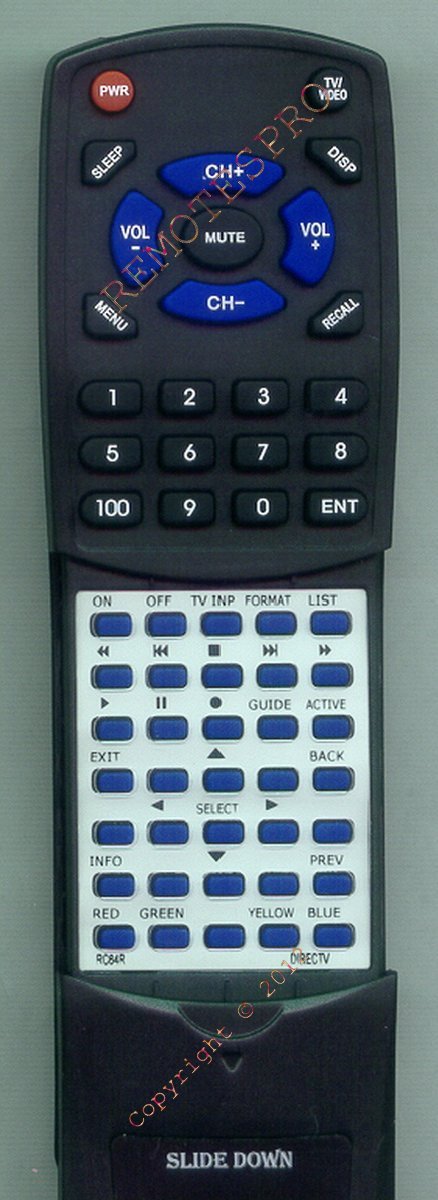
Image 1: Front view of the Redi-Remote Replacement Remote Control. This image displays the general shape and button layout of the remote, including the upper section of buttons.
3. Setup
3.1 Battery Installation
The remote control requires four (4) AAA batteries for operation. These batteries are included with your purchase.
- Locate the battery compartment cover on the back of the remote control.
- Slide the cover downwards or press the latch (if present) and lift to remove it.
- Insert four (4) AAA batteries, ensuring that the positive (+) and negative (-) terminals align correctly with the markings inside the compartment. Incorrect battery orientation can prevent the remote from functioning.
- Replace the battery compartment cover by sliding it back into place until it clicks securely.
Once batteries are installed, the remote is ready for use with your compatible DIRECTV unit.
4. Operating Instructions
4.1 Basic Operation
To operate your DIRECTV unit, point the remote control directly at the DIRECTV receiver and press the desired function button. Ensure there are no obstructions between the remote and the receiver.
4.2 Accessing Hidden Buttons (Sliding Cover)
The remote control features a sliding cover on its lower half. This cover conceals additional buttons that provide extended functionality for your DIRECTV unit.
- To reveal the hidden buttons, gently slide the lower half of the remote downwards.
- Once the cover is slid down, the additional buttons will become accessible.
- To conceal the buttons again, slide the cover upwards until it is fully closed.
5. Maintenance
- Cleaning: Wipe the remote control with a soft, dry cloth. Do not use liquid cleaners or abrasive materials, as these can damage the remote's surface or internal components.
- Battery Replacement: If the remote's performance degrades or it stops responding, replace all four AAA batteries with new ones. Do not mix old and new batteries, or different types of batteries.
- Storage: Store the remote in a dry place away from extreme temperatures and direct sunlight.
6. Troubleshooting
If you experience issues with your Redi-Remote replacement remote control, please refer to the following common solutions:
- Remote is not responding:
- Ensure the batteries are inserted correctly with the proper polarity (+/-).
- Replace the batteries with fresh AAA batteries.
- Check for any obstructions between the remote control and the DIRECTV receiver.
- Ensure you are pointing the remote directly at the DIRECTV receiver.
- Buttons are not working:
- Verify that the remote is clean and there is no debris obstructing the buttons.
- If only some buttons are not working, try replacing the batteries.
- Remote range is poor:
- Ensure the batteries are fresh.
- Remove any objects that might be blocking the infrared signal path.
- Move closer to the DIRECTV receiver.
If these steps do not resolve the issue, please contact the seller for further assistance.
7. Specifications
| Model Number | RTRC64R |
| Compatible DIRECTV Models | 313922852281, RC64R, RC1984720 |
| Brand | Redi-Remote |
| Connectivity Technology | Infrared (IR) |
| Power Source | 4 x AAA Batteries (included) |
| Product Dimensions | 7.5 x 2.25 x 0.75 inches (approx.) |
| Item Weight | 4.5 ounces |
| Special Feature | No Programming Required |
8. Warranty and Support
For any concerns regarding your Redi-Remote replacement remote control, including warranty information or technical support, please contact the seller directly through your purchase platform. They will be able to provide the most accurate and timely assistance.


