
Introduction
This manual provides instructions for the Redi-Remote replacement remote control, model RTDVDR100A. This remote is specifically designed to operate the MUSTEK DVDR100A unit. It is a custom-built replacement and does not require programming.
Setup
Battery Installation
The remote control requires four (4) AAA alkaline batteries for operation.
- Locate the battery compartment cover on the back of the remote control.
- Slide the cover downwards to open the compartment.
- Insert four AAA batteries, ensuring the positive (+) and negative (-) terminals align with the markings inside the compartment.
- Slide the battery compartment cover back into place until it clicks securely.
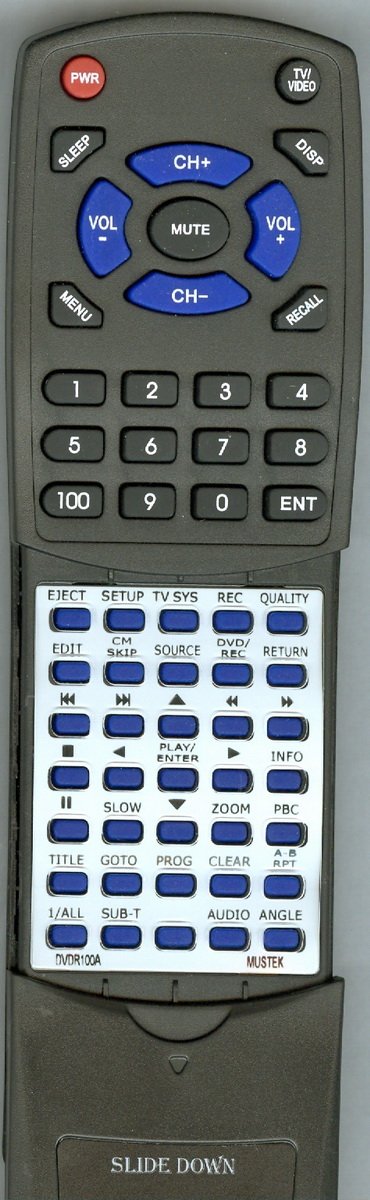
Image Description: A view of the Redi-Remote replacement remote control. The image highlights the overall design and suggests the location of the battery compartment on the rear side.
Operating Instructions
Basic Operation
This Redi-Remote replacement remote control is pre-programmed for the MUSTEK DVDR100A unit and requires no additional setup. Point the remote directly at the infrared sensor on your MUSTEK DVDR100A unit.
Accessing Additional Functions
The remote control features a sliding cover on its lower half. To access additional buttons and functions, gently slide this cover downwards. After use, you may slide it back up to protect the buttons.
Maintenance
Cleaning
To clean the remote control, use a soft, dry cloth. Do not use liquid cleaners or abrasive materials, as these may damage the surface or internal components.
Battery Replacement
Replace batteries when the remote's response becomes inconsistent or stops functioning. Always replace all four batteries simultaneously with new AAA alkaline batteries. Do not mix old and new batteries or different battery types.
Troubleshooting
Remote Not Responding
- Check Batteries: Ensure batteries are inserted correctly with the correct polarity (+/-). Replace old batteries with new AAA alkaline batteries.
- Line of Sight: Verify there are no obstructions between the remote control and the MUSTEK DVDR100A unit's infrared sensor.
- Distance: Ensure you are within the effective operating range (approximately 20 feet).
- Unit Power: Confirm that the MUSTEK DVDR100A unit is powered on.
Limited Functionality
- Sliding Cover: Ensure the lower sliding cover is moved down to reveal all available buttons for full functionality.
- Compatibility: This remote is designed exclusively for the MUSTEK DVDR100A. It cannot be programmed to control other devices.
Specifications
| Feature | Detail |
|---|---|
| Model Number | RTDVDR100A |
| Compatibility | MUSTEK DVDR100A |
| Dimensions | 7 1/2" x 2 1/4" x 3/4" |
| Power Source | 4 x AAA Alkaline Batteries (included) |
| Connectivity | Infrared (IR) |
| Operating Range | Up to 20 feet |
| Special Features | No programming required, sliding cover for additional buttons |
| Weight | 4.5 Ounces |
| Button Quantity | 58 |
Support
For any questions or concerns regarding your Redi-Remote replacement remote control, please contact the seller or manufacturer directly. Refer to your purchase documentation for contact information.