
1. Product Overview
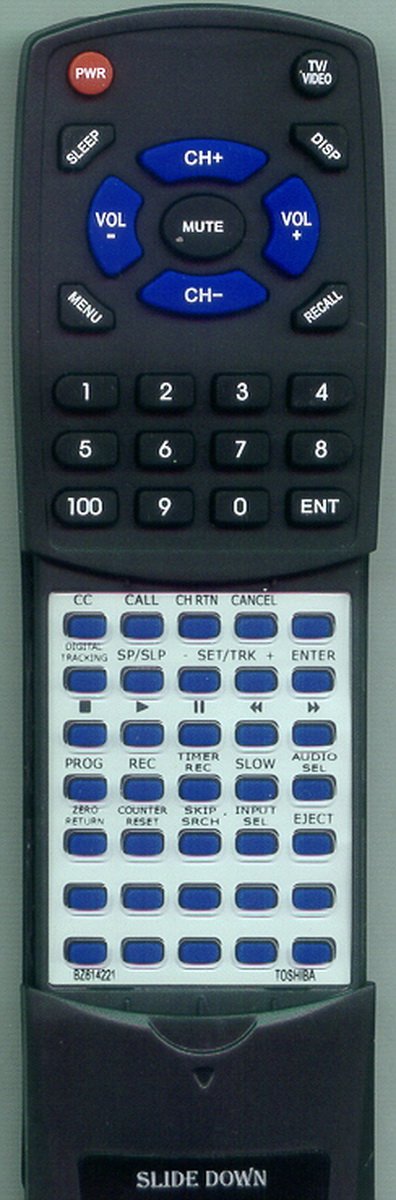
This Redi-Remote replacement remote control is designed to operate specific Toshiba TV/VCR combo units. It provides full functionality for the designated models without requiring any programming.
Key Features:
- Pre-programmed for immediate use with compatible Toshiba models.
- Controls all essential functions of your Toshiba TV/VCR combo.
- Features a sliding cover to protect and reveal lower half buttons.
- Compact and ergonomic design for comfortable handling.
2. Setup
Battery Installation
- Locate the battery compartment on the back of the remote control.
- Slide open the battery compartment cover.
- Insert four (4) AAA batteries, ensuring the positive (+) and negative (-) terminals align correctly with the markings inside the compartment.
- Close the battery compartment cover securely.
The remote control is pre-programmed and ready for use once batteries are installed. No additional setup or coding is required.
3. Operating Instructions
Basic Functions
Point the remote control directly at your Toshiba TV/VCR combo unit. Ensure there are no obstructions between the remote and the unit's infrared receiver.
- Power Button: Turns the unit on or off.
- Channel Up/Down: Changes the television channel.
- Volume Up/Down: Adjusts the audio volume.
- Number Buttons (0-9): Directly select channels or input numbers.
- Mute Button: Silences the audio output.
Advanced Functions (Sliding Cover)
The lower half of the remote control features a sliding cover. Gently slide this cover downwards to reveal additional buttons for advanced functions, such as VCR controls, menu navigation, and input selection. Slide the cover upwards to conceal these buttons when not in use.
Compatible Models:
- Toshiba MV20FM4
- Toshiba MV20FL1
- Toshiba BZ614221
- Toshiba MV14FM4
- Toshiba MV20FM3
- Toshiba MV20FL3
- Toshiba MV20FL4
- Toshiba MV14FL4
- Toshiba VCFL20S
4. Maintenance
Cleaning
To clean the remote control, use a soft, dry cloth. For stubborn dirt, slightly dampen the cloth with water or a mild, non-abrasive cleaner. Avoid using harsh chemicals or abrasive materials, as these can damage the remote's surface or internal components.
Battery Replacement
Replace batteries when the remote's response becomes sluggish or stops working. Always replace all four (4) AAA batteries at the same time with new ones. Do not mix old and new batteries, or different types of batteries, as this can lead to leakage or improper function.
5. Troubleshooting
Remote Not Responding
- Check Batteries: Ensure batteries are inserted correctly with the correct polarity (+/-) and are not depleted. Replace with fresh AAA batteries if necessary.
- Line of Sight: Verify that there is a clear line of sight between the remote control and the infrared sensor on your Toshiba unit. Remove any obstructions.
- Remote Sensor: Ensure the infrared sensor on your Toshiba unit is not blocked or dirty.
- Compatibility: Confirm that your Toshiba model is listed as compatible with this Redi-Remote replacement.
Buttons Not Working Correctly
- Clean Remote: Dust or debris under buttons can sometimes cause issues. Gently clean the remote's surface.
- Battery Check: Weak batteries can sometimes cause intermittent button functionality. Replace batteries.
6. Specifications
| Product Dimensions | 7 x 2.5 x 1 inches |
| Item Weight | 4.5 ounces |
| Item Model Number | RTBZ614221 |
| Batteries Required | 4 AAA batteries (included) |
| Connectivity Technology | Infrared |
| Compatible Devices | Television (Toshiba TV/VCR Combos) |
| Max Number of Supported Devices | 1 |
7. Warranty and Support
This Redi-Remote replacement remote control is designed for reliability and performance. For any concerns with the remote after purchase, please contact the seller directly for assistance.
Redi-Remote products are not equipped with laser pointers or LED lights and cannot be programmed to control auxiliary devices. They are specifically designed to perform all functions for the unit they are intended to control.
For further support or inquiries, please refer to the contact information provided at the point of purchase.