
1. Product Overview
This Redi-Remote replacement remote control is specifically designed to be compatible with the Venturer AVR2000W stereo system. It is a custom-built replacement that replicates the functions of the original remote control for the specified unit. This remote is not an original Venturer product but a dedicated replacement by Redi-Remote.
Key Features:
- Pre-programmed for Venturer AVR2000W: No additional programming is required.
- Dedicated Functionality: Designed to perform all functions for the Venturer AVR2000W unit.
- Compact Design: Measures approximately 7.5 inches x 2.25 inches x 0.75 inches.
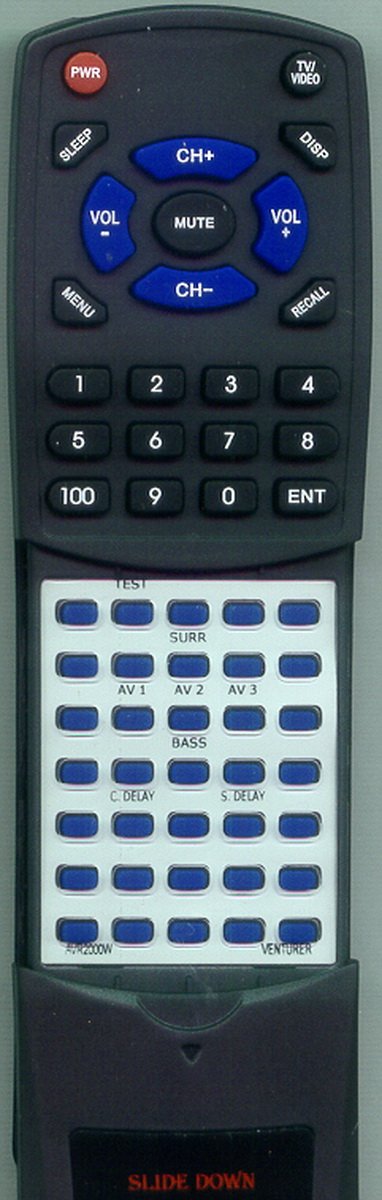
Image 1.1: Redi-Remote Replacement Remote Control for Venturer AVR2000W. This image displays the front view of the remote control, highlighting its button layout and ergonomic design.
2. Setup
2.1 Battery Installation
The remote control requires 4 AAA batteries for operation. These batteries are typically included with your purchase.
- Locate the battery compartment on the back of the remote control.
- Slide the battery compartment cover downwards or in the direction indicated by an arrow to open it.
- Insert 4 AAA batteries, ensuring the positive (+) and negative (-) terminals align correctly with the markings inside the compartment.
- Replace the battery compartment cover by sliding it back into place until it clicks securely.
2.2 Initial Use
This Redi-Remote is pre-programmed and does not require any setup codes or synchronization with your Venturer AVR2000W unit. Once batteries are installed, it is ready for immediate use.
- Point the remote control directly at your Venturer AVR2000W stereo system.
- Press any function button (e.g., Power, Volume Up) to test its operation.
3. Operating Instructions
The Redi-Remote is designed to replicate the functions of your original Venturer AVR2000W remote control. The buttons on this replacement remote correspond to the functions available on your stereo system.
3.1 Basic Functions
- Power: Turns the Venturer AVR2000W unit on or off.
- Volume Up/Down: Adjusts the master volume level.
- Mute: Silences the audio output.
- Input/Source: Cycles through available audio input sources (e.g., CD, AUX, Tuner).
- Channel/Track: Navigates through radio presets or audio tracks.
- Play/Pause/Stop: Controls media playback.
3.2 Advanced Functions and Button Mapping
While the Redi-Remote performs all functions of the original unit, specific button labels for advanced features (such as individual speaker sound adjustment or specific menu navigation) may vary or require familiarity with your Venturer AVR2000W's original manual. If you encounter difficulty locating a specific function, please refer to your Venturer AVR2000W's original user manual for detailed button descriptions and their corresponding actions.
4. Maintenance
4.1 Cleaning
To clean your remote control, use a soft, dry cloth. For stubborn dirt, slightly dampen the cloth with water or a mild, non-abrasive cleaner. Avoid using harsh chemicals or abrasive materials, as these can damage the remote's surface or internal components.
4.2 Battery Replacement
Replace batteries when the remote's performance degrades or stops working. Always replace all batteries at the same time with new ones of the same type (AAA). Do not mix old and new batteries, or different types of batteries.
4.3 Storage
Store the remote control in a dry place, away from direct sunlight, extreme temperatures, and high humidity. If the remote will not be used for an extended period, it is advisable to remove the batteries to prevent leakage.
5. Troubleshooting
If your Redi-Remote is not functioning as expected, please follow these troubleshooting steps:
- Remote Not Responding:
- Check the batteries: Ensure they are inserted correctly with the correct polarity (+/-).
- Replace batteries: If the batteries are old or depleted, replace all 4 AAA batteries with new ones.
- Line of Sight: Ensure there is a clear line of sight between the remote control and the Venturer AVR2000W unit. Obstructions can block the infrared signal.
- Distance: Make sure you are within the effective operating range of the remote control.
- Specific Functions Not Working:
- Verify compatibility: Confirm that your stereo system is indeed the Venturer AVR2000W model. This remote is designed specifically for this model.
- Consult original manual: For very specific or advanced functions, refer to the original Venturer AVR2000W user manual to understand the expected behavior and button mapping.
- Remote Appears Damaged: If the remote has been dropped or physically damaged, internal components may be affected.
If troubleshooting steps do not resolve the issue, please contact customer support for further assistance.
6. Specifications
| Feature | Detail |
|---|---|
| Brand | Redi-Remote |
| Model Number | RTAVR2000W |
| Compatible Devices | Venturer AVR2000W Stereo System |
| Connectivity Technology | Infrared |
| Power Source | 4 x AAA Batteries (included) |
| Product Dimensions | 7 x 2.5 x 1 inches (approximate) |
| Item Weight | 4.5 ounces (approximate) |
| Special Feature | No Programming Required |
| Max Number of Supported Devices | 1 |
7. Support
For any concerns with your Redi-Remote replacement remote control after purchase, or if you require further assistance with troubleshooting, please contact the seller directly. They can provide specific guidance and support related to your product.
Warranty Information: Specific warranty details may vary. Please refer to your purchase documentation or contact the seller for information regarding warranty coverage.