
Introduction
This manual provides instructions for the Redi-Remote replacement remote control, designed for specific MEMOREX TV/DVD Combo units. This remote is a custom-built replacement and is not an original MEMOREX product. It is pre-programmed to function with the listed models without additional setup.
Compatible MEMOREX Models:
- 845D47BT1DVDBMEH
- MLTD3222
- MLTD2622
Package Contents
- Redi-Remote Replacement Remote Control
- 4 AAA batteries (included)
Setup
1. Installing Batteries
The remote control requires 4 AAA batteries. These batteries are included with your purchase.
- Locate the battery compartment cover on the back of the remote control.
- Slide the cover downwards or press the latch and lift to open the compartment.
- Insert the 4 AAA batteries, ensuring the positive (+) and negative (-) terminals align correctly with the markings inside the compartment.
- Replace the battery compartment cover by sliding it back into place until it clicks securely.
Note: This remote control is pre-programmed for the specified MEMOREX models and does not require any additional programming.
Operating the Remote Control
This Redi-Remote is designed to perform all functions of the original remote for your MEMOREX TV/DVD Combo unit. Point the remote directly at the MEMOREX unit when operating.
Key Features and Functions
The remote features 58 buttons. A cover over the lower half of the remote can be slid down to reveal additional buttons.
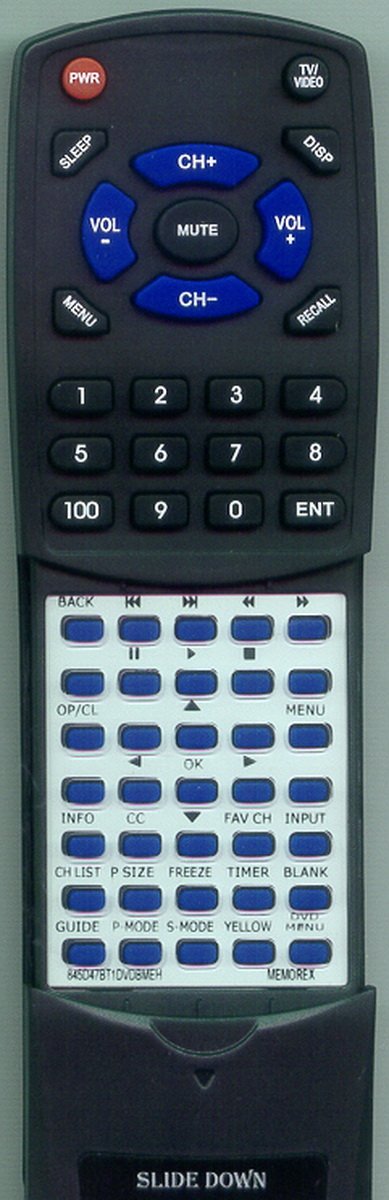
Image: Front view of the Redi-Remote Replacement Remote Control. This image displays the ergonomic design and the layout of the buttons, including the sliding cover for the lower half.
- Power Button: Turns the MEMOREX unit on or off.
- Channel Buttons: Navigate through channels.
- Volume Buttons: Adjust the audio volume.
- Number Pad: Direct channel input.
- Menu Button: Access the unit's on-screen menu.
- Navigation Buttons (Up/Down/Left/Right/OK): Used for menu navigation and selection.
- Input/Source Button: Select input sources (e.g., TV, DVD).
- DVD Playback Controls: Play, Pause, Stop, Fast Forward, Rewind, Skip for DVD functions. (Located under the sliding cover)
- Other Function Buttons: Specific functions related to your MEMOREX unit, such as display, audio settings, etc. (Some may be under the sliding cover).
This remote control operates using infrared technology and has a maximum range of 20 feet. Ensure there are no obstructions between the remote and the MEMOREX unit for optimal performance.
Maintenance
- Cleaning: Wipe the remote control with a soft, dry cloth. Do not use liquid cleaners or abrasive materials.
- Battery Replacement: Replace all 4 AAA batteries when the remote's performance degrades or if the unit does not respond. Do not mix old and new batteries, or different types of batteries.
- Storage: Store the remote in a dry place, away from direct sunlight and extreme temperatures.
- Avoid Drops: Protect the remote from physical impact, as drops can damage internal components.
Troubleshooting
| Problem | Possible Cause | Solution |
|---|---|---|
| Remote not responding. | Dead or incorrectly inserted batteries. | Replace batteries with new ones, ensuring correct polarity (+/-). |
| Remote has short range or intermittent response. | Weak batteries; Obstruction between remote and unit; Remote not pointed directly at unit. | Replace batteries. Remove any obstructions. Point the remote directly at the MEMOREX unit's IR receiver. |
| Specific buttons not working. | Button stuck or damaged; Remote malfunction. | Gently press the button multiple times. If issue persists, contact customer support. |
| Remote controls other devices. | This remote is designed for specific MEMOREX models only and cannot be programmed for auxiliary devices. | Ensure you are using the correct remote for the intended device. This remote is not universal. |
Specifications
- Brand: Redi-Remote
- Model Number: RT845D47BT1DVDBMEH
- Compatible Devices: MEMOREX TV/DVD Combo (Models: 845D47BT1DVDBMEH, MLTD3222, MLTD2622)
- Connectivity Technology: Infrared
- Maximum Range: 20 Feet (approx. 6 meters)
- Number of Buttons: 58
- Controller Type: Button Control
- Special Features: Ergonomic design, Sliding cover for lower buttons
- Power Source: 4 x AAA Batteries (included)
- Item Dimensions (L x W x H): 7.5" x 2.25" x 0.75" (19.05 cm x 5.72 cm x 1.91 cm)
- Item Weight: 4.5 Ounces (approx. 127.57 grams)
- UPC: 791090936521
Warranty and Support
For any concerns or issues with your Redi-Remote replacement remote control after purchase, please contact the manufacturer directly. This product is a custom replacement and is supported by Redi-Remote.
Please refer to your purchase documentation for specific warranty details and contact information.