
1. Introduction
This manual provides instructions for the Redi-Remote replacement remote control, model RT8300472900050S. This remote is specifically designed to be compatible with Insignia units KRC4729D, NSR5100, and 8300472900050S. It functions as a direct replacement and does not require programming for the specified Insignia models.
The remote control measures approximately 7.5 inches (19 cm) in length, 2.25 inches (5.7 cm) in width, and 0.75 inches (1.9 cm) in thickness, and weighs about 4.5 ounces (127 grams).
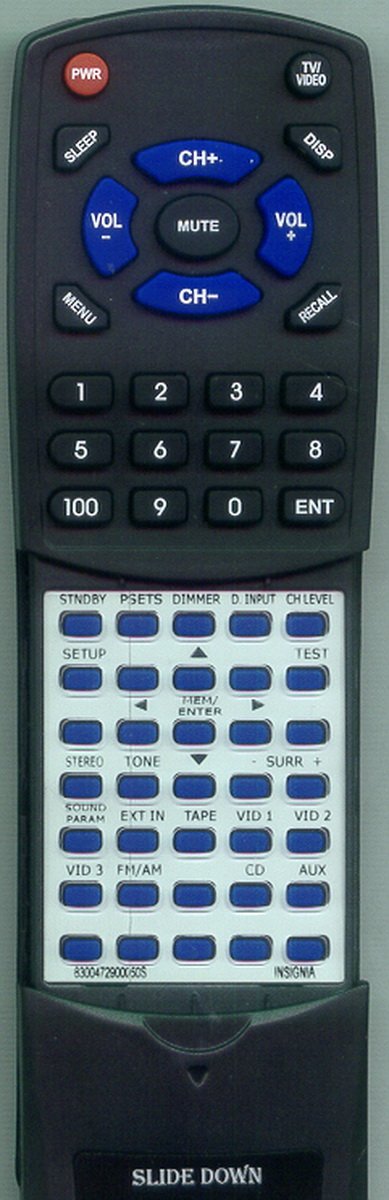
Figure 1: Redi-Remote Replacement Remote Control. This image displays the front view of the remote control, highlighting its ergonomic design and button layout.
2. Setup
2.1 Battery Installation
The remote control requires four (4) AAA batteries, which are included with the product. Follow these steps to install the batteries:
- Locate the battery compartment cover on the back of the remote control.
- Slide the cover downwards or press the latch (if present) and lift to open the compartment.
- Insert four AAA batteries, ensuring the positive (+) and negative (-) terminals align correctly with the markings inside the compartment.
- Replace the battery compartment cover by sliding it back into place until it clicks securely.
Note: Ensure batteries are inserted correctly to prevent damage to the remote control.
2.2 Initial Use
This Redi-Remote replacement remote control is pre-programmed for the specified Insignia models (KRC4729D, NSR5100, 8300472900050S) and does not require any additional programming. Once batteries are installed, it is ready for immediate use with your compatible Insignia unit.
3. Operating Instructions
3.1 Basic Operation
To operate your Insignia unit, point the remote control directly towards the unit's infrared receiver and press the desired button. The remote uses infrared (IR) technology, requiring a clear line of sight between the remote and the device.
The remote control features 58 buttons, providing comprehensive control over your Insignia unit's functions. A sliding cover is present over the lower half of the remote; slide this cover down to access additional buttons.
3.2 Range
The maximum effective operating range for this remote control is approximately 20 feet (6 meters).
3.3 Device Compatibility
This remote control is designed to operate only the specific Insignia unit it is intended for. It cannot be programmed to control auxiliary devices such as sound systems, DVD players, or other televisions.
4. Maintenance
4.1 Cleaning
To clean the remote control, gently wipe its surface with a soft, dry, or slightly damp cloth. Do not use abrasive cleaners, solvents, or harsh chemicals, as these may damage the remote's finish or internal components.
4.2 Battery Replacement
Replace the batteries when the remote control's response becomes inconsistent or stops functioning. Refer to Section 2.1 for battery installation instructions. Always replace all four batteries at the same time with new AAA batteries.
4.3 Storage
Store the remote control in a cool, dry place away from direct sunlight, extreme temperatures, and high humidity. If the remote will not be used for an extended period, it is recommended to remove the batteries to prevent leakage.
5. Troubleshooting
- Remote not responding:
- Ensure the remote has fresh batteries and they are installed correctly.
- Check for any obstructions between the remote control and the Insignia unit's IR receiver.
- Verify you are within the maximum operating range of 20 feet.
- Confirm the remote is pointed directly at the Insignia unit.
- Certain buttons not working:
- Check if the sliding cover is fully open to reveal all buttons.
- Ensure the batteries are not low, as this can sometimes affect specific functions before complete failure.
- Clean the remote's surface, especially around the buttons, to remove any debris.
- Remote does not control other devices:
This remote is designed exclusively for the specified Insignia units and cannot be programmed to control other brands or types of devices.
6. Specifications
| Brand | Redi-Remote |
| Model Number | RT8300472900050S |
| Compatible Insignia Models | KRC4729D, NSR5100, 8300472900050S |
| Connectivity Technology | Infrared (IR) |
| Maximum Range | 20 feet (6 meters) |
| Number of Buttons | 58 |
| Power Source | 4 x AAA Batteries (included) |
| Item Weight | 4.5 Ounces (127 grams) |
| Dimensions (L x W x H) | 7.5" x 2.25" x 0.75" (19 cm x 5.7 cm x 1.9 cm) |
| Special Features | Ergonomic design, Sliding button cover |
| UPC | 791090931960 |
7. Support Information
For any concerns or questions regarding your Redi-Remote replacement remote control after purchase, please contact the seller directly for assistance. This ensures you receive prompt and accurate support tailored to your specific product.