
Dorman 974-302
Dorman 974-302 TPMS Sensor Instruction Manual
Model: 974-302 | Brand: Dorman
Product Overview
The Dorman 974-302 is a programmable 433 MHz Tire Pressure Monitoring System (TPMS) sensor designed to replace original equipment sensors on a wide range of vehicles. This sensor offers versatility as it can be calibrated to specific vehicle requirements or cloned to replicate an existing sensor's data. Constructed from durable materials, it ensures reliable performance and a long service life.
Key Features:
- Versatile Replacement: Compatible with vehicles using 433 MHz TPMS frequencies.
- Programmable: Can be calibrated to vehicle specifications or cloned from an existing sensor.
- Durable Construction: Manufactured with quality components for lasting performance.
- Trusted Quality: Backed by Dorman's extensive automotive experience.
Setup and Installation
Installation of the Dorman 974-302 TPMS sensor requires specific programming. It is essential to note that this sensor must be programmed using a compatible tool, such as the Dorman MULTi-FIT II programming tool (Part Number 974-505), which is sold separately. Professional installation and programming are highly recommended.
Installation Steps:
- Tire Removal: Safely remove the tire from the wheel.
- Old Sensor Removal: Carefully remove the existing TPMS sensor from the wheel valve stem.
- New Sensor Installation: Install the Dorman 974-302 sensor onto the wheel valve stem, ensuring it is securely fastened according to manufacturer specifications.
- Programming: Using the Dorman MULTi-FIT II programming tool (or equivalent compatible tool), program the new sensor. This can be done by:
- Cloning: Copying the ID of the original sensor to the new Dorman sensor. This method often bypasses the need for vehicle relearn procedures.
- Calibrating to Vehicle Specification: Programming the sensor with a new, unique ID and then performing a vehicle relearn procedure to register the new sensor with the vehicle's TPMS system.
- Tire Remounting and Balancing: Remount the tire onto the wheel and balance the wheel assembly.
- Vehicle Relearn (if necessary): If the sensor was programmed with a new ID, follow your vehicle's specific TPMS relearn procedure. Consult your vehicle's owner's manual or a professional technician for this process.
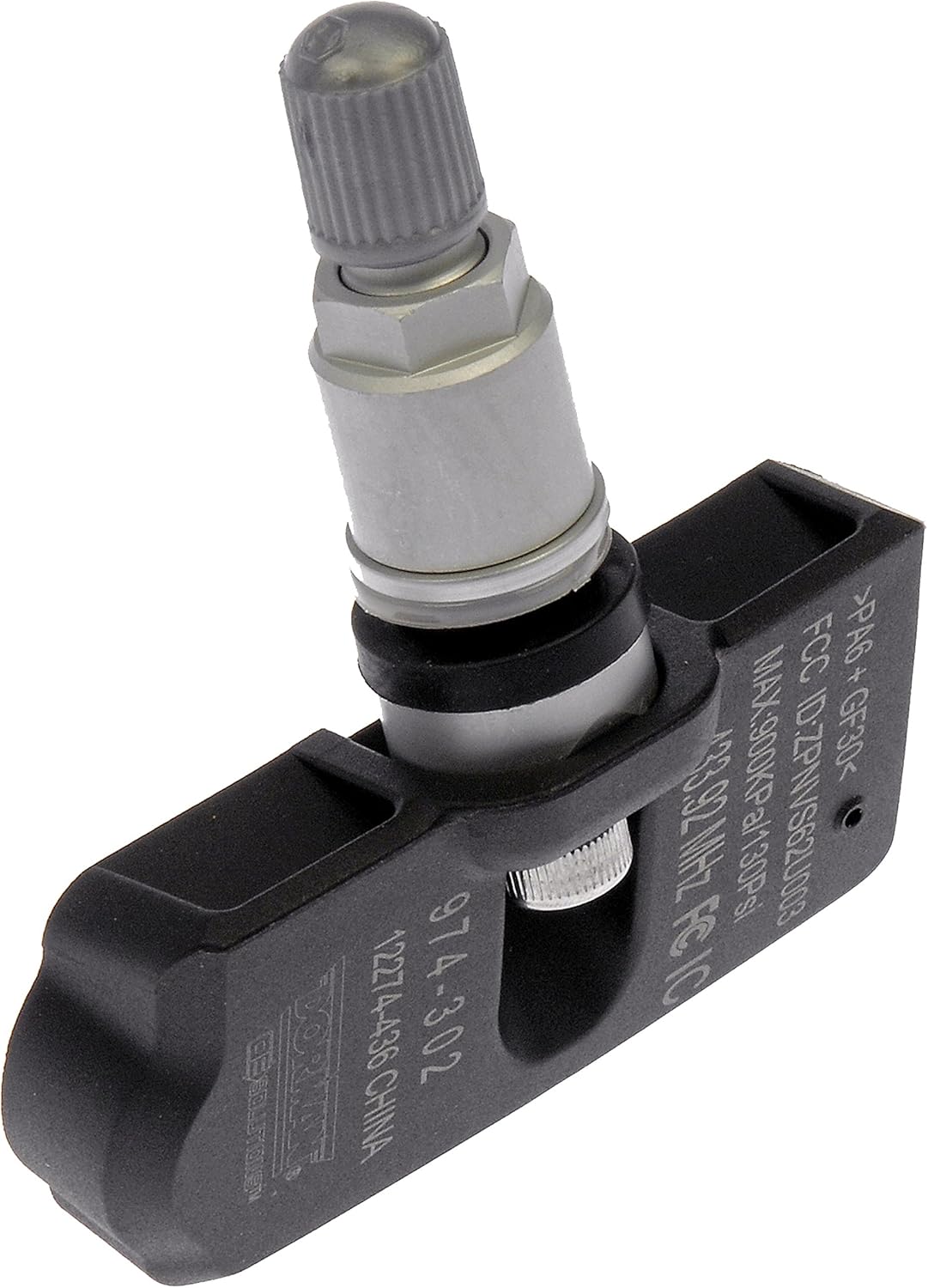
Figure 1: Angled view of the Dorman 974-302 TPMS sensor, showing its compact design and valve stem.

Figure 2: Front view of the Dorman 974-302 TPMS sensor, highlighting the model number and frequency.

Figure 3: Back view of the Dorman 974-302 TPMS sensor, showing the sealed casing.
Operation
Once properly installed and programmed, the Dorman 974-302 TPMS sensor will continuously monitor the air pressure within the tire. It transmits this data wirelessly to your vehicle's Tire Pressure Monitoring System receiver. If the tire pressure falls below or rises above the vehicle manufacturer's recommended thresholds, the TPMS warning light on your dashboard will illuminate, alerting the driver to a potential issue.
The sensor operates on a 433 MHz frequency, ensuring compatibility with a wide range of vehicles designed for this frequency.
Maintenance
TPMS sensors are generally maintenance-free components once installed. However, regular tire maintenance practices contribute to their longevity and accurate operation:
- Regular Tire Pressure Checks: Even with TPMS, manually checking tire pressure with a gauge periodically is recommended to ensure accuracy and catch slow leaks before they trigger the warning light.
- Valve Stem Care: Ensure the valve stem cap is always securely in place to prevent dirt and moisture from entering the sensor.
- Professional Tire Service: When tires are rotated, repaired, or replaced, ensure that the service technician is aware of the TPMS sensors and handles them with care to avoid damage.
- Battery Life: TPMS sensors are powered by an internal battery. The battery life is typically several years (5-10 years), but it is not user-replaceable. When the battery depletes, the sensor will need to be replaced.
Troubleshooting
If your TPMS warning light illuminates or you experience issues after installation, consider the following common troubleshooting steps:
| Problem | Possible Cause | Solution |
|---|---|---|
| TPMS light remains on after new sensor installation. | Sensor not properly programmed or vehicle relearn not completed. | Ensure the sensor was programmed correctly with a Dorman MULTi-FIT II tool. Perform the vehicle's specific TPMS relearn procedure. Consult a professional if unsure. |
| Incorrect tire pressure reading. | Sensor malfunction, incorrect programming, or actual tire pressure issue. | Manually check tire pressure with a reliable gauge. Verify sensor programming. If issues persist, the sensor may be faulty and require replacement. |
| TPMS light flashes then stays solid. | Indicates a TPMS system malfunction, often a dead sensor battery or sensor failure. | Have the TPMS system diagnosed by a qualified technician. Individual sensors may need to be replaced. |
For more detailed troubleshooting, refer to the official Troubleshooting Guide (PDF) provided by Dorman.
Technical Specifications
| Specification | Detail |
|---|---|
| Model Number | 974-302 |
| Manufacturer | Dorman Products |
| Frequency | 433 MHz |
| Item Weight | 1.41 ounces |
| Product Dimensions | 2.8 x 1.2 x 2.8 inches |
| Exterior Finish | Machined |
| Included Components | TPMS Sensor |
Warranty and Support
Dorman stands behind the quality of its products. While specific warranty details for the 974-302 sensor are not provided in this manual, Dorman has over a century of automotive experience and a dedicated team of product experts in the United States to support their products.
For further assistance, product information, or to inquire about warranty details, please visit the official Dorman website or contact their customer support. You can also explore the Dorman Store on Amazon for more information.
Related documents974-302

Ask a question about this manual
Ask about setup, troubleshooting, compatibility, parts, safety, or missing instructions. Manuals+ will review the question and use this page’s manual context to help answer it.