
Codelocks CL155
Codelocks CL155 Mortice Latch Mechanical Lock User Manual
Model: CL155 (Part Number: 0155 SG)
Product Overview
The Codelocks CL155 Mortice Latch Mechanical Lock is a light-duty, keyless entry solution designed for various commercial and residential applications. It operates without batteries or external power, relying on a mechanical pushbutton code for access. The latch retracts by turning the inside lever freely or the outside knob after a correct code input. This model includes a hold-open function, which can be enabled or disabled during installation, allowing for free entry without a code when desired.

Image: Front view of the Codelocks CL155 Mortice Latch Mechanical Lock, showcasing the keypad and knob.
Setup and Installation
This section provides an overview of the components and general steps for installing your Codelocks CL155. For detailed, step-by-step instructions, please refer to the "Installation & Programming Operating Instructions" included with your product.
Included Components

Image: All components included with the Codelocks CL155 Mortice Latch Mechanical Lock, laid out for inspection.
- 1 x Front plate
- 1 x Back plate
- 2 x Neoprene seals
- 1 x Spring loaded spindle
- 1 x Latch (60mm backset)
- 1 x Strike plate
- 4 x Wood screws (for latch & strike plate)
- 1 x Tweezers (for changing the code)
- 3 x Fixing bolts (1 spare)
- 1 x Latch support post
- Code Tumblers (2 spare)
- 1 x Code card
- 1 x Installation & Programming Operating Instructions
Code Setting and Changing
The CL155 features tumbler alignment for easy code changes. To change the code, use the provided tweezers to manipulate the code tumblers according to the instructions in your manual. Ensure the new code is recorded and kept in a secure location.

Image: Close-up view of the Codelocks CL155 keypad, showing the numbered buttons and code tumblers.
Hold-Open Function
The hold-open function allows the door to be opened without entering a code. This feature can be enabled or disabled during the installation process based on your security and convenience requirements. Consult the installation manual for specific instructions on configuring this function.
Operating Instructions
Unlocking from the Outside
- Enter the correct code sequence using the pushbuttons on the front plate.
- Turn the outside knob to retract the latch.
- Release the knob and close the door to re-engage the lock.
Unlocking from the Inside
From the inside, simply turn the lever to retract the latch and open the door. No code is required for exit.
Using the Hold-Open Function (if enabled)
If the hold-open function is enabled, the door can be opened from the outside without a code. This is useful for periods when unrestricted access is needed. To re-engage the code requirement, disable the hold-open function as per the installation instructions.
Maintenance
The Codelocks CL155 is designed for durability and requires minimal maintenance. Regular cleaning and occasional checks can help ensure its longevity and proper function.
- Cleaning: Wipe the lock's exterior surfaces with a soft, damp cloth. Avoid abrasive cleaners or solvents, as these can damage the finish.
- Inspection: Periodically check all visible components for signs of wear or damage. Ensure all screws are tight.
- Neoprene Seals: The included neoprene seals help protect internal mechanisms from environmental elements. Ensure they are properly seated and undamaged.
- Lubrication: Mechanical locks generally benefit from occasional lubrication of internal moving parts with a graphite-based lubricant or a light silicone spray. Consult a locksmith if you are unsure about proper lubrication techniques.
Troubleshooting
If you encounter issues with your Codelocks CL155, consider the following common solutions:
- Code Not Working:
- Ensure you are entering the correct code sequence.
- Verify that the code tumblers are correctly set according to your desired code. Refer to the code changing instructions.
- Check for any jammed buttons or debris preventing proper button depression.
- Latch Not Retracting:
- Confirm the correct code has been entered.
- Check for any obstructions in the door frame or latch mechanism.
- Ensure the spindle is correctly engaged and not damaged.
- Knob/Lever Feels Loose:
- Inspect the fixing bolts and ensure they are securely tightened.
- Check the spindle for proper seating and any signs of damage.
If these steps do not resolve the issue, contact Codelocks customer support or a qualified locksmith.
Specifications
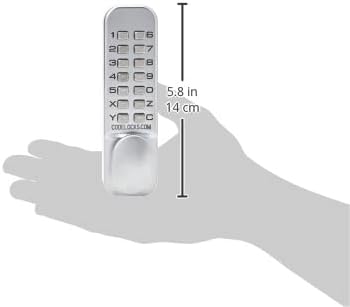
Image: Diagram illustrating the dimensions of the Codelocks CL155 Mortice Latch Mechanical Lock.
| Brand | Codelocks |
| Model Name | CL155 Mortice Latch |
| Part Number | 0155 SG |
| Lock Type | Mortise Lock |
| Special Feature | Key Unlock (refers to mechanical operation, not a physical key) |
| Material | Zinc |
| Finish Type | Powder Coated |
| Color | Silver Grey |
| Item Weight | 2.53 pounds |
| Usage | Inside, Outside |
| Batteries Required? | No |
| Recommended Uses | Securing doors or entrances |
Warranty Information
Specific warranty details for the Codelocks CL155 Mortice Latch Mechanical Lock are typically provided with the product packaging or can be found on the official Codelocks website. Please retain your proof of purchase for warranty claims. For the most current and detailed warranty terms, visit the manufacturer's official website or contact their customer service.
Support and Contact
For further assistance, technical support, or inquiries regarding your Codelocks CL155 Mortice Latch Mechanical Lock, please refer to the following resources:
- Official Website: Visit the Codelocks official website for product documentation, FAQs, and support contact information.
- Customer Service: Contact Codelocks customer service directly for personalized support. Contact details are usually available on their website.
- Professional Installation: If you are unsure about any installation steps, it is recommended to consult a qualified locksmith or professional installer.
Related documentsCL155


Ask a question about this manual
Ask about setup, troubleshooting, compatibility, parts, safety, or missing instructions. Manuals+ will review the question and use this page’s manual context to help answer it.