
1. Introduction
Thank you for choosing the Signstek ST-05B 0.5W FM Transmitter. This device is designed to broadcast audio signals over a short range using FM radio frequencies. It features a dual-mode operation for versatile audio input. This manual provides detailed instructions for the safe and efficient use of your transmitter. Please read it thoroughly before operation and retain it for future reference.
2. Safety Information
- Voltage Compatibility: This product is designed for specific voltage requirements. If used in regions with different voltage standards (e.g., India), a suitable step-down/up converter is absolutely essential to prevent damage to the device and ensure safe operation. Failure to use the correct converter will void the warranty and may pose a safety hazard.
- Antenna Connection: Always connect the antenna before connecting the power supply. Operating the transmitter without an antenna can cause damage to the device.
- Power Supply: Use only the provided power adapter or a compatible 12V 1.0A power supply.
- Ventilation: Ensure adequate ventilation around the transmitter to prevent overheating. Do not cover the device during operation.
- Water and Moisture: Keep the device away from water, moisture, and high humidity environments.
- Disassembly: Do not attempt to disassemble or modify the transmitter. This will void the warranty and may lead to malfunction or injury.
3. Package Contents
Carefully unpack the box and ensure all items are present and in good condition. If any items are missing or damaged, contact your retailer.
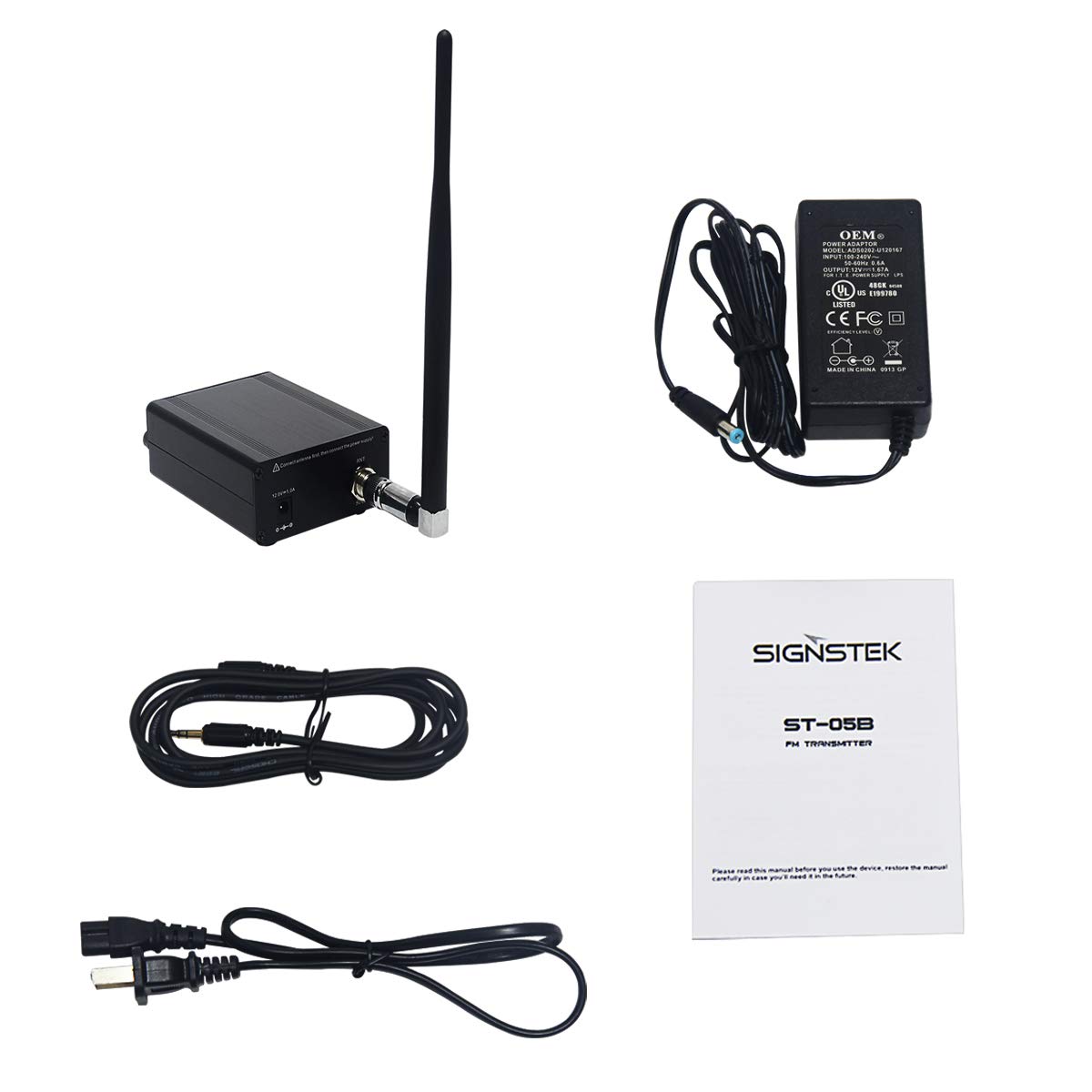
Image: The complete package contents of the Signstek ST-05B FM Transmitter, showing the main unit, antenna, power adapter, audio input cable, and the instruction manual.
- Signstek ST-05B FM Transmitter Unit
- FM Antenna
- Power Adapter (12V 1.0A)
- Audio Cable (3.5mm to 3.5mm)
- User Manual
4. Product Overview
Familiarize yourself with the various parts and controls of your Signstek ST-05B FM Transmitter.
4.1 Front Panel

Image: A front-angle view of the Signstek ST-05B FM Transmitter, highlighting the display screen, audio input volume knob, power button, frequency up/down buttons, and microphone input volume knob.
- Display Screen: Shows the current FM transmitting frequency.
- Audio Knob (-VOL+): Adjusts the input volume for the audio source.
- Power Button (⏻): Turns the device on or off.
- Frequency Adjustment Buttons (▲ / ▼): Increases or decreases the transmitting frequency.
- MIC Knob (-VOL+): Adjusts the input volume for the microphone.
4.2 Rear Panel

Image: A rear-angle view of the Signstek ST-05B FM Transmitter, showing the 12V 1.0A power input jack, the audio input jack, and the ANT (antenna) connector with a warning label.
- 12.0V - 1.0A Power Input: Connect the provided power adapter here.
- Audio Input: Connect your audio source (e.g., MP3 player, computer) using the 3.5mm audio cable.
- ANT (Antenna) Connector: Connect the FM antenna here. Warning: Ensure the antenna is connected before powering on the device.
5. Setup
Follow these steps for initial setup of your FM transmitter:
- Connect the Antenna: Screw the provided FM antenna securely into the ANT connector on the rear panel of the transmitter. Ensure it is finger-tight.
- Connect Audio Source: Use the supplied 3.5mm audio cable to connect your audio device (e.g., smartphone, tablet, computer) to the Audio Input jack on the rear panel.
- Connect Power: Plug the power adapter into the 12V 1.0A power input jack on the rear panel, then plug the adapter into a suitable power outlet. Remember to use a voltage converter if required for your region.
- Power On: Press and hold the Power Button (⏻) on the front panel for a few seconds until the display screen illuminates.
6. Operating Instructions
6.1 Setting the Transmitting Frequency
- After powering on, the display will show the current transmitting frequency.
- Use the Frequency Adjustment Buttons (▲ for up, ▼ for down) to select your desired FM frequency. Choose a frequency that is clear and not currently in use by a local radio station to avoid interference.
- Tune your FM radio receiver (e.g., car radio, portable radio) to the same frequency displayed on the transmitter.
6.2 Adjusting Audio Input
- Start playing audio from your connected source device.
- Adjust the Audio Knob (-VOL+) on the front panel to control the volume of the audio being transmitted. Start with a low volume and gradually increase it to avoid distortion.
- Adjust the volume on your FM radio receiver to a comfortable listening level.
6.3 Using the Microphone Input
The ST-05B supports microphone input for voice broadcasting.
- Connect a compatible microphone (not included) to the microphone input jack (if available on your model, typically a 3.5mm jack).
- Adjust the MIC Knob (-VOL+) on the front panel to control the microphone volume.
- Speak into the microphone and listen for your voice on the tuned FM radio receiver.
6.4 Application Scenarios

Image: A diagram illustrating diverse uses for the Signstek ST-05B FM Transmitter, such as broadcasting to car radios, for public address in parks or factories, for campus announcements, and for communication within a vehicle convoy.
The Signstek ST-05B can be used in various settings:
- Car Radio: Broadcast audio from your device to your car's FM radio.
- Park/Outdoor Radio: Share audio with a group in an open area.
- Factory/Warehouse Radio: For announcements or background music.
- Campus Radio: Local broadcasting for educational or entertainment purposes.
- Vehicle Convoy Radio: Facilitate communication within a group of vehicles.
7. Maintenance
- Cleaning: Use a soft, dry cloth to clean the exterior of the transmitter. Do not use liquid cleaners or abrasive materials.
- Storage: When not in use for extended periods, disconnect the power adapter and store the device in a cool, dry place.
- Antenna Care: Handle the antenna carefully to avoid bending or breaking.
8. Troubleshooting
| Problem | Possible Cause | Solution |
|---|---|---|
| No power | Power adapter not connected or faulty; power outlet not working. | Ensure power adapter is securely connected to both the transmitter and a working power outlet. Check if a voltage converter is needed and functioning correctly. |
| No audio output from radio | Incorrect frequency; audio cable loose or faulty; audio source not playing; volume too low. | Verify the transmitter and radio are on the same frequency. Check audio cable connections. Ensure audio is playing from the source device and transmitter audio knob is adjusted. |
| Poor audio quality/static | Interference from other FM stations; antenna not properly connected; audio input volume too high (distortion). | Try a different, clear FM frequency. Ensure antenna is securely connected. Reduce audio input volume on the transmitter. Move transmitter away from other electronic devices. |
| Microphone not working | Incompatible microphone; microphone not connected; MIC volume too low. | Ensure you are using a compatible microphone. Check microphone connection. Adjust the MIC volume knob. Note that some standard microphones may require specific wiring or adapters to function correctly with this unit. |
| Limited transmission range | Antenna not properly connected; environmental obstructions; local regulations. | Ensure antenna is fully extended and securely connected. Minimize obstructions between transmitter and receiver. Transmission range can vary based on environment. |
9. Specifications
| Feature | Description |
|---|---|
| Model | ST-05B |
| Brand | Signstek |
| Special Feature | Dual Connection |
| Item Weight | 680 g |
| Color | Black |
| Control Type | Voice Control (for microphone input) |
| UPC | 693595582329 |
| ASIN | B00CM2VPMQ |
10. Support
For technical support, warranty information, or service inquiries, please contact your retailer or visit the official Signstek website. Please have your model number (ST-05B) and purchase details ready when contacting support.
