1. Introduction
The Whistler CR73 radar detector offers comprehensive protection against various radar and laser threats. This device is designed to detect X-band, K-band, Superwide Ka-band, and specific laser signals including Laser Atlanta Stealth mode, Laser Ally, and LTI Truspeed S. It provides 360-degree perimeter protection, detecting signals from all directions. Key features include a digital icon display, real voice alerts in English and Spanish, POP Mode detection, and advanced filtering technologies like Traffic Flow Signal Rejection (TFSR) and Field Disturbance Sensor Rejection (FDSR) to minimize false alerts.
2. What's in the Box
- Whistler CR73 Laser Radar Detector
- 12V Power Cord
- Windshield Bracket Kit
- User Guide
3. Key Features
- Icon Display with Digital Signal Strength Indicator
- Bilingual (English/Spanish) Real Voice Alerts
- Total Band Protection (X-band, K-band, Superwide Ka-band, Laser)
- Field Disturbance Sensor Rejection (FDSR)
- Traffic Flow Signal Rejection (TFSR)
- POP Mode Detection
- 360° Max Coverage
- Safety Warning System
- Dim/Dark Mode
- VG-2 Detection
4. Setup
4.1 Mounting the Detector
The Whistler CR73 can be mounted on your vehicle's windshield using the provided bracket kit. Ensure the detector has a clear view of the road ahead and behind for optimal performance.

Image: Whistler CR73 mounted on a car windshield, showing the side profile and suction cup bracket.
4.2 Power Connection
Connect the supplied 12V power cord to the detector's power input and then to your vehicle's cigarette lighter or 12V accessory outlet. The detector will power on automatically when the vehicle's ignition is turned on.
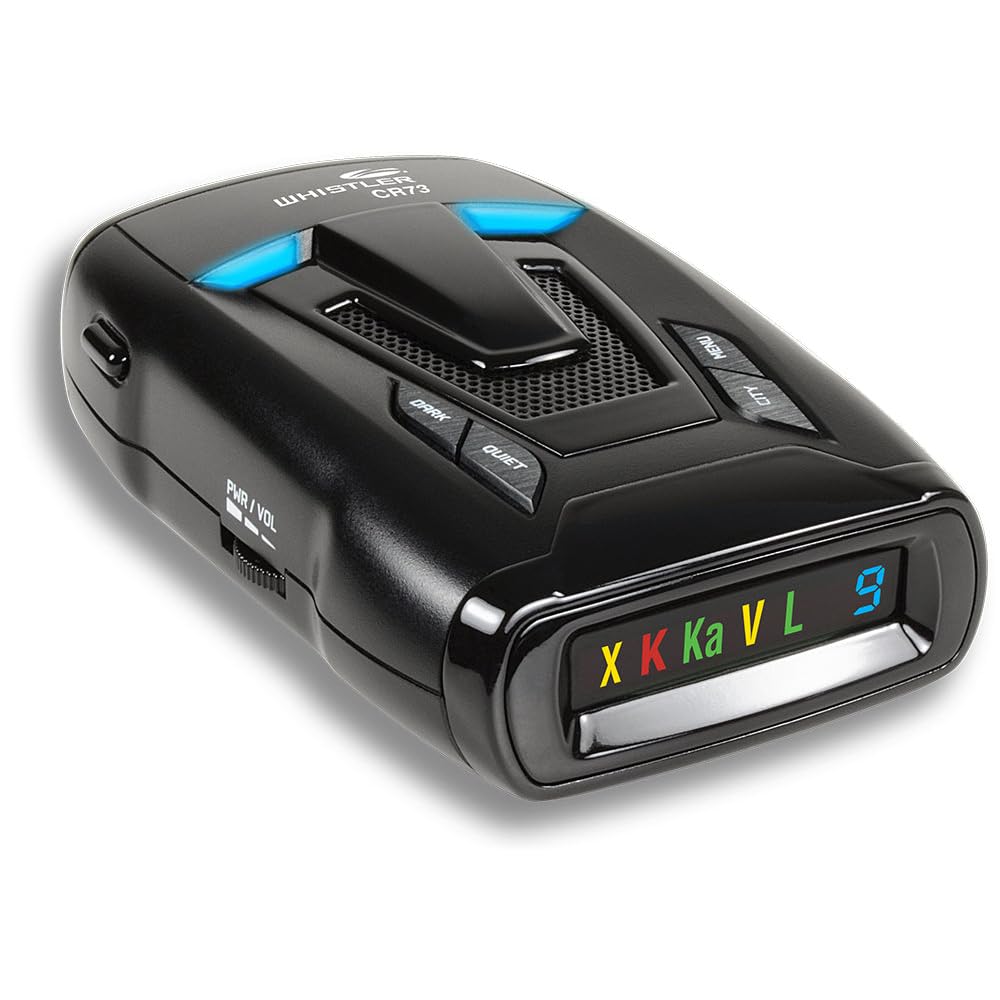
Image: Front view of the Whistler CR73 Radar Detector, illustrating the power connection point.
5. Operating Instructions
5.1 Power On/Off and Volume Control
The detector powers on automatically with vehicle ignition. Use the volume buttons (VOL+ / VOL-) to adjust the alert volume. The display will show the current volume level.
5.2 Display and Alerts
The digital icon display shows detected bands (X, K, Ka, L for Laser) and signal strength. Voice alerts provide clear, audible warnings in English or Spanish.

Image: Close-up of the Whistler CR73 display, indicating active radar/laser bands and signal strength.
5.3 Sensitivity Modes (City/Highway)
Press the CITY button to toggle between City and Highway sensitivity modes. City mode reduces false alerts in urban areas, while Highway mode provides maximum detection range on open roads.
5.4 Dim/Dark Mode
Press the DIM button to adjust the display brightness. Options typically include Bright, Dim, and Dark for reduced visibility during night driving.
5.5 Band and Alert Settings
The CR73 offers customizable settings for various bands (X, K, Ka) and VG-2 RDD alerts. Refer to the detailed user guide for specific instructions on how to toggle these settings.
5.6 Official Product Videos
Video: A brief product overview of a radar detector, demonstrating its compact size and basic features. This video is provided by the seller.
Video: Demonstration of a radar detector's functionality, specifically highlighting KA, K, Laser, and X band detection. This video is provided by the seller.
6. Maintenance
- Keep the detector away from direct sunlight or high temperatures for prolonged periods.
- Regularly clean the exterior of the detector with a soft, damp cloth. Avoid abrasive cleaners.
- Ensure the power cord and connections are secure and free from debris.
7. Troubleshooting
7.1 No Power
Ensure the 12V power cord is securely connected to both the detector and the vehicle's power outlet. Check the vehicle's fuse for the power outlet.
7.2 Excessive False Alerts
Switch to City mode to reduce sensitivity in urban areas. Ensure FDSR and TFSR technologies are enabled. Refer to the user guide for instructions on disabling specific bands if necessary.
7.3 Weak Detection Range
Ensure the detector is mounted with a clear line of sight to the road. Obstructions like windshield tint or other devices can interfere with performance. Verify that the detector is in Highway mode for maximum range.
8. Specifications
| Feature | Detail |
|---|---|
| Product Dimensions | 7.63" L x 2.22" W x 6" H |
| Item Weight | 9.6 ounces |
| Item Model Number | CR73 |
| Color | Black |
| Power Source | Corded Electric |
| Voltage | 12 Volts |
| Display Type | Digital |
| Frequency Bands Supported | 10.525 GHz (X-band), 24.125 GHz (K-band), 34.7 GHz (Ka-band), Laser |
| UPC | 052303407758 |
9. Warranty Information
The Whistler CR73 Laser Radar Detector comes with a manufacturer's warranty. Please refer to the warranty card included in your product packaging or visit the official Whistler website for detailed information regarding warranty coverage, terms, and conditions.
10. Customer Support
For technical assistance, troubleshooting, or any questions regarding your Whistler CR73, please contact Whistler Customer Support. You can find contact information (phone numbers, email, or support portal) on the official Whistler website or in the included user guide.


