1. Introduction
The JOYO JA-03 Tube Drive Mini Guitar Pocket Amplifier is a compact and portable device designed for guitarists to practice silently with headphones. It features a 'Tube Drive' sound effect, allowing for a range of tones from clean to overdriven. This manual provides detailed instructions for the proper setup, operation, and maintenance of your JA-03 amplifier.
2. Safety Information
- Do not expose the unit to rain or moisture.
- Avoid operating the unit near heat sources or in direct sunlight.
- Use only the specified battery type (2 x AAA batteries).
- Do not attempt to disassemble or modify the unit. Refer all servicing to qualified personnel.
- Keep out of reach of children.
3. Package Contents
- JOYO JA-03 Tube Drive Mini Guitar Pocket Amplifier
- 2 x AAA Batteries
- User Manual
4. Product Overview
Familiarize yourself with the components of your JOYO JA-03 amplifier:
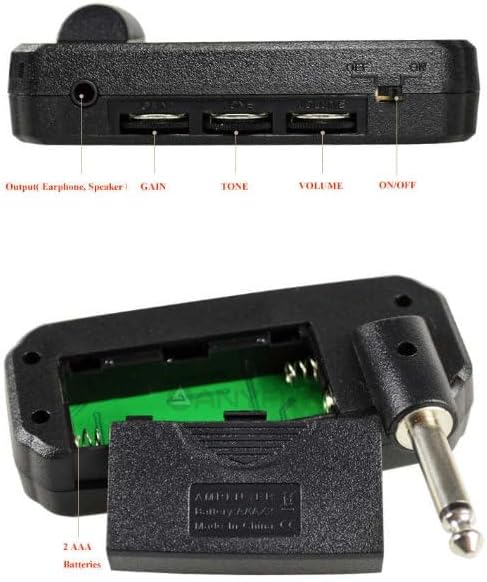
Image: Top view of the JOYO JA-03 amplifier, showing the input jack, output jack, control knobs, and battery compartment.
- Guitar Input Jack: Connects directly to your electric guitar.
- MP3 Input Jack (AUX IN): 3.5mm jack for connecting an external audio source like an MP3 player or smartphone.
- Earphone Output Jack (PHONE): 3.5mm jack for connecting headphones.
- GAIN Control: Adjusts the amount of overdrive or distortion.
- TONE Control: Adjusts the tonal characteristics, from darker to brighter.
- VOLUME Control: Adjusts the overall output level to your headphones.
- POWER ON/OFF Switch: Turns the amplifier on or off.
- Battery Compartment: Houses two AAA batteries.
5. Setup
5.1 Battery Installation
The JA-03 amplifier requires two AAA batteries for operation.
- Locate the battery compartment cover on the back of the unit.
- Slide the cover open.
- Insert two AAA batteries, ensuring correct polarity (+/-) as indicated inside the compartment.
- Close the battery compartment cover securely.
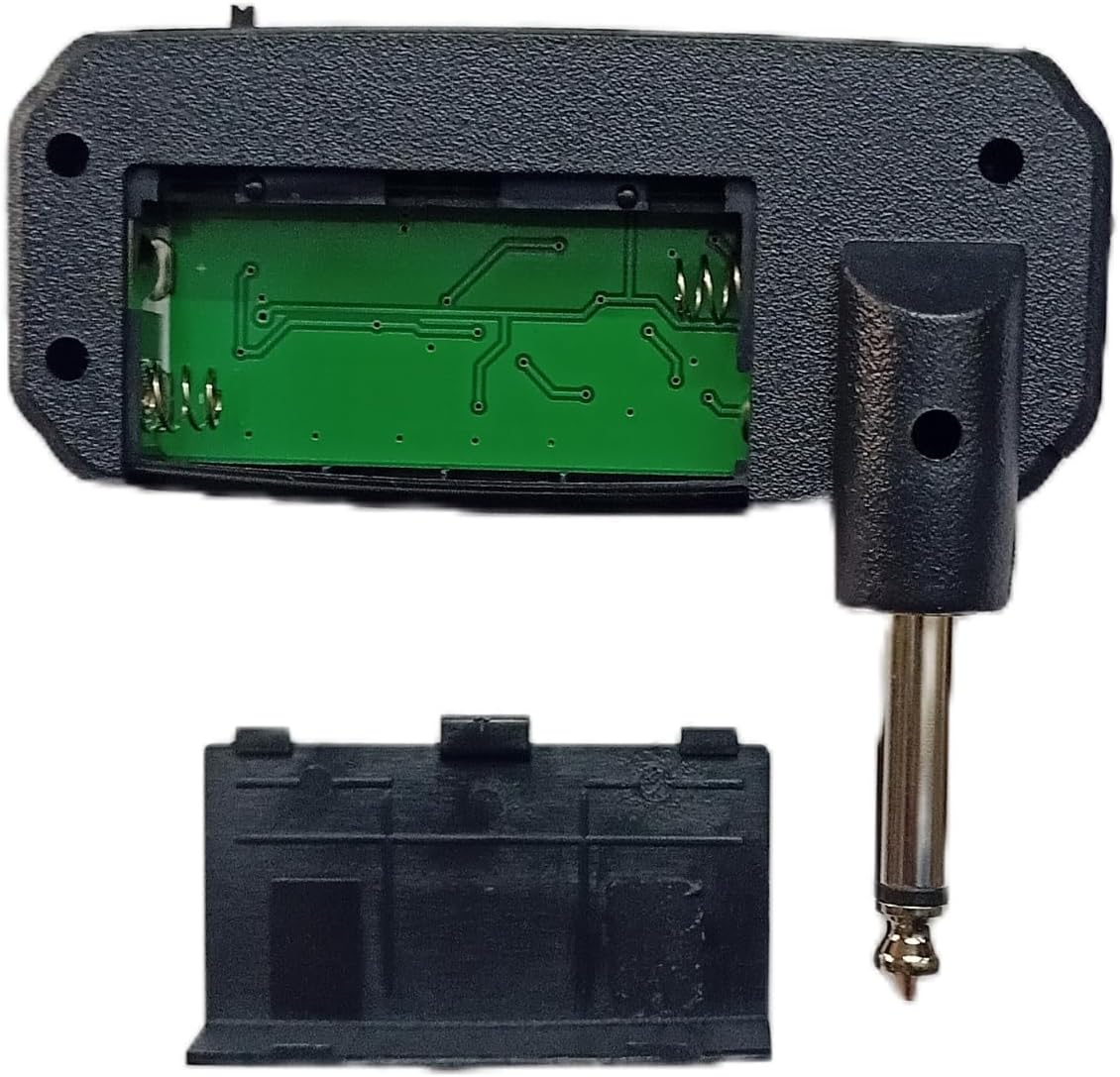
Image: The JOYO JA-03 amplifier with its battery compartment open, showing the slots for two AAA batteries.
5.2 Connecting to Guitar
Plug the 1/4-inch jack of the JA-03 amplifier directly into your electric guitar's output jack.
5.3 Connecting Headphones
Connect your headphones to the 3.5mm Earphone Output Jack (PHONE) on the amplifier.

Image: A musician playing a bass guitar with the JOYO JA-03 amplifier plugged into the instrument and headphones connected to the amplifier.
5.4 Connecting an MP3 Player (AUX In)
To play along with backing tracks, connect your MP3 player or smartphone to the 3.5mm MP3 Input Jack (AUX IN) using a standard 3.5mm audio cable (not included).
6. Operation
6.1 Power On/Off
Slide the POWER ON/OFF switch to the 'ON' position to power on the amplifier. A small LED indicator will illuminate. Slide the switch to 'OFF' when not in use to conserve battery life.
6.2 Adjusting Controls
Use the three control knobs to shape your sound:
- GAIN: Rotate this knob clockwise to increase the amount of overdrive and distortion, achieving the 'Tube Drive' effect. Rotate counter-clockwise for cleaner tones.
- TONE: Adjusts the brightness or darkness of your sound. Turn clockwise for a brighter, more cutting tone, and counter-clockwise for a warmer, mellower tone.
- VOLUME: Controls the overall loudness of the sound heard through your headphones. Adjust to a comfortable listening level.

Image: A close-up view of the JOYO JA-03 amplifier's control knobs, labeled GAIN, TONE, and VOLUME.
7. Maintenance
- Cleaning: Wipe the unit with a soft, dry cloth. Do not use abrasive cleaners or solvents.
- Storage: When not in use for extended periods, remove the batteries to prevent leakage. Store the amplifier in a cool, dry place away from direct sunlight.
- Battery Replacement: Replace batteries when the sound becomes weak or distorted, or the LED indicator fails to light up.
8. Troubleshooting
| Problem | Possible Cause | Solution |
|---|---|---|
| No sound |
|
|
| Weak or distorted sound |
|
|
| Humming or buzzing noise |
|
|
9. Specifications
| Feature | Specification |
|---|---|
| Model | JA-03 |
| Sound Effect | Tube Drive |
| MP3 Input Jack | 3.5mm |
| Earphone Output Jack | 3.5mm |
| Power | 2 x AAA Batteries |
| Material | Acrylonitrile Butadiene Styrene (ABS) |
| Dimensions (L x W x H) | 89mm x 77mm x 26mm (3.5 x 3.03 x 1.02 inches) |
| Weight | 54g (1.9 ounces) |
| Compatible Devices | Electric Guitar |
10. Warranty
JOYO products are manufactured to high-quality standards. This product is covered by a limited warranty against defects in materials and workmanship. Please retain your proof of purchase for warranty claims. Specific warranty terms and duration may vary by region. For detailed warranty information, please refer to the official JOYO website or contact your local distributor.
11. Support
For further assistance, technical support, or inquiries regarding your JOYO JA-03 amplifier, please visit the official JOYO website or contact JOYO customer service through the retailer where the product was purchased. You can also find additional resources and FAQs on the JOYO brand store page on Amazon: JOYO Official Store.


