
Introduction
This manual provides detailed instructions for the proper use and maintenance of your Casio G-Shock GD-350-1BDR wristwatch. Designed for durability and functionality, this watch features shock resistance, 200-meter water resistance, a vibration alert, world time, stopwatch, countdown timer, and multiple alarms. Please read this manual thoroughly to ensure optimal performance and longevity of your timepiece.
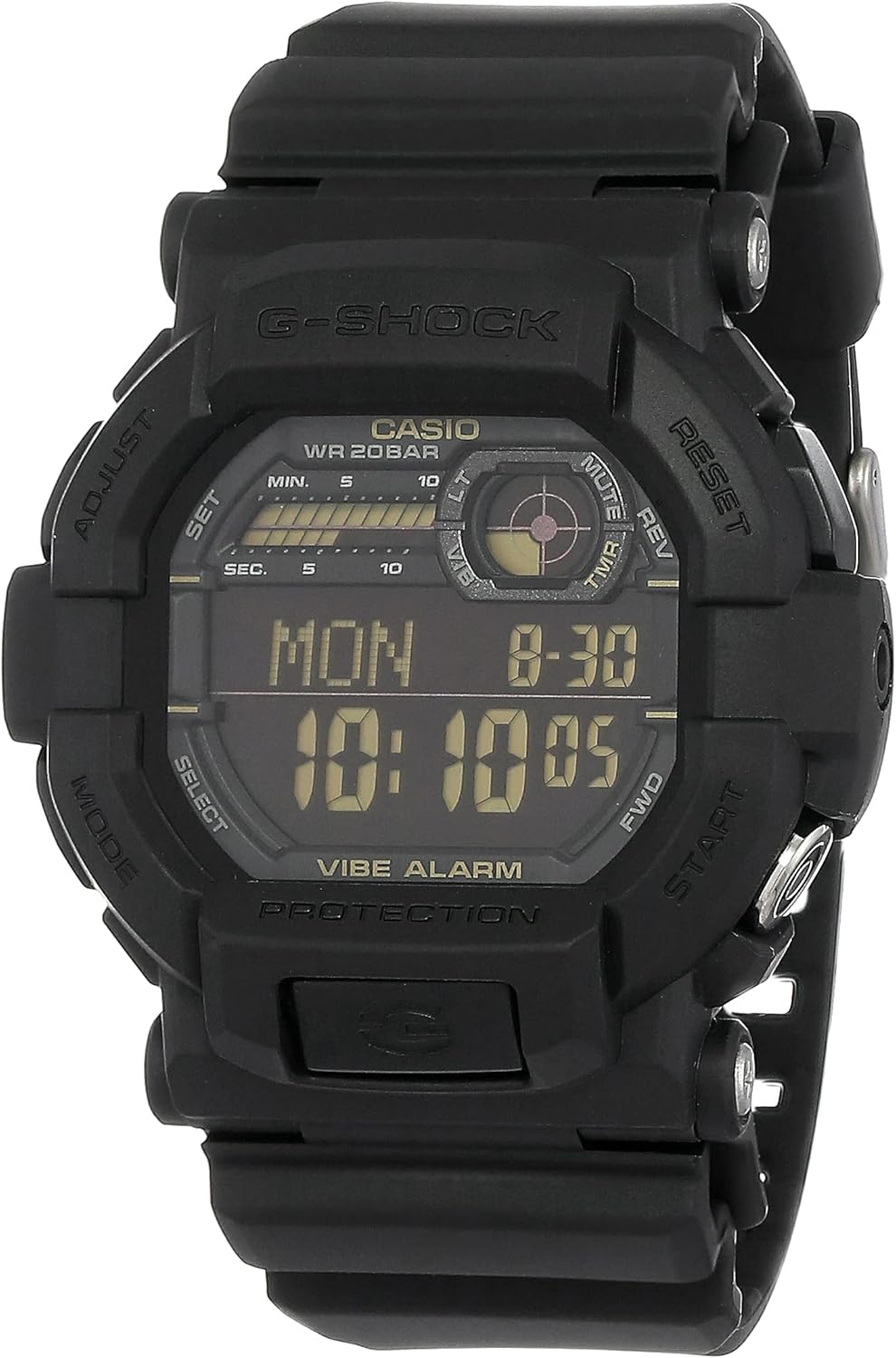
Front view of the Casio G-Shock GD-350-1BDR wristwatch, displaying the digital time, date, and various indicators.
Getting Started: Setup
Button Functions
Your GD-350-1BDR watch features five buttons for various operations:
- ADJUST (Top Left): Used to enter and exit setting modes, and to confirm settings.
- MODE (Bottom Left): Cycles through the watch's different modes (Timekeeping, World Time, Stopwatch, Countdown Timer, Alarm).
- RESET (Top Right): Used to reset values during setting, or to stop the stopwatch/countdown timer.
- START/FWD (Middle Right): Used to start the stopwatch/countdown timer, or to advance values during setting.
- LIGHT (Bottom Right): Activates the LED backlight.

Side view of the Casio G-Shock GD-350-1BDR wristwatch, illustrating the placement of the control buttons.
Setting the Time and Date
- In Timekeeping Mode, press and hold the ADJUST button until the city code starts to flash. This indicates the setting mode.
- Use the START/FWD and RESET buttons to select your home city code.
- Press the MODE button to cycle through the settings: DST (Daylight Saving Time), 12/24-hour format, Seconds, Hour, Minute, Year, Month, Day.
- Use the START/FWD and RESET buttons to change the flashing value.
- Once all settings are correct, press the ADJUST button to exit the setting mode.
Operating Modes
Timekeeping Mode
This is the default mode, displaying the current time, day of the week, and date. You can switch between 12-hour and 24-hour formats as described in the 'Setting the Time and Date' section.
World Time Mode
The watch can display the current time in 35 time zones (100 cities). To access:
- From Timekeeping Mode, press the MODE button until 'WT' (World Time) appears.
- Use the START/FWD and RESET buttons to scroll through different city codes.
Stopwatch Mode
The stopwatch measures elapsed time, split times, and two finishes. It has a 1/100-second accuracy.
- From Timekeeping Mode, press the MODE button until 'STW' (Stopwatch) appears.
- Press START/FWD to start, RESET to stop, and RESET again to clear.
Countdown Timer Mode
The countdown timer can be set for up to 24 hours and features a direct start button.
- From Timekeeping Mode, press the MODE button until 'TMR' (Timer) appears.
- To set the timer: Press and hold ADJUST, then use START/FWD and RESET to set the desired countdown time. Press ADJUST to confirm.
- Press START/FWD to start the countdown. The watch will vibrate when the timer reaches zero.
Alarm Mode
The watch features 5 daily or one-time alarms, including one snooze alarm, and an hourly time signal. It also includes a vibration alert.
- From Timekeeping Mode, press the MODE button until 'ALM' (Alarm) appears.
- Use START/FWD to scroll through alarms (AL1 to AL5, SNZ, SIG).
- To set an alarm: With the desired alarm selected, press and hold ADJUST. Use START/FWD and RESET to set the hour and minute. Press ADJUST to confirm.
- To turn an alarm on/off: In Alarm Mode, press RESET to toggle the selected alarm.
LED Backlight
Press the LIGHT button (bottom right) to illuminate the display for easy reading in low-light conditions. The backlight duration can be adjusted in settings.
Maintenance and Care
Water Resistance
The Casio G-Shock GD-350-1BDR is water-resistant to 200 meters (20 BAR). This means it is suitable for showering, swimming, and diving. Do not operate buttons while the watch is submerged in water.
Cleaning
To maintain the appearance of your watch, wipe it regularly with a soft, dry cloth. For stubborn dirt, use a mild soap solution and a soft brush, then rinse thoroughly with fresh water and dry completely.
Battery
The watch is powered by 1 Lithium Ion battery. The battery life is designed for extended use. A low battery warning indicator will appear on the display when the battery level is critical. Battery replacement should be performed by a qualified technician to ensure water resistance is maintained.
Shock Resistance
The G-Shock design provides superior shock resistance. However, avoid unnecessary impacts to prolong the life of your watch.
Troubleshooting
- Display is blank or dim: Check the battery level. If the low battery warning is displayed, replace the battery. Ensure the watch is not exposed to extreme temperatures.
- Time is incorrect: Re-adjust the time and date settings as described in the 'Setting the Time and Date' section. Verify the correct city code and DST setting.
- Buttons are unresponsive: Ensure the watch is not in a mode that locks button operations. If the issue persists, a full reset may be required (refer to the full manufacturer's manual for advanced reset procedures).
- Vibration alert not working: Check if the vibration alert is enabled in the alarm settings.
Specifications
| Model Number | GD-350-1BDR |
| Case/Bezel Material | Resin |
| Band Material | Resin |
| Glass Type | Mineral Glass |
| Shock Resistant | Yes |
| Water Resistance | 200M (20 BAR) |
| Vibration Alert | Yes |
| LED Backlight | Yes (Flash Alert) |
| World Time | 35 Time Zones |
| Stopwatch | 1/100-second |
| Countdown Timer | Yes |
| Alarms | 5 Daily or One-Time Alarms (with 1 Snooze Alarm) |
| Hourly Time Signal | Yes |
| Low Battery Warning | Yes |
| Full Auto-Calendar | To Year 2099 |
| Time Format | 12/24-Hour Format |
| Accuracy | ±15 Seconds Per Month |
| Case Dimensions (H x W x T) | 53.4 × 50.8 × 18 mm |
| Product Dimensions | 8.46 x 0.71 x 2.01 inches |
| Item Weight | 2.65 ounces |
| Battery Type | 1 Lithium Ion battery (included) |

Visual comparison of the watch's dimensions against a standard credit card for scale.
Warranty Information
Specific warranty details for the Casio G-Shock GD-350-1BDR are not provided within this manual. For comprehensive warranty terms and conditions, please refer to the warranty card included with your product or visit the official Casio website.
Customer Support
For further assistance, technical support, or inquiries regarding your Casio G-Shock GD-350-1BDR wristwatch, please visit the official Casio customer support website or contact their authorized service centers. Contact information may vary by region.


