1. Important Safety Instructions
When using electrical appliances, basic safety precautions should be followed, including the following:
- Read all instructions before using the appliance.
- Do not operate the oven if it is damaged or malfunctioning. Contact qualified service personnel.
- Do not heat liquids or other foods in sealed containers as they are liable to explode.
- Do not use corrosive chemicals or vapors in this appliance.
- This appliance is intended for household use only.
- Close supervision is necessary when the appliance is used by or near children.
- Do not immerse the power cord, plug, or the appliance in water or other liquid.
- Ensure proper ventilation around the microwave oven.
- Always use microwave-safe cookware.
2. Product Overview
The Haier HSC-2590EGCB is a 25-liter microwave oven with grill and ventilation functions, designed for efficient cooking and heating.
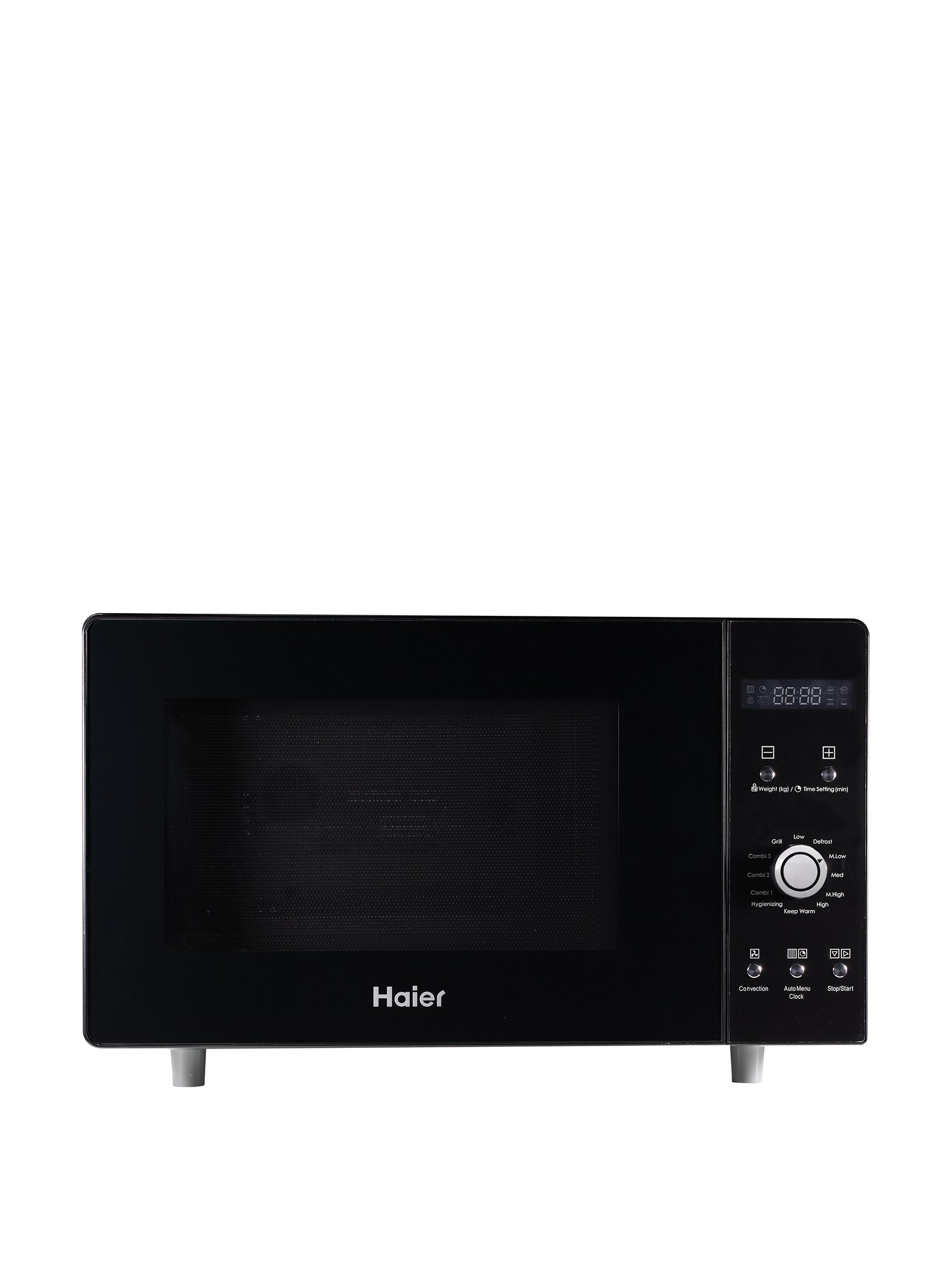
Image 1: Front view of the Haier HSC-2590EGCB Microwave Oven. This image displays the appliance's sleek black glass design, control panel on the right, and the door handle.
Components:
- Door: Features a safety lock system.
- Control Panel: Includes buttons for various functions and a digital display.
- Turntable: Rotates food for even cooking.
- Turntable Support: Holds the turntable in place.
- Waveguide Cover: Protects the microwave components. Do not remove.
- Grill Heater: Located at the top interior for grilling functions.
3. Setup and Installation
3.1 Unpacking
Carefully remove all packaging materials from the microwave oven and its accessories. Check the oven for any damage, such as dents or a broken door. Do not install if damaged.
3.2 Placement
- Place the oven on a flat, stable surface strong enough to hold its weight.
- Ensure adequate ventilation: leave at least 20 cm of space above the oven, 10 cm at the rear, and 5 cm on each side.
- Do not block any ventilation openings.
- Keep the oven away from heat sources and strong magnetic fields.
3.3 Electrical Connection
- Plug the power cord into a properly grounded electrical outlet (230V, 50Hz).
- Do not use extension cords or adapters.
- Ensure the voltage specified on the appliance matches your local power supply.
4. Operating Instructions
4.1 Setting the Clock
- Press the 'Clock' button once.
- Use the 'Time/Weight' dial or number buttons to set the hour.
- Press 'Clock' again.
- Use the 'Time/Weight' dial or number buttons to set the minutes.
- Press 'Clock' to confirm.
4.2 Microwave Cooking
- Place food in a microwave-safe container on the turntable.
- Close the oven door securely.
- Press the 'Microwave' button.
- Use the 'Power Level' button to select the desired power (e.g., 100% for high, 50% for medium).
- Use the 'Time/Weight' dial or number buttons to set the cooking time.
- Press 'Start' to begin cooking.
4.3 Grill Function
- Place food on the grill rack (if provided) in a heat-resistant dish.
- Press the 'Grill' button.
- Use the 'Time/Weight' dial or number buttons to set the grilling time.
- Press 'Start'.
4.4 Defrosting
The oven offers defrosting by weight or by time.
Defrost by Weight:
- Place frozen food in the oven.
- Press the 'Defrost by Weight' button.
- Use the 'Time/Weight' dial or number buttons to select the food weight.
- Press 'Start'.
Defrost by Time:
- Place frozen food in the oven.
- Press the 'Defrost by Time' button.
- Use the 'Time/Weight' dial or number buttons to set the defrosting time.
- Press 'Start'.
4.5 Stopping/Canceling Operation
To pause cooking, open the door or press the 'Stop/Cancel' button once. To cancel a program completely, press 'Stop/Cancel' twice.
5. Maintenance and Cleaning
5.1 Cleaning the Oven Interior
- Wipe the interior cavity with a damp cloth after each use.
- For stubborn stains, use a mild detergent or a microwave-safe cleaner.
- Do not use abrasive cleaners or scouring pads.
- Regularly clean the waveguide cover to prevent food residue buildup.
5.2 Cleaning the Oven Exterior
- Wipe the exterior surfaces with a soft, damp cloth.
- Clean the control panel gently with a soft, dry cloth.
5.3 Cleaning the Turntable and Support
- Remove the turntable and turntable support.
- Wash them in warm, soapy water or in a dishwasher.
- Rinse thoroughly and dry before returning to the oven.
6. Troubleshooting
Common Issues and Solutions:
- Oven not starting: Ensure the power cord is securely plugged in. Check the household fuse or circuit breaker. Make sure the door is closed properly.
- Food not heating: Verify that the cooking time and power level are set correctly. Ensure the door is fully closed.
- Sparks in the oven: Remove any metal objects or containers. Ensure no food residue is stuck to the interior walls or waveguide cover.
- Turntable not rotating: Check if the turntable is correctly placed on its support. Ensure there is no obstruction beneath the turntable.
- Oven light not working: The bulb may need replacement. Contact qualified service personnel.
If the problem persists after trying these solutions, contact customer service.
7. Specifications
| Brand | Haier |
| Model Number | HSC-2590EGCB |
| Color | Black |
| Capacity | 25 Liters |
| Power Output (Microwave) | 900 Watts |
| Voltage | 230 Volts |
| Material | Glass |
| Product Dimensions (L x W x H) | 51 x 45.5 x 30.3 cm |
| Product Weight | 18.5 kg |
| Installation Type | Freestanding |
8. Warranty and Support
This Haier appliance is covered by a manufacturer's warranty. Please refer to the warranty card included with your purchase for specific terms and conditions, including the warranty period and coverage details.
For technical support, service, or to inquire about replacement parts, please contact Haier customer service. Contact information can typically be found on the Haier official website or in the documentation provided with your product.
Always provide your product model number (HSC-2590EGCB) when contacting support to ensure efficient service.


