
1. Product Overview
The Pro Chef PC8100 is a 5-quart hot water urn designed for convenient and safe hot water dispensing. It features both automatic and manual dispensing options, an insulated stainless steel inner tank, and a classic design suitable for various kitchen decors. The unit operates on 110V/120V power.
Key Features:
- 5-quart capacity for ample hot water supply.
- Automatic and manual water dispensing with safety locks.
- Insulated stainless steel inner tank for heat retention.
- Stable base design to prevent tilting.
- Electronic push-button for hands-free dispensing.
- Unique internal air pump for manual dispensing.

Image 1: Front view of the Pro Chef PC8100 Hot Water Urn, showcasing its stainless steel body and water level indicator.
2. Important Safety Instructions
To reduce the risk of fire, electric shock, or injury, always follow these basic safety precautions:
- Read all instructions before using the appliance.
- Do not touch hot surfaces. Use handles or knobs.
- To protect against electrical hazards, do not immerse cord, plugs, or the appliance in water or other liquid.
- Close supervision is necessary when any appliance is used by or near children.
- Unplug from outlet when not in use and before cleaning. Allow to cool before putting on or taking off parts, and before cleaning the appliance.
- Do not operate any appliance with a damaged cord or plug, or after the appliance malfunctions or has been damaged in any manner.
- The use of accessory attachments not recommended by the appliance manufacturer may result in fire, electric shock, or injury to persons.
- Do not use outdoors.
- Do not let cord hang over edge of table or counter, or touch hot surfaces.
- Do not place on or near a hot gas or electric burner, or in a heated oven.
- Always attach plug to appliance first, then plug cord into the wall outlet. To disconnect, turn any control to “off,” then remove plug from wall outlet.
- Do not use appliance for other than intended use.
- Exercise extreme caution when dispensing hot water.
- Ensure the safety lock is engaged when the dispenser is not in use, especially around children.
3. Setup and First Use
- Unpack and Inspect: Carefully remove the hot water urn from its packaging. Inspect for any damage.
- Initial Cleaning: Before first use, clean the interior of the urn with warm water and a soft cloth. Do not use abrasive cleaners. Wipe the exterior with a damp cloth.
- Fill with Water: Open the lid and fill the inner tank with fresh, clean water. Do not exceed the 'FULL' mark indicated on the water level gauge. Using filtered water is recommended to prevent mineral buildup.
- Secure Lid: Close the lid securely. Ensure it is properly latched to prevent steam escape and maintain temperature.
- Connect Power: Plug the power cord into a standard 110V/120V grounded electrical outlet.

Image 2: The Pro Chef PC8100 Hot Water Urn on a countertop, ready for use, with a cup of tea and cookies nearby.
4. Operating Instructions
Boiling and Keep Warm Functions:
- Once plugged in and filled with water, the unit will automatically begin the boiling process. The 'Boiling' indicator light will illuminate.
- After boiling, the unit will automatically switch to 'Keep Warm' mode, maintaining the water at a hot temperature. The 'Keep Warm' indicator light will illuminate.
- To re-boil water, press the 'Re-Boil' button.
Water Dispensing:
The PC8100 offers two methods for dispensing hot water:
- Electronic Push Button (Auto Dispense):
Ensure the safety lock is disengaged. Place your cup or container under the dispenser spout. Press and hold the 'Auto Dispense' button to release hot water. Release the button to stop dispensing. - Manual Pump:
This method uses an internal air pump and does not require electricity, making it suitable for use during power outages or for specific religious observances. Ensure the safety lock is disengaged. Place your cup or container under the dispenser spout. Press the manual pump button on the top of the lid repeatedly until the desired amount of water is dispensed.
Safety Lock:
The unit is equipped with both manual and electronic safety locks to prevent accidental dispensing of hot water. Always engage the safety lock when the unit is not in active use, especially if children are present.
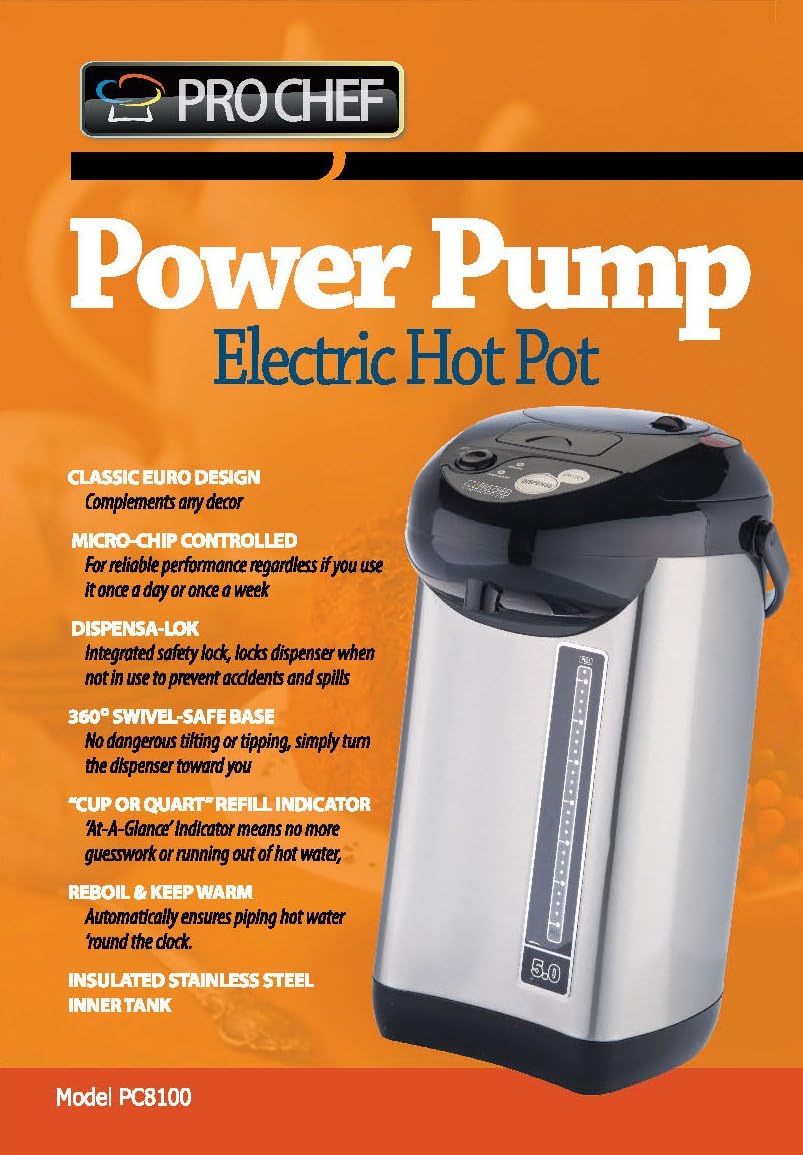
Image 3: Diagram highlighting key features of the Pro Chef PC8100, including the Dispensa-Lok, 360° Swivel-Safe Base, and insulated stainless steel inner tank.
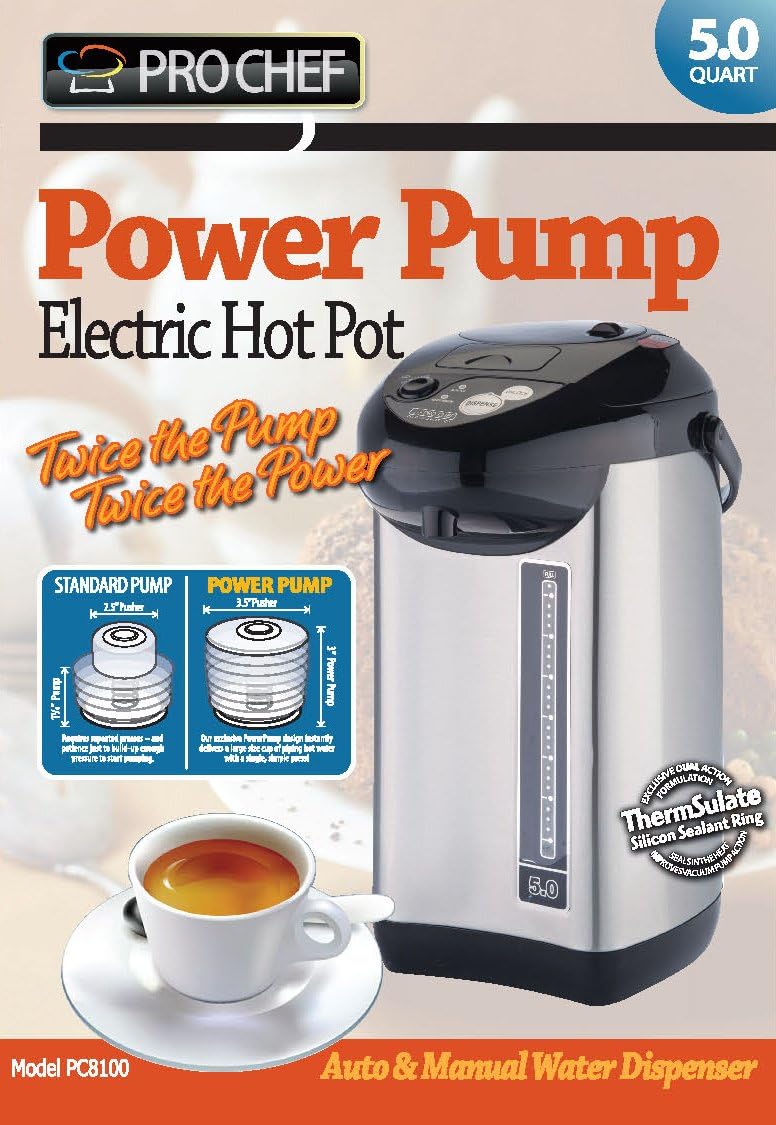
Image 4: Illustration comparing the 'Standard Pump' and 'Power Pump' mechanisms, emphasizing the enhanced dispensing capability of the Pro Chef PC8100.
5. Maintenance and Cleaning
Regular cleaning and maintenance will ensure the longevity and optimal performance of your hot water urn.
- Exterior Cleaning: Wipe the exterior of the unit with a soft, damp cloth. Do not use harsh chemicals or abrasive materials.
- Interior Cleaning: The inner tank should be hand washed. Unplug the unit and allow it to cool completely before cleaning. Do not immerse the entire unit in water.
- Descaling: Over time, mineral deposits (limescale) may build up inside the tank, especially in areas with hard water. To descale, fill the urn with a solution of water and white vinegar (e.g., 1 part vinegar to 2 parts water) or a commercial descaling agent according to its instructions. Allow it to sit for several hours or overnight, then boil the solution. Drain and rinse thoroughly several times with fresh water to remove any vinegar odor or residue.
- Storage: When not in use for an extended period, ensure the unit is clean, dry, and stored in a cool, dry place.
6. Troubleshooting
If you encounter issues with your Pro Chef PC8100, refer to the following common troubleshooting steps:
- Unit Not Powering On:
Check if the power cord is securely plugged into both the urn and a working electrical outlet. Ensure the outlet is receiving power. - Water Not Heating:
Verify that the unit is plugged in and the 'Boiling' indicator light is on. If the water level is too low, the unit may not heat. Refill water if necessary. - Water Not Dispensing (Electronic):
Ensure the safety lock is disengaged. Check if the unit is powered on. If the water level is too low, the electronic pump may not operate. - Water Not Dispensing (Manual Pump):
Ensure the manual safety lock is disengaged. Press the pump button firmly and repeatedly. If the issue persists, check for any blockages in the spout. - Unusual Odor or Taste:
Perform a thorough cleaning and descaling as described in the Maintenance section. Ensure you are using fresh, clean water.
If the problem persists after attempting these steps, please contact customer support for further assistance.
7. Specifications
| Brand | Prochef |
| Model Number | PC8100 |
| Capacity | 5 Quarts |
| Material | Stainless Steel |
| Product Dimensions | 11 x 10.8 x 17 inches |
| Item Weight | 6 pounds |
| Power Input | 110V/120V (as per feature bullets) |
| Product Care | Hand wash, Wipe clean |
8. Warranty and Support
For detailed warranty information, product registration, or customer support, please refer to the documentation included with your purchase or visit the official Pro Chef website. Keep your purchase receipt as proof of purchase for warranty claims.
Note on Videos: The provided video content is associated with the 'NutriChef' brand and not directly with the 'Pro Chef PC8100' model. Therefore, no videos have been embedded in this manual to ensure accuracy and relevance to the specified product.


