
Introduction
Congratulations on your purchase of the Citizen Metropolitan Eco-Drive AP4030-57A watch. This timepiece combines classic design with Citizen's innovative Eco-Drive technology, which harnesses the power of light from any source to continuously recharge the watch, eliminating the need for battery replacement. This manual provides detailed instructions for the proper setup, operation, and maintenance of your watch to ensure its longevity and accurate performance.
Product Overview
The Citizen Metropolitan Eco-Drive AP4030-57A is a sophisticated men's analog watch featuring a stainless steel case and bracelet, a white dial, and a mineral crystal. It is equipped with a quartz movement powered by Eco-Drive technology. The watch includes multiple subdials for day, date, and 24-hour time display, enhancing its functionality.
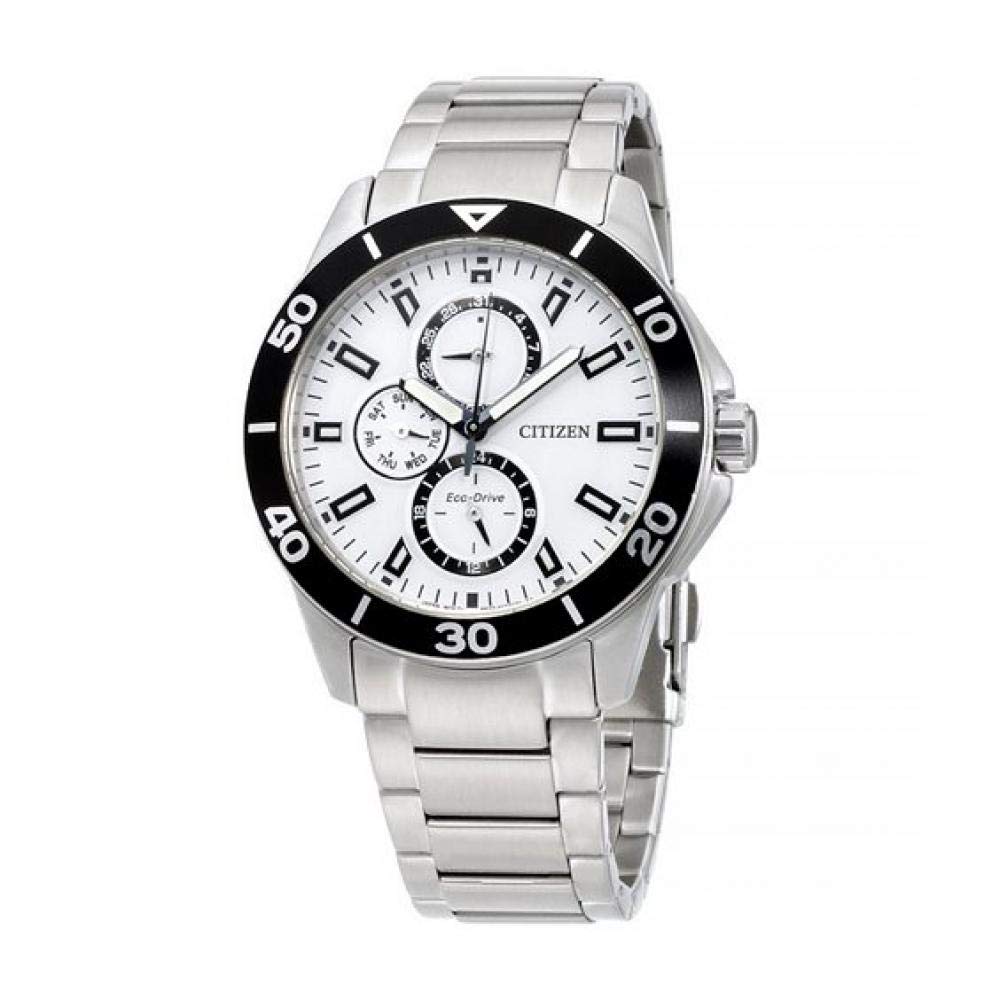
Image: Front view of the Citizen Metropolitan Eco-Drive AP4030-57A watch. It features a white dial with three subdials: one for the day of the week (at 9 o'clock), one for the date (at 3 o'clock), and a 24-hour indicator (at 6 o'clock). The watch has a silver-tone stainless steel case and bracelet, a black rotating bezel with minute markers, and luminous hands and hour markers. The Citizen Eco-Drive logo is visible on the dial.
Setup
1. Charging the Watch (Eco-Drive)
Your Citizen Eco-Drive watch is powered by light. To ensure optimal performance, expose the watch dial to light regularly.
- Place the watch where it can receive direct light, such as near a window or under a lamp.
- Avoid placing the watch in direct sunlight for extended periods in hot environments, as this may cause damage.
- A full charge can last for several months in the dark, but regular exposure to light is recommended.
- If the watch stops or the second hand moves in two-second intervals, it indicates a low charge and requires immediate exposure to light.
2. Setting the Time and Date
The watch crown (located on the right side of the case) has multiple positions for adjustment.
- Setting the Time:
- Pull the crown out to the second click position (farthest out). The second hand will stop.
- Rotate the crown to set the hour and minute hands. Ensure the 24-hour subdial also reflects the correct AM/PM (e.g., 12 for noon, 24 for midnight).
- Push the crown back in to the normal position to start the watch.
- Setting the Date:
- Pull the crown out to the first click position.
- Rotate the crown clockwise or counter-clockwise (depending on the movement) to adjust the date subdial (at 3 o'clock) and the day subdial (at 9 o'clock). Avoid setting the date between 9:00 PM and 1:00 AM, as this can interfere with the automatic date change mechanism.
- Push the crown back in to the normal position.
Note: After setting, always ensure the crown is fully pushed in to maintain water resistance.
Operating the Watch
Timekeeping
Once the time and date are set, your watch will operate continuously as long as it receives sufficient light exposure. The main hands display the current hour and minute, while the second hand sweeps smoothly.
Subdial Functions
- Day Subdial (at 9 o'clock): Displays the current day of the week (e.g., SUN, MON, TUE).
- Date Subdial (at 3 o'clock): Indicates the current date of the month (1-31).
- 24-Hour Subdial (at 6 o'clock): Shows the current time in a 24-hour format, useful for distinguishing AM/PM.
Maintenance
Cleaning
To maintain the appearance of your watch:
- Wipe the case and crystal with a soft, dry cloth.
- For the stainless steel bracelet, use a soft brush and mild soapy water if necessary, then rinse thoroughly with clean water and dry completely.
- Avoid using harsh chemicals or abrasive materials, as these can damage the watch's finish.
Water Resistance
Your watch has a water resistance rating of 100 meters (10 ATM). This means it is suitable for swimming, showering, and snorkeling.
- Do not operate the crown or pushers (if any) while the watch is wet or submerged.
- After exposure to saltwater, rinse the watch with fresh water and dry it thoroughly.
- Water resistance is not a permanent condition and may be affected by aging gaskets or accidental impacts. It is recommended to have the water resistance checked periodically by an authorized service center.
Troubleshooting
- Watch has stopped or second hand moves in two-second intervals: This indicates insufficient charge. Expose the watch to bright light for several hours. For a full charge, it may require several days of exposure to ambient light or several hours of direct sunlight.
- Time or date is incorrect: Refer to the "Setting the Time and Date" section under Setup. Ensure the crown is fully pushed in after adjustment.
- Condensation inside the crystal: This may indicate a loss of water resistance. Avoid further exposure to water and contact an authorized service center immediately.
- If problems persist, please contact Citizen customer support or an authorized service center.
Specifications
| Model Number | AP4030-57A |
| Movement Type | Eco-Drive Quartz |
| Display Type | Analog |
| Case Material | Stainless Steel |
| Band Material | Stainless Steel |
| Case Diameter | 43 Millimeters |
| Case Thickness | 11 Millimeters |
| Water Resistance | 100 Meters (10 ATM) |
| Dial Color | White |
| Band Color | Silver-tone |
| Crystal Material | Mineral |
| Item Weight | 151.5 Grams |
Warranty and Support
Your Citizen watch is covered by a warranty against original manufacturing defects.
- For watches purchased from official Italian Citizen retailers: A 2-year warranty is provided by Citizen Watch Italy spa, valid from the date of purchase.
- For watches purchased from international official Citizen retailers: A 1-year international warranty is provided.
For warranty claims, service, or technical support, please contact your authorized Citizen retailer or visit the official Citizen website for your region to locate a service center. Always retain your proof of purchase and warranty card.


