Introduction
This manual provides essential information for the proper setup, operation, and maintenance of your Shure GLXD24/SM58 Wireless Microphone System. This system combines advanced LINKFREQ Automatic Frequency Management technology with intelligent lithium-ion battery rechargeability to deliver clear digital audio performance.
Package Contents
The Shure GLXD24/SM58 Wireless Microphone System package includes the following components:
- (1) GLXD4 Wireless Receiver
- (1) GLXD2 Handheld Transmitter with SM58 Cardioid Microphone
- (1) Microphone Clip
- (1) PS42US Power Supply
- (1) SB902A Rechargeable Lithium-Ion Battery
- (1) USB Charge Cable
- (1) Carrying Case
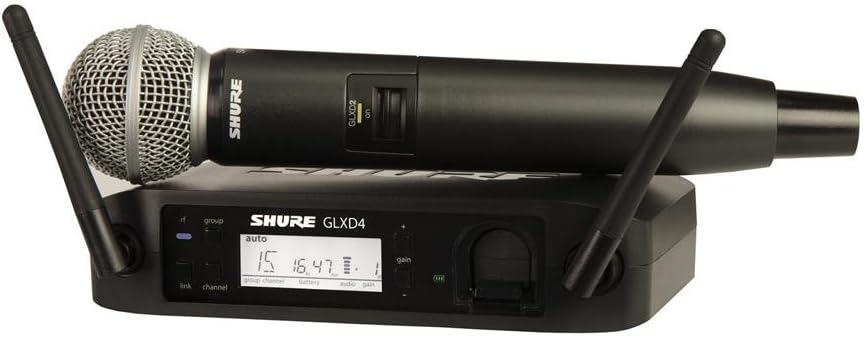
The Shure GLXD24/SM58 system includes the GLXD4 wireless receiver and the GLXD2 handheld transmitter with an SM58 vocal microphone capsule.
A closer view of the GLXD4 wireless receiver and the GLXD2 handheld transmitter, highlighting their compact design and essential controls.
Setup
1. GLXD4 Wireless Receiver Setup
- Connect the PS42US Power Supply to the GLXD4 receiver and a power outlet.
- Connect the GLXD4 receiver's audio output to your mixer or amplifier using an appropriate audio cable (XLR or 1/4-inch).
- Position the receiver in a location with a clear line of sight to the transmitter, away from large metal objects or other wireless devices.
2. GLXD2 Handheld Transmitter Setup
- Unscrew the bottom cap of the GLXD2 transmitter and insert the SB902A Rechargeable Lithium-Ion Battery. Ensure correct polarity.
- Screw the bottom cap back on securely.
- Press and hold the power button on the transmitter to turn it on.
3. System Pairing (LINKFREQ Automatic Frequency Management)
The GLX-D system features LINKFREQ Automatic Frequency Management for seamless setup. The receiver automatically scans for the best open frequencies and links with the transmitter.
- Ensure both the receiver and transmitter are powered on.
- The receiver will automatically perform a scan and link with the transmitter. The display on both units will confirm a successful link.
- If manual linking is required, refer to the detailed instructions in the full user guide for your specific model.
This video provides an overview of the Shure GLX-D system, demonstrating its components and basic functionality, including receiver and transmitter interaction.
Operating
1. Power On/Off
- Receiver: Press the power button on the front panel to turn the GLXD4 receiver on or off.
- Transmitter: Press and hold the power button on the GLXD2 handheld transmitter for approximately 2 seconds to turn it on or off.
2. Volume Control
Adjust the audio output level of the receiver using the gain control knob on the front panel of the GLXD4. It is recommended to start with a lower gain setting and gradually increase it to avoid audio clipping.
3. Battery Life and Charging
The GLXD2 transmitter uses an intelligent lithium-ion battery (SB902A) that provides up to 16 hours of continuous use. The remaining battery life is displayed on both the transmitter and receiver screens.
- To charge the battery, connect the USB Charge Cable to the transmitter and a USB power source.
- The GLXD4 receiver also features an integrated charging port for convenient battery recharging.
An official product video showcasing the Shure SM58 microphone's performance capabilities and durability in various live sound environments.
Maintenance
- Cleaning: Use a soft, dry cloth to clean the exterior surfaces of the receiver and transmitter. Avoid using harsh chemicals or abrasive materials.
- Battery Care: Store the lithium-ion battery in a cool, dry place when not in use. Avoid extreme temperatures.
- Microphone Grille: Periodically remove the microphone grille and clean any debris or moisture from the foam windscreen.
Troubleshooting
- No Audio: Ensure both the receiver and transmitter are powered on and successfully linked. Check all cable connections and volume levels.
- Signal Dropouts/Interference: Reposition the receiver for better line of sight. Perform a frequency scan on the receiver to find a clearer channel. Ensure no other wireless devices are operating on conflicting frequencies.
- Low Battery: Recharge the SB902A battery. The system provides up to 16 hours of use, but performance may degrade as the battery level becomes critically low.
Specifications
| Feature | Specification |
|---|---|
| Item Weight | 1.01 Kilograms (2.22 pounds) |
| Microphone Form Factor | Handheld |
| Item Dimensions (L x W x H) | 4.25 x 18.25 x 13 inches |
| Power Source | Battery Powered |
| Number of Batteries | Lithium Metal batteries required (included) |
| Material | Alloy Steel, Plastic |
| Signal-to-Noise Ratio | 114 dB |
| Number of Channels | 1 |
| Model Name | GLXD24/SM58 |
| Connectivity Technology | Wireless |
| Polar Pattern | Unidirectional |
Warranty and Support
The Shure GLXD24/SM58 Wireless Microphone System is covered by the manufacturer's warranty. For detailed warranty information, product registration, or technical support, please refer to the official Shure website or contact their customer service directly. Keep your purchase receipt for warranty claims.


