
1. Introduction
Thank you for choosing the JetBeam DDR-26 XM-L2 Rechargeable Digital Display LED Flashlight. This manual provides detailed instructions for the proper use, setup, operation, and maintenance of your new flashlight. Please read this manual thoroughly before using the product to ensure optimal performance and longevity.
2. Product Overview
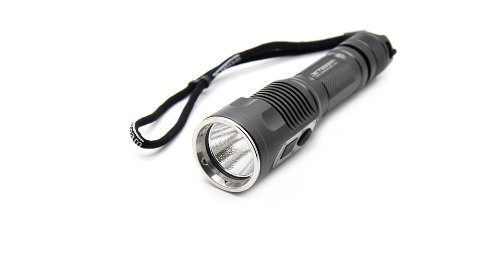
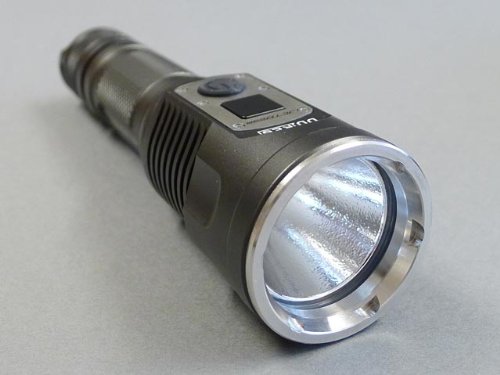
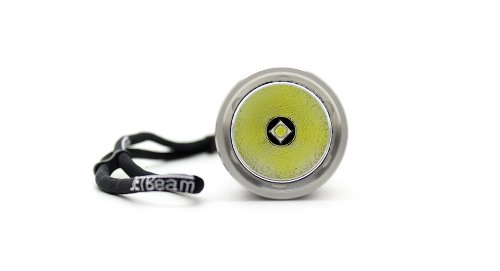
The JetBeam DDR-26 is a high-performance, rechargeable LED flashlight featuring an advanced XM-L2 LED and a convenient digital display. Its robust design and versatile functionality make it suitable for various applications.

3. Setup
3.1 Battery Installation
The JetBeam DDR-26 requires 1 CR123A battery (or compatible rechargeable battery). To install the battery:
- Unscrew the tail cap of the flashlight by turning it counter-clockwise.
- Insert the battery with the positive (+) end facing towards the head of the flashlight.
- Screw the tail cap back on clockwise until it is securely tightened. Ensure the O-ring is properly seated to maintain water resistance.
3.2 Charging
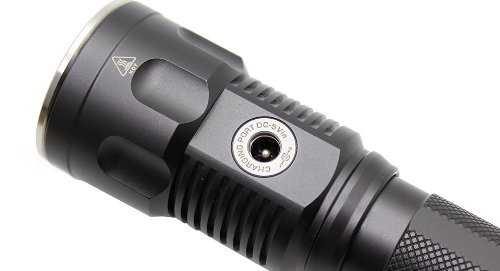
The DDR-26 features a built-in charging port (refer to Figure 2.5). To charge the flashlight:
- Locate the charging port cover on the side of the flashlight and gently lift it to expose the port.
- Connect the appropriate charging cable (not specified in product data, assume standard DC 5V) to the port and a compatible power source.
- The digital display will typically indicate the charging status.
- Once charging is complete, disconnect the cable and securely close the charging port cover to protect it from dust and water.
4. Operating Instructions
4.1 Power On/Off
To turn the flashlight on or off, press the main power button located near the digital display (refer to Figure 2.3).
4.2 Mode Selection
While the flashlight is on, press the power button repeatedly to cycle through different brightness modes (e.g., Low, Medium, High) and special modes (e.g., Strobe, SOS), if available. The digital display may show the current brightness level or mode.
4.3 Digital Display Functionality
The digital display provides real-time information, which may include:
- Battery voltage or remaining battery life.
- Current brightness level or output.
- Charging status when connected to a power source.
5. Maintenance
5.1 Cleaning
Regularly clean the flashlight body with a soft, damp cloth. Do not use abrasive cleaners or solvents. Keep the lens clean for optimal light output.
5.2 O-Ring Lubrication
To maintain water resistance, periodically inspect and lubricate the O-rings with silicone grease. Replace O-rings if they appear damaged or worn.
5.3 Storage
If the flashlight will not be used for an extended period, remove the battery to prevent leakage and store the flashlight in a cool, dry place.
6. Troubleshooting
- Flashlight not turning on: Check if the battery is installed correctly with the positive end facing the head. Ensure the battery is charged. Tighten the tail cap securely.
- Light is dim or flickering: The battery may be low; recharge or replace it. Ensure battery contacts are clean.
- Digital display not working: Ensure the battery is properly installed and charged. If the issue persists, contact customer support.
- Charging issue: Verify the charging cable is properly connected to both the flashlight and the power source. Ensure the power source is active.
7. Specifications
| Feature | Specification |
|---|---|
| Part Number | JetBeam DDR-26 |
| Height | 2 Inches |
| Length | 5.5 Inches |
| Width | 2 Inches |
| Weight | 159 g |
| Batteries Required | Yes |
| Number of Batteries | 1 CR123A batteries required |
| Item Dimensions (LxWxH) | 14 x 5.1 x 5.1 Centimeters |
| ASIN | B00C91YPEA |
| Date First Available | 9 January 2016 |
8. Warranty and Support
For warranty information or technical support, please refer to the warranty card included with your product or visit the official JETBeam website. Keep your purchase receipt as proof of purchase.


