
Introduction
The AKG HT470 is a professional analog wireless handheld transmitter designed for reliable audio transmission. It features pilot tone transmission for monitoring battery status and preventing unexpected startup noise. The transmitter continuously sends data, including low-battery information, to the receiver. Its infrared data link simplifies automatic frequency setup, making it user-friendly. The unique dipole-antenna design ensures consistent transmission, even when the antenna is partially obstructed by the user's hand. An advanced battery identification system detects the battery type, providing up to 14 hours of operation with a single AA-size battery, with remaining operating time displayed.
Key Features:
- Pilot Tone Transmission: Monitors transmitter battery status and provides tone code squelch.
- Dipole-Antenna Design: Ensures optimal performance even if the antenna is partially covered.
- Infrared Synchronization: Facilitates quick and easy setup.
- 50mW Transmission Power: Provides maximum radio signal strength for extended range applications.
- Integrated Charging Contacts: Allows for convenient charging of standard NiMH batteries within the transmitter.
Safety Information
Consumer Alert: Most users do not require a license to operate this wireless microphone system. However, operating this microphone system without a license is subject to specific restrictions:
- The system must not cause harmful interference.
- It must operate at a low power level (not exceeding 50 milliwatts).
- It has no protection from interference received from any other device.
Purchasers should also be aware that the FCC is currently evaluating the use of wireless microphone systems, and these rules are subject to change. For further information, contact the FCC at 1-888-CALL-FCC (TTY: 1-888-TELL-FCC) or visit the FCC's wireless microphone website at fcc.gov/cgb/wirelessmicrophones.
Package Contents
The AKG HT470 D5 Band 7 Wireless Handheld Transmitter package typically includes:
- AKG HT470 D5 Wireless Handheld Transmitter
- Wireless Microphones and Transmitters (as per included components)
- User Documentation (this manual)
Setup
1. Battery Installation
The HT470 transmitter operates on one AA-size battery. An enhanced battery identification system automatically detects the battery type (e.g., alkaline, NiMH).
- Unscrew the bottom cap of the handheld transmitter.
- Insert one AA-size battery, ensuring correct polarity (+/-).
- Screw the bottom cap back on securely.
Note: For rechargeable NiMH batteries, the integrated charging contacts allow for convenient charging directly within the transmitter.
2. Infrared Synchronization
The HT470 uses an infrared data link for automatic frequency setup with a compatible AKG receiver (sold separately).
- Ensure both the HT470 transmitter and the receiver are powered on.
- On the receiver, initiate the frequency scan and synchronization process (refer to your receiver's manual for specific steps).
- Align the infrared port on the HT470 transmitter with the infrared port on the receiver. The ports are typically marked with an IR symbol.
- Hold them steady until the synchronization is complete and the receiver indicates a successful link.
This process automatically sets the transmitter's frequency to match the receiver, ensuring a clear and stable connection.
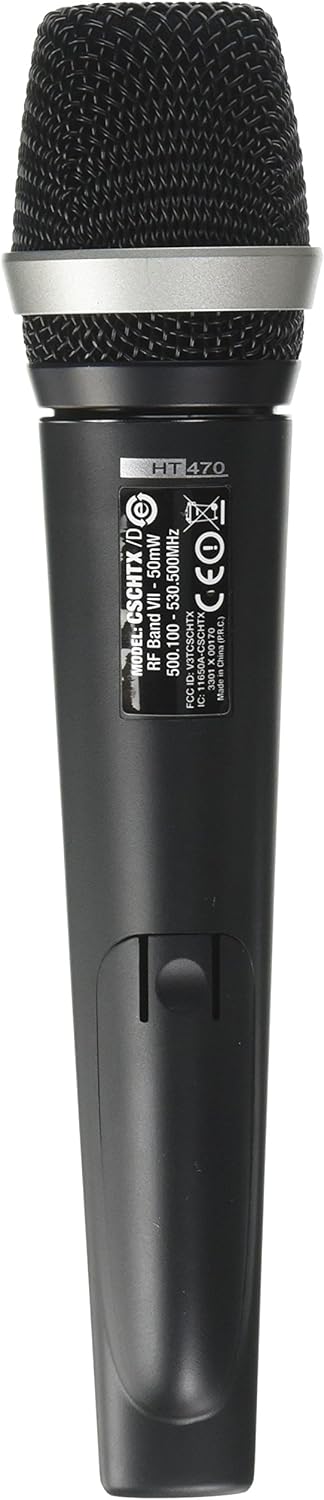
Figure 1: Rear view of the HT470 transmitter, displaying model information and regulatory details. This side typically contains the battery compartment and infrared sensor.
Operating Instructions
1. Powering On/Off
- To power on the transmitter, locate the power button/switch and press/slide it to the 'ON' position.
- To power off, press/slide the power button/switch to the 'OFF' position.
2. Monitoring Battery Life
The HT470 transmitter features a display that shows the remaining operating time in hours. This information is continuously sent to the receiver via pilot tone transmission.
- Regularly check the display on the transmitter or the receiver for the current battery status.
- Replace or recharge the AA-size battery when the display indicates low operating time to avoid interruptions.
3. Optimal Performance
The unique dipole-antenna design of the HT470 ensures reliable transmission. While designed to perform even when partially covered, avoid intentionally obstructing the antenna for best results.

Figure 2: Front view of the AKG HT470 D5 transmitter, highlighting the microphone grille and main body. This is the primary operational view.
Maintenance
1. Cleaning
- Wipe the exterior of the transmitter with a soft, dry cloth.
- Do not use abrasive cleaners, solvents, or harsh chemicals.
- Ensure no moisture enters the microphone grille or battery compartment.
2. Battery Care
- If using rechargeable NiMH batteries, utilize the integrated charging contacts for convenient recharging.
- Remove batteries if the transmitter will not be used for an extended period to prevent leakage.
- Dispose of used batteries according to local regulations.
3. Storage
Store the transmitter in a cool, dry place, away from direct sunlight and extreme temperatures.
Troubleshooting
| Problem | Possible Cause | Solution |
|---|---|---|
| No audio output from receiver. | Transmitter not powered on; low battery; incorrect frequency synchronization; receiver issues. | Ensure transmitter is on. Check battery level and replace/recharge if necessary. Re-synchronize transmitter and receiver via infrared. Verify receiver is functioning correctly. |
| Interference or poor signal quality. | Obstruction between transmitter and receiver; other wireless devices operating on similar frequencies; transmitter too far from receiver. | Ensure clear line of sight. Change operating frequency if possible (via receiver). Reduce distance between transmitter and receiver. Refer to FCC guidelines for wireless microphone operation. |
| Transmitter display not showing battery time. | Battery not inserted correctly; battery completely drained; internal fault. | Check battery insertion and polarity. Replace with a fresh battery. If problem persists, contact support. |
Specifications
| Model Name | HT470 D5 Band 7 |
| Brand | AKG |
| Microphone Form Factor | Handheld |
| Connectivity Technology | Wireless |
| Power Source | Battery Powered (1x AA-size) |
| Transmission Power | Up to 50mW |
| Operating Time | Up to 14 hours (with one AA-size battery) |
| Item Weight | 1 pound |
| Product Dimensions (L x W x H) | 1 x 1 x 1 inches (approximate) |
| Color | Black |
| Item Model Number | 3301X00170 |
| UPC | 885038029526 |
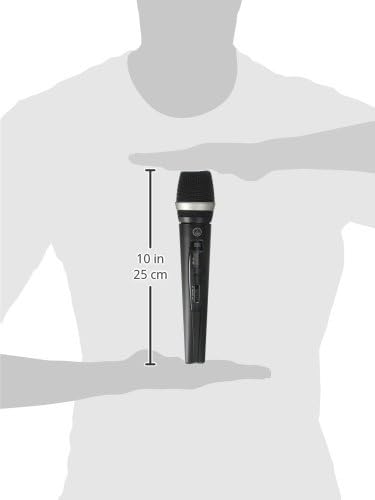
Figure 3: Dimensional view of the HT470 transmitter, illustrating its approximate size.
Warranty and Support
Warranty Information
AKG products are designed and manufactured to the highest quality standards. For specific warranty terms and conditions applicable to your region and product, please refer to the warranty card included with your purchase or visit the official AKG website.
Customer Support
For technical assistance, troubleshooting, or service inquiries, please contact AKG customer support. Contact details can typically be found on the official AKG website or in the documentation provided with your product.
Online resources, including FAQs and additional product information, may also be available on the AKG website.