
Genteq PD510009
Genteq ECM Motor Diagnostic Tool User Manual
Model: PD510009
Introduction
This user manual provides comprehensive instructions for the safe and effective operation of the Genteq ECM Motor Diagnostic Tool. This tool is designed to assist technicians in troubleshooting ECM (Electronically Commutated Motor) motors, commonly found in HVAC equipment.
Product Overview
The Genteq ECM Motor Diagnostic Tool is a compact, portable device engineered for quick and accurate diagnosis of ECM motor issues. It features a simple ON/OFF switch and various connectors for interfacing with different motor types.
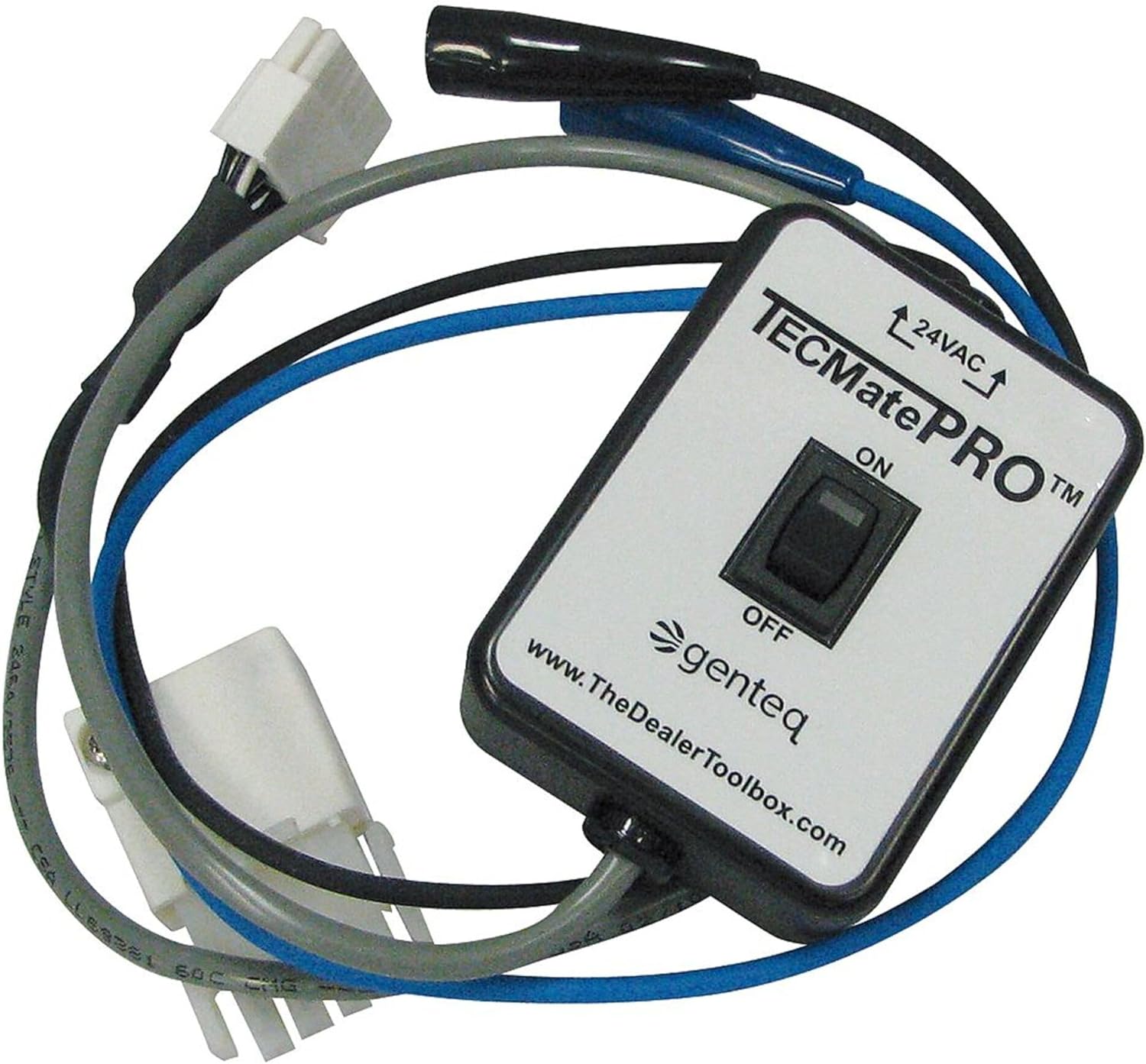
Figure 1: Genteq ECM Motor Diagnostic Tool. This image shows the main diagnostic unit, a white and black rectangular box with an ON/OFF toggle switch, and attached cables with various electrical connectors, including a white multi-pin connector and a black alligator clip.
Key Components:
- Main Unit: The central diagnostic module with control switch.
- Connection Cables: Integrated cables with specific connectors for ECM motor interfaces.
- Power Input: Indicated by "24VAC" on the unit, for external power supply.
Setup
- Safety First: Ensure the ECM motor and associated equipment are de-energized and locked out before connecting the diagnostic tool.
- Identify Motor Type: Determine the specific ECM motor type and its corresponding diagnostic port.
- Connect Tool: Carefully connect the appropriate cable from the diagnostic tool to the ECM motor's diagnostic port. Ensure a secure connection.
- Apply Power: Connect the 24VAC power supply to the diagnostic tool.
Note: Refer to the ECM motor's specific documentation for exact diagnostic port locations and connection procedures.
Operating Instructions
Once the tool is properly connected and powered, follow these steps to operate:
- Power On: Flip the toggle switch on the main unit to the "ON" position.
- Observe Indicators: The tool will provide diagnostic feedback, typically through LED indicators or motor response. Consult the motor's manual for interpretation of these signals.
- Troubleshoot: Based on the diagnostic feedback, perform necessary troubleshooting steps on the ECM motor.
- Power Off: After diagnosis, flip the toggle switch to the "OFF" position.
- Disconnect: Carefully disconnect the tool from the ECM motor and power supply.
The primary function of this tool is to facilitate the troubleshooting process of ECM motors by providing a direct interface for diagnostic signals.
Maintenance
The Genteq ECM Motor Diagnostic Tool requires minimal maintenance to ensure longevity and reliable operation.
- Cleaning: Wipe the unit with a soft, dry cloth. Do not use abrasive cleaners or solvents.
- Storage: Store the tool in a cool, dry place, away from direct sunlight and extreme temperatures.
- Cable Inspection: Periodically inspect cables and connectors for any signs of wear, damage, or fraying. Replace if necessary.
- Avoid Drops: Protect the tool from physical impact and drops.
Troubleshooting
If you encounter issues while using the ECM Motor Diagnostic Tool, consider the following common troubleshooting steps:
| Problem | Possible Cause | Solution |
|---|---|---|
| Tool does not power on. | No 24VAC power supply; faulty power connection; internal fault. | Verify 24VAC power supply is active and connected correctly. Check power cable integrity. If problem persists, contact support. |
| No diagnostic feedback from motor. | Incorrect connection to motor; motor not powered; motor fault; tool fault. | Ensure tool is securely connected to the correct diagnostic port. Verify motor is powered. Test tool on a known good motor if possible. |
| Intermittent operation. | Loose connections; damaged cables. | Check all connections for tightness. Inspect cables for damage. |
For issues not covered here, please refer to the support section.
Specifications
| Attribute | Detail |
|---|---|
| Brand | Genteq |
| Model Number | PD510009 |
| Item Weight | 1 pound |
| Product Dimensions | 9.5 x 9.5 x 2.5 inches |
| Manufacturer Part Number | 8794700FSG01 |
| Screen Size | 2.8 Inches (Note: This specification might refer to a display if present, or a general product dimension. The image does not show a screen.) |
| UPC | 094714744992 |
| Country of Origin | China |
Warranty Information
Specific warranty details for the Genteq ECM Motor Diagnostic Tool are typically provided at the point of purchase or within the product packaging. Please retain your proof of purchase for warranty claims.
For information regarding extended protection plans, please refer to the retailer or manufacturer's official website. Examples of available protection plans include 3-Year and 4-Year options.
Support and Contact
For technical assistance, troubleshooting beyond this manual, or warranty inquiries, please contact Genteq customer support.
- Manufacturer Website: www.TheDealerToolbox.com (as indicated on the product image)
- General Inquiries: Refer to the official Genteq website or your product documentation for specific contact numbers or email addresses.
Ask a question about this manual
Ask about setup, troubleshooting, compatibility, parts, safety, or missing instructions. Manuals+ will review the question and use this page’s manual context to help answer it.