
1. Introduction
This manual provides essential information for the safe and efficient assembly, operation, and maintenance of your Metro MW208 Standard Duty Utility Cart. Please read these instructions thoroughly before using the product to ensure proper function and to prevent injury or damage.
The Metro MW208 is a robust, stainless steel utility cart designed for various applications, featuring an open design with three solid shelves, a tubular stainless steel frame, two push handles, and four swivel casters for easy maneuverability.
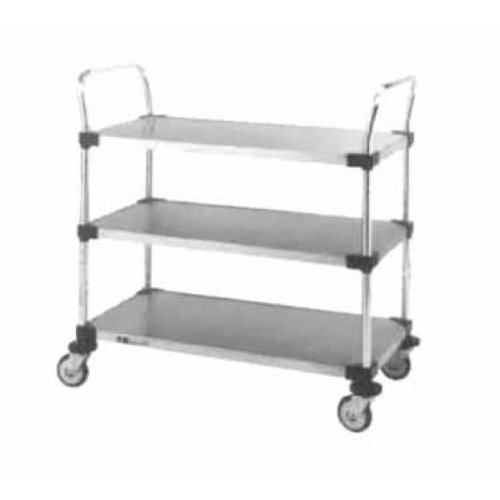
Image 1.1: Metro MW208 Standard Duty Utility Cart. This image displays the cart's three-shelf open design, stainless steel construction, and swivel casters.
2. Safety Information
WARNING: Failure to follow these safety instructions may result in serious injury or damage to the product.
- Weight Capacity: Do not exceed the maximum weight capacity specified in the 'Specifications' section. Overloading can cause instability and structural failure.
- Even Distribution: Distribute loads evenly across the shelves. Uneven loading can cause the cart to tip.
- Secure Items: Ensure all items on the cart are stable and secure before moving.
- Movement: Push the cart slowly and carefully, especially on uneven surfaces or inclines. Avoid sudden stops or turns.
- Braking: If equipped with locking casters, engage the brakes when the cart is stationary to prevent unintended movement.
- Assembly: Ensure all fasteners are securely tightened before use. Periodically check and retighten as necessary.
- Maintenance: Regularly inspect the cart for any signs of wear, damage, or loose components. Do not use a damaged cart.
3. Package Contents
Please verify that all components are present before beginning assembly. If any parts are missing or damaged, contact Metro customer support.
- 3 x Solid Shelves (24'' x 36'')
- 2 x Side Frame Assemblies (with push handles)
- 4 x Swivel Casters (resilient tread)
- Connecting Rods/Crossbars (quantity may vary based on design)
- Assembly Hardware (screws, bolts, washers, nuts, etc.)
- Instruction Manual (this document)
4. Setup and Assembly
Assembly typically requires basic hand tools (e.g., wrench, screwdriver). It is recommended to assemble the cart on a clean, flat surface.
- Unpack Components: Carefully remove all parts from the packaging and lay them out. Check against the 'Package Contents' list.
- Attach Casters: Insert the stems of the four swivel casters into the designated holes at the bottom of the side frame assemblies. Ensure they are securely seated. If threaded, tighten with a wrench.
- Connect Side Frames: Position the two side frame assemblies upright. Attach the connecting rods or crossbars between the side frames at the designated points for the shelves. Do not fully tighten fasteners yet.
- Install Shelves: Slide the three solid shelves into the grooves or onto the support brackets on the side frames. Ensure the shelves are level and properly seated.
- Secure All Fasteners: Once all shelves are in place and the cart structure is aligned, securely tighten all screws, bolts, and nuts. Do not overtighten.
- Final Check: Gently rock the cart to ensure stability. Verify that all casters rotate freely and that the cart moves smoothly.
5. Operating Instructions
Follow these guidelines for safe and effective use of your utility cart.
- Loading: Place heavier items on lower shelves to maintain a low center of gravity and improve stability. Distribute weight evenly.
- Pushing: Always push the cart using the designated push handles. Avoid pulling the cart, especially when loaded, as this can reduce control.
- Maneuvering: Use the swivel casters to navigate tight spaces. Take wide turns and avoid sharp, sudden movements.
- Inclines/Declines: Exercise extreme caution when moving the cart on ramps or sloped surfaces. Reduce speed and maintain a firm grip on the handles. Never leave a loaded cart unattended on an incline.
- Storage: When not in use, store the cart in a dry, level area. If equipped with locking casters, engage the brakes.
6. Maintenance
Regular maintenance will prolong the life of your Metro MW208 Utility Cart.
- Cleaning: Wipe down stainless steel surfaces with a damp cloth and mild detergent. Avoid abrasive cleaners or scouring pads that can scratch the finish. Dry thoroughly.
- Caster Inspection: Periodically check casters for debris (e.g., string, hair) wrapped around the axles. Clean as needed. Ensure casters rotate and swivel freely.
- Fastener Check: Every few months, inspect all bolts, screws, and nuts. Tighten any that have become loose due to vibration or use.
- Damage Assessment: Inspect the frame and shelves for any signs of bending, cracks, or other damage. Discontinue use if significant damage is found and contact customer support for replacement parts or advice.
7. Troubleshooting
| Problem | Possible Cause | Solution |
|---|---|---|
| Cart is wobbly or unstable. | Loose fasteners; uneven assembly; damaged frame. | Check and tighten all assembly fasteners. Ensure shelves are properly seated. Inspect frame for damage. |
| Cart is difficult to push or casters do not swivel freely. | Debris in casters; damaged casters; overloaded cart. | Clean debris from caster wheels and axles. Replace damaged casters. Reduce load on the cart. |
| Shelves are not level. | Improper shelf installation; bent frame component. | Re-seat shelves, ensuring they are fully engaged in their supports. Inspect frame for any bending. |
8. Specifications
| Model | MW208 (MW200 Series) |
| Brand | Metro |
| Material | Stainless Steel (Frame and Shelves) |
| Number of Shelves | 3 |
| Shelf Size | 24'' x 36'' (approximate, based on description) |
| Caster Type | 4 Swivel Casters, Resilient Tread |
| Handles | 2 Push Handles |
| Design | Open |
9. Warranty and Support
Metro products are manufactured to high-quality standards. For specific warranty information, please refer to the warranty card included with your purchase or visit the official Metro website. For technical support, replacement parts, or any inquiries regarding your MW208 Utility Cart, please contact Metro customer service directly.
Metro Customer Support: Please refer to your product packaging or the official Metro website for the most current contact information.


