
Continental 50016
Continental 50016 Accu-Drive Pulley User Manual
Model: 50016
Introduction
This manual provides essential information for the proper installation, operation, and maintenance of your Continental 50016 Accu-Drive Pulley. Designed as an OEM-style replacement, this pulley is manufactured with OE-specified materials, ensuring reliable performance in your vehicle's accessory drive system. Please read this manual thoroughly before proceeding with any installation or maintenance.
Safety Information
Always prioritize safety when working on automotive systems. Failure to follow these guidelines may result in injury or damage to the vehicle.
- Ensure the vehicle's engine is off and cool before beginning any work. Disconnect the battery to prevent accidental starting.
- Wear appropriate personal protective equipment (PPE), including safety glasses and gloves.
- Use proper tools for the job. Do not force components.
- If you are unsure about any step, consult a qualified automotive technician.
- Keep hands and clothing clear of moving parts when the engine is running.
Product Overview
What's in the Box
- Accu-Drive Pulley (Continental 50016)
Key Features
- Manufactured by a leading producer of high-quality automotive products.
- Designed with the user in mind for ease of installation and reliable performance.
- Proven and tested for durability and function under real-world conditions.
- Meets or exceeds all required and standardized testing for automotive components.
- OEM-style construction using OE-specified materials.
Product Images
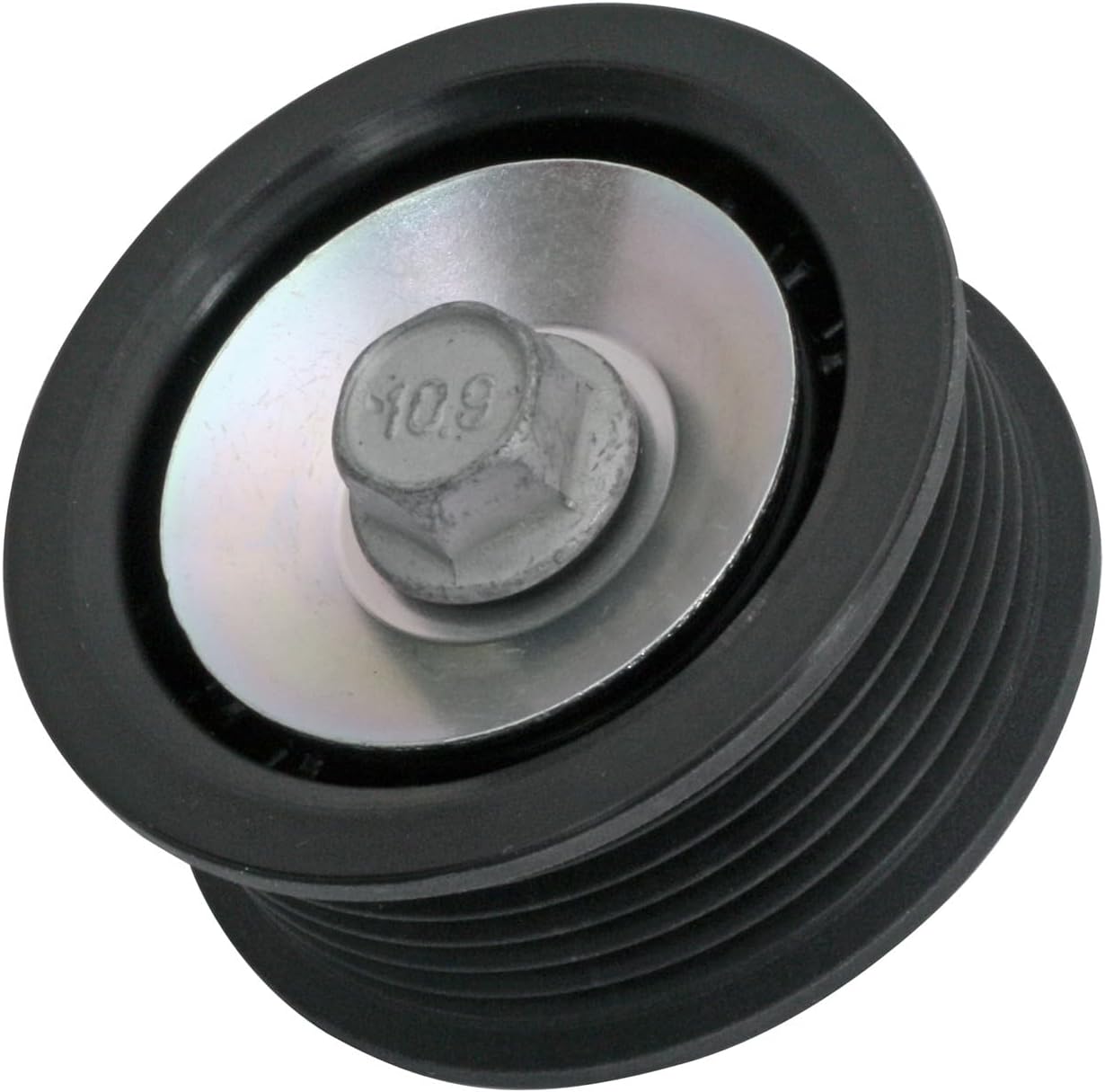
Front view of the Continental 50016 Accu-Drive Pulley, showing the ribbed surface and mounting bolt.

Top-down view of the pulley, highlighting the central bolt and washer assembly.

Rear view of the pulley, showing the bearing and its housing.
Setup & Installation
The Continental 50016 Accu-Drive Pulley is designed for direct replacement in compatible automotive applications. Professional installation is recommended.
- Preparation: Ensure the engine is off and cool. Disconnect the negative terminal of the vehicle's battery. Identify the location of the existing pulley to be replaced.
- Belt Removal: Using a serpentine belt tool or appropriate wrench, relieve tension on the serpentine belt tensioner. Carefully remove the serpentine belt from the pulley.
- Old Pulley Removal: Locate the mounting bolt for the old pulley. Use the correct size wrench or socket to loosen and remove the bolt. Carefully remove the old pulley from its mounting point.
- New Pulley Installation: Position the new Continental 50016 Accu-Drive Pulley onto the mounting stud or bracket. Ensure it is seated correctly. Install the mounting bolt and tighten it to the vehicle manufacturer's specified torque. Refer to your vehicle's service manual for exact torque specifications.
- Belt Reinstallation: Route the serpentine belt correctly around all pulleys, ensuring it is seated in all grooves. Apply tension to the tensioner and carefully guide the belt back onto the new pulley. Double-check that the belt is properly aligned on all pulleys.
- Final Checks: Reconnect the vehicle's battery. Start the engine and observe the belt and pulley operation. Listen for any unusual noises and check for proper belt alignment and tension.
Operating Principles
The Continental 50016 Accu-Drive Pulley functions as an idler pulley within the vehicle's serpentine belt system. Its primary role is to guide the serpentine belt, maintain proper belt tension, and ensure smooth operation of the engine's accessories (such as the alternator, power steering pump, and air conditioning compressor). The pulley's bearing allows it to rotate freely, reducing friction and wear on the belt and other components. Proper functioning of this pulley is critical for the efficient and reliable operation of the entire accessory drive system.
Maintenance
Regular inspection of your Accu-Drive Pulley can help prevent unexpected failures and extend the life of your serpentine belt system.
- Visual Inspection: Periodically inspect the pulley for signs of wear, cracks, or damage to the ribbed surface. Check for any wobbling or misalignment when the engine is running (with extreme caution).
- Bearing Check: With the engine off and belt removed, spin the pulley by hand. It should spin smoothly and quietly. Any grinding, squealing, or excessive play indicates a worn bearing and requires replacement.
- Cleanliness: Keep the pulley and surrounding area free from dirt, debris, and oil, which can accelerate wear.
- Replacement: Pulleys are wear items. Replace the pulley if any signs of wear or bearing failure are detected, or as recommended by your vehicle's maintenance schedule.
Troubleshooting
Common issues related to idler pulleys and potential solutions:
| Symptom | Possible Cause | Solution |
|---|---|---|
| Squealing or chirping noise from belt area | Worn or seized pulley bearing; misaligned pulley; worn belt. | Inspect pulley for smooth rotation and play. Replace pulley if bearing is faulty. Check belt alignment and condition. |
| Belt slipping or coming off pulley | Pulley misalignment; worn pulley surface; incorrect belt tension. | Verify pulley is correctly installed and aligned. Inspect pulley surface for damage. Check and adjust belt tension. |
| Vibration or rattling from engine bay | Loose or damaged pulley; worn bearing. | Check pulley mounting bolt for tightness. Inspect pulley for physical damage or excessive play. Replace if damaged. |
Specifications
| Specification | Detail |
|---|---|
| Manufacturer | Continental ContiTech |
| Brand | Continental |
| Model Number | 50016 |
| Item Weight | 5.9 ounces |
| Product Dimensions | 4.5 x 4.5 x 3.25 inches |
| Exterior Finish | Machined |
| Manufacturer Part Number | 50016 |
| ASIN | B00C2NSICK |
| Date First Available | September 24, 2013 |
Warranty & Support
For information regarding warranty coverage and technical support for your Continental 50016 Accu-Drive Pulley, please refer to the official Continental website or contact their customer service directly. Keep your purchase receipt as proof of purchase for any warranty claims.
Related documents50016

Ask a question about this manual
Ask about setup, troubleshooting, compatibility, parts, safety, or missing instructions. Manuals+ will review the question and use this page’s manual context to help answer it.