
RCA RCR313BE
RCA RCR313BR Big Button Three-Device Universal Remote
Model: RCR313BE
Product Overview
The RCA RCR313BR is a versatile 3-device universal remote designed to simplify your home entertainment setup. It can control up to three different components, eliminating the need for multiple remotes. Key features include streaming and dual navigation capabilities, along with various programming methods such as auto code search, brand/manual code searches, and direct code entry. This remote also offers volume and transport key punch-through, large buttons for ease of use, a partially backlit keypad, and an ergonomic hand-comfort design.
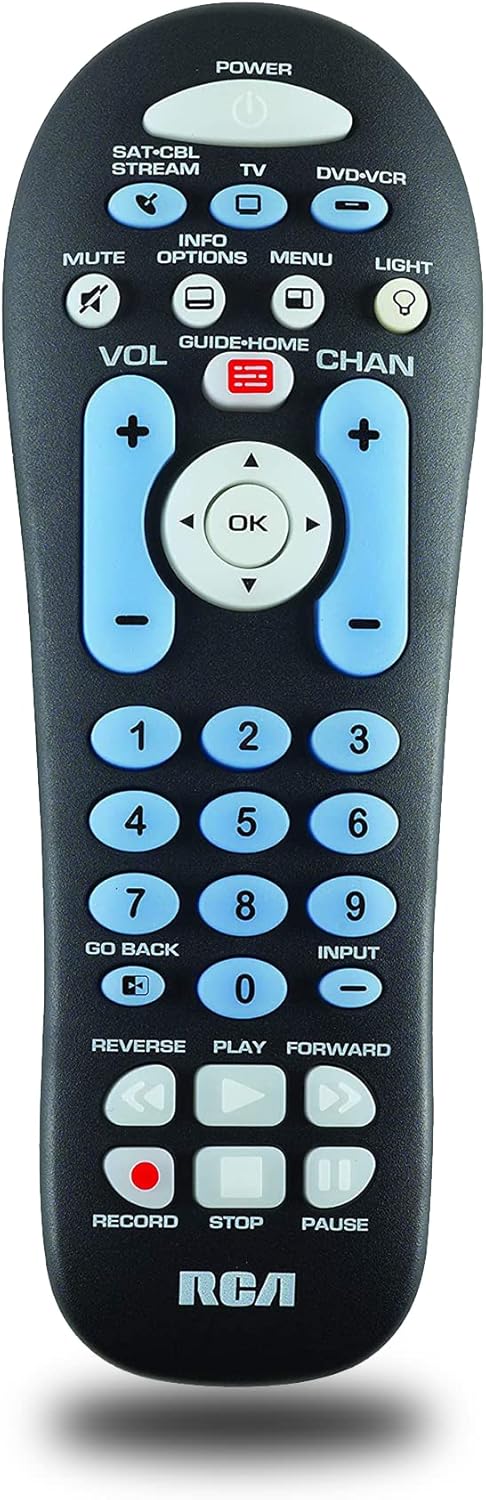
Front view of the RCA RCR313BR Big Button Universal Remote, showcasing its large, clearly labeled buttons and ergonomic design.
Setup Guide
1. Battery Installation
The RCA RCR313BR remote requires two AA batteries for operation. Follow these steps to install them:
- Locate the battery compartment cover on the back of the remote control.
- Press down on the tab and slide the cover off.
- Insert two new AA batteries, ensuring the positive (+) and negative (-) terminals align with the markings inside the compartment.
- Slide the battery compartment cover back into place until it clicks securely.
2. Programming the Remote
This universal remote can be programmed to control up to three devices, including TVs, DVD/VCR players, and satellite receivers/cable boxes/digital TV converters. There are several methods for programming:
- Automatic Code Search: This method scans through codes to find the correct one for your device. It is often the easiest method if you do not know your device's brand code.
- Brand Code Search: If you know the brand of your device, you can use this method to search through codes specific to that brand.
- Manual Code Entry: If you have a specific 4-digit code for your device from the remote's code list (typically provided in a separate manual or online), you can enter it directly.
- Direct Code Entry: Similar to manual code entry, but may involve a different sequence for specific devices.
Refer to the detailed programming instructions that came with your remote or visit the RCA support website for specific code lists and step-by-step guides for each programming method. The remote is compatible with major brands including Samsung, Vizio, TCL, LG, Sony, Hisense, and more.

The RCA RCR313BR remote shown held in a hand, illustrating its ergonomic design and compact size (approximately 2.39 x 1.34 x 6.83 inches).
Operating Instructions
Once programmed, your RCA RCR313BR remote can control your selected devices. Here's a guide to its main functions:
- Device Selection Buttons (SAT-CBL-STREAM, TV, DVD-VCR): Press the corresponding button at the top of the remote to select the device you wish to control. The remote will then send commands to that specific device.
- POWER: Turns the selected device on or off.
- MUTE: Mutes or unmutes the audio of the selected device.
- VOL (+/-): Increases or decreases the volume. This function can be programmed to always control the TV's volume, regardless of the selected device (volume punch-through).
- CHAN (+/-): Changes channels up or down.
- Number Pad (0-9): Used for direct channel entry or inputting programming codes.
- INFO, OPTIONS, MENU, LIGHT: These buttons provide access to on-screen menus, information displays, and can activate the remote's backlight (if applicable).
- GUIDE-HOME: Accesses the electronic program guide or the home screen of streaming devices.
- Navigation Pad (Up, Down, Left, Right, OK): Used to navigate menus and confirm selections.
- INPUT: Cycles through video inputs on your TV.
- GO BACK: Returns to the previous screen or menu.
- Playback Controls (REVERSE, PLAY, FORWARD, RECORD, STOP, PAUSE): Control media playback on DVD/VCR players or streaming devices. These functions can also be programmed for transport key punch-through.
For optimal performance, ensure a clear line of sight between the remote's infrared (IR) emitter and the device's IR receiver.
Care and Maintenance
To ensure the longevity and proper functioning of your RCA RCR313BR universal remote, follow these simple care guidelines:
- Cleaning: Wipe the remote with a soft, slightly damp cloth. Do not use abrasive cleaners, solvents, or harsh chemicals, as these can damage the remote's surface or internal components.
- Battery Replacement: Replace batteries when the remote's performance degrades or if the backlight (if applicable) becomes dim. Always replace both batteries at the same time with new AA batteries. Do not mix old and new batteries, or different types of batteries.
- Storage: Store the remote in a cool, dry place away from direct sunlight, extreme temperatures, and high humidity.
- Avoid Drops: Protect the remote from physical shocks and drops, which can damage internal circuitry.
Troubleshooting
If you encounter issues with your RCA RCR313BR universal remote, try the following troubleshooting steps:
- Remote Not Responding:
- Check the batteries. Ensure they are inserted correctly with the correct polarity and are not depleted. Replace them if necessary.
- Ensure there is a clear line of sight between the remote and the device you are trying to control. Obstructions can block the infrared signal.
- Make sure you have selected the correct device mode (TV, DVD-VCR, SAT-CBL-STREAM) on the remote.
- Buttons Not Working Correctly / Limited Functionality:
- The remote may not be correctly programmed for your device. Try reprogramming the remote using a different code or programming method (e.g., automatic code search).
- Some advanced functions may not be supported by all devices or may require specific programming. Consult the remote's full instruction manual for advanced programming options.
- Volume or Transport Keys Not Working on All Devices:
- The remote features volume and transport key punch-through. If these are not working as expected, you may need to reconfigure this feature. Refer to the full manual for instructions on setting up punch-through.
If problems persist after trying these steps, consult the comprehensive user manual provided with your remote or visit the RCA support website for further assistance.
Product Specifications
- Model Number: RCR313BE
- Brand: RCA
- Max Number of Supported Devices: 3
- Compatible Devices: Television, Streaming Device, DVD/VCR, Satellite Receiver, Cable Box, Digital TV Converter
- Connectivity Technology: Infrared (IR)
- Wireless Communication Technology: RF (for certain functions/devices, though primarily IR)
- Color: Black
- Special Features: Universal, Backlit Keypad (partially)
- Batteries Required: 2 AA batteries
- Product Dimensions: 20.02 x 6.05 x 3.33 cm (7.88 x 2.38 x 1.31 inches)
- Item Weight: 121.9 g (4.3 oz)
- Manufacturer: Audiovox Accessories Corporation
- First Available Date: 10 March 2013
Warranty and Support
For detailed warranty information regarding your RCA RCR313BR universal remote, please refer to the warranty card included with your purchase or visit the official RCA website. Warranty terms and conditions may vary by region and retailer.
If you require technical support, have questions about programming, or need assistance with any aspect of your remote, please contact RCA customer support. Contact information can typically be found on the RCA website or in the documentation provided with your product.
Online resources such as FAQs and programming code lists are often available on the manufacturer's support pages.
Ask a question about this manual
Ask about setup, troubleshooting, compatibility, parts, safety, or missing instructions. Manuals+ will review the question and use this page’s manual context to help answer it.