
Introduction
The Scotch LS1000 Heat-Free Laminator provides a simple and efficient method for protecting documents up to 12 inches wide without the need for electricity or heat. This manual provides essential information for the safe and effective operation, setup, and maintenance of your laminator.
Safety Information
- Read all instructions before using the laminator.
- Keep hands and loose clothing away from moving parts during operation.
- This device is not a toy. Keep out of reach of children.
- Do not attempt to laminate objects thicker than 1/10 inch.
- Use only Scotch brand laminating cartridges designed for the LS1000 model.
- Do not force documents into the laminator.
Package Contents
Verify that your package contains the following items:
- Scotch LS1000 Heat-Free Laminator
- One (1) Laminating Cartridge
Setup
- Unpack the Laminator: Carefully remove the laminator from its packaging and place it on a stable, flat surface.
- Install the Laminating Cartridge: Open the laminator's cover. Align the laminating cartridge with the guides inside the machine and gently push it into place until it clicks securely. Ensure the film is properly threaded according to the cartridge's instructions.

Image: Installing the laminating cartridge into the Scotch LS1000. The cartridge is inserted into the top opening of the laminator, with the film roll visible.
- Close the Cover: Close the laminator cover until it latches securely.
Operating Instructions
The Scotch LS1000 operates with three simple steps: Load, Turn, and Trim.
- Load Document: Insert your document, poster, or artwork into the laminator's feed slot. Ensure the document is centered and straight. The laminator can accommodate documents up to 12 inches wide and 1/10 inch thick.
- Turn Handle: Slowly turn the handle clockwise. The document will be drawn into the laminator and laminated as it passes through the rollers. Continue turning until the entire document has passed through and is fully laminated.
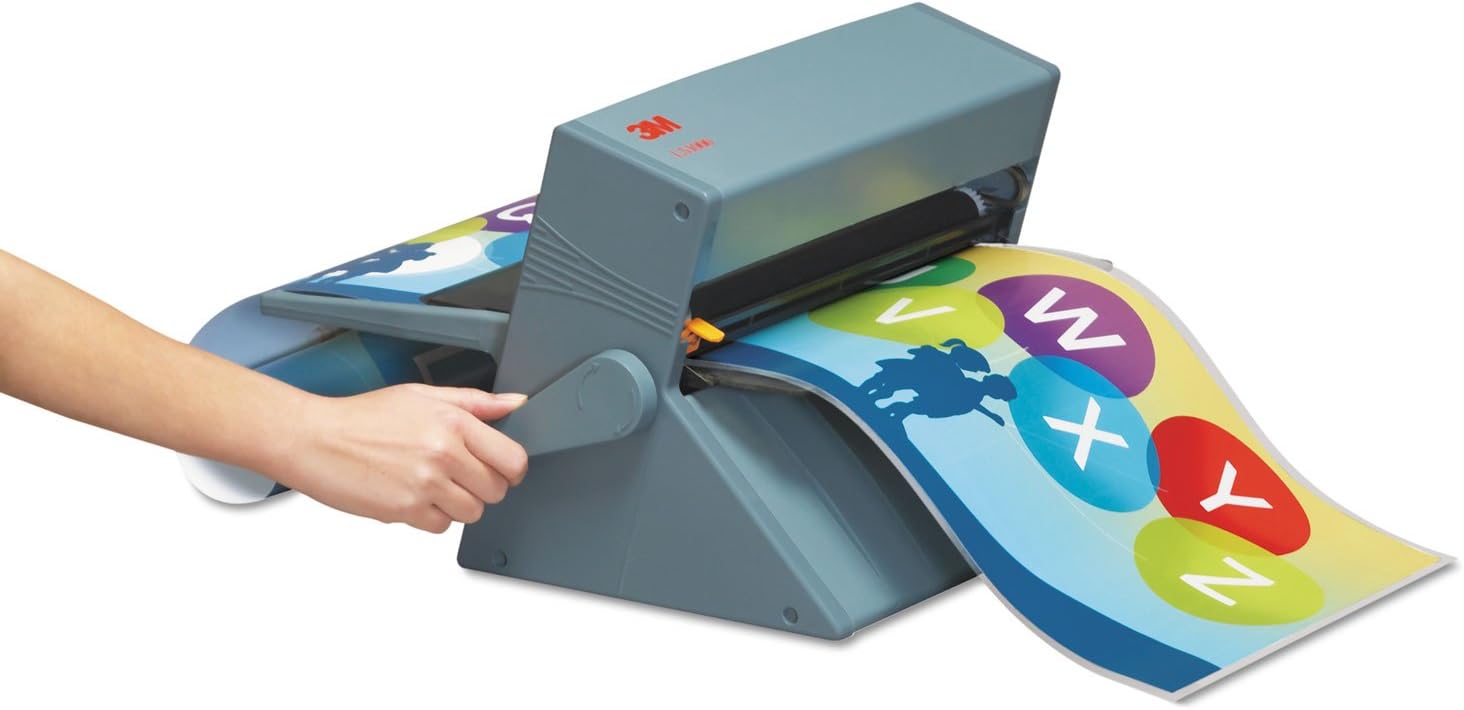
Image: Operating the Scotch LS1000. A user turns the side handle to feed a document through the laminator, which emerges laminated.
- Trim (Optional): Once laminated, you may trim the excess film around your document using scissors or a paper trimmer for a clean finish.
The LS1000 is compatible with inkjet, thermal, and other sensitive papers. It can laminate both sides for protection or laminate one side and apply permanent adhesive to the other for signs or labels.
Maintenance
- Cleaning: Periodically wipe the exterior of the laminator with a soft, dry cloth. Do not use abrasive cleaners or solvents.
- Cartridge Replacement: When the laminating film runs out, replace the cartridge with a new Scotch LS1000 compatible cartridge. Refer to the "Setup" section for cartridge installation.
- Storage: Store the laminator in a clean, dry place when not in use.
Troubleshooting
| Problem | Possible Cause | Solution |
|---|---|---|
| Document not feeding properly. | Document is not aligned, or cartridge is not installed correctly. | Ensure the document is straight and centered. Verify the laminating cartridge is securely in place. |
| Lamination appears wrinkled or uneven. | Document was not fed straight, or handle was turned too quickly. | Feed documents slowly and ensure they are straight. Turn the handle at a consistent, moderate pace. |
| Laminator handle is difficult to turn. | Document is too thick, or a jam has occurred. | Do not force the handle. Remove the document if possible. Ensure documents do not exceed 1/10 inch thickness. |
Specifications
- Model: LS1000
- Laminating Width Maximum: 12 Inches
- Maximum Document Thickness: 1/10 inch
- Operation: Manual, Heat-Free
- Product Dimensions: 13.5 x 13.3 x 18.5 inches
- Item Weight: 0.01 ounces (Note: This weight seems unusually low and may refer to a component, not the full unit. Refer to packaging for accurate shipping weight.)
- Brand: Scotch
- Manufacturer: 3M
Warranty and Support
For warranty information or technical support, please refer to the documentation included with your purchase or visit the official Scotch brand website. You may also contact 3M customer service directly for assistance.