
Introduction
This manual provides essential instructions for the safe and efficient operation of your RCA RS2928B CD Music System. This versatile audio system integrates Bluetooth wireless technology, a CD player, and an FM radio, along with a clock/timer function and a USB charging port. Please read this manual thoroughly before using the device and retain it for future reference.
Important Safety Information
To reduce the risk of electric shock, fire, or injury, always follow these basic safety precautions:
- Do not expose this appliance to rain or moisture.
- Do not block any ventilation openings.
- Ensure proper power supply voltage as indicated on the unit.
- Protect the power cord from being walked on or pinched.
- Unplug the unit during lightning storms or when unused for long periods.
- Refer all servicing to qualified service personnel.
- Do not open the cabinet; there are no user-serviceable parts inside.
Package Contents
Please check that the following items are included in your package:
- RCA RS2928B CD Music System Main Unit
- Two (2) Speakers
- Remote Control
- AC Power Adapter
- User Manual (this document)
Product Overview
Main Unit Front View
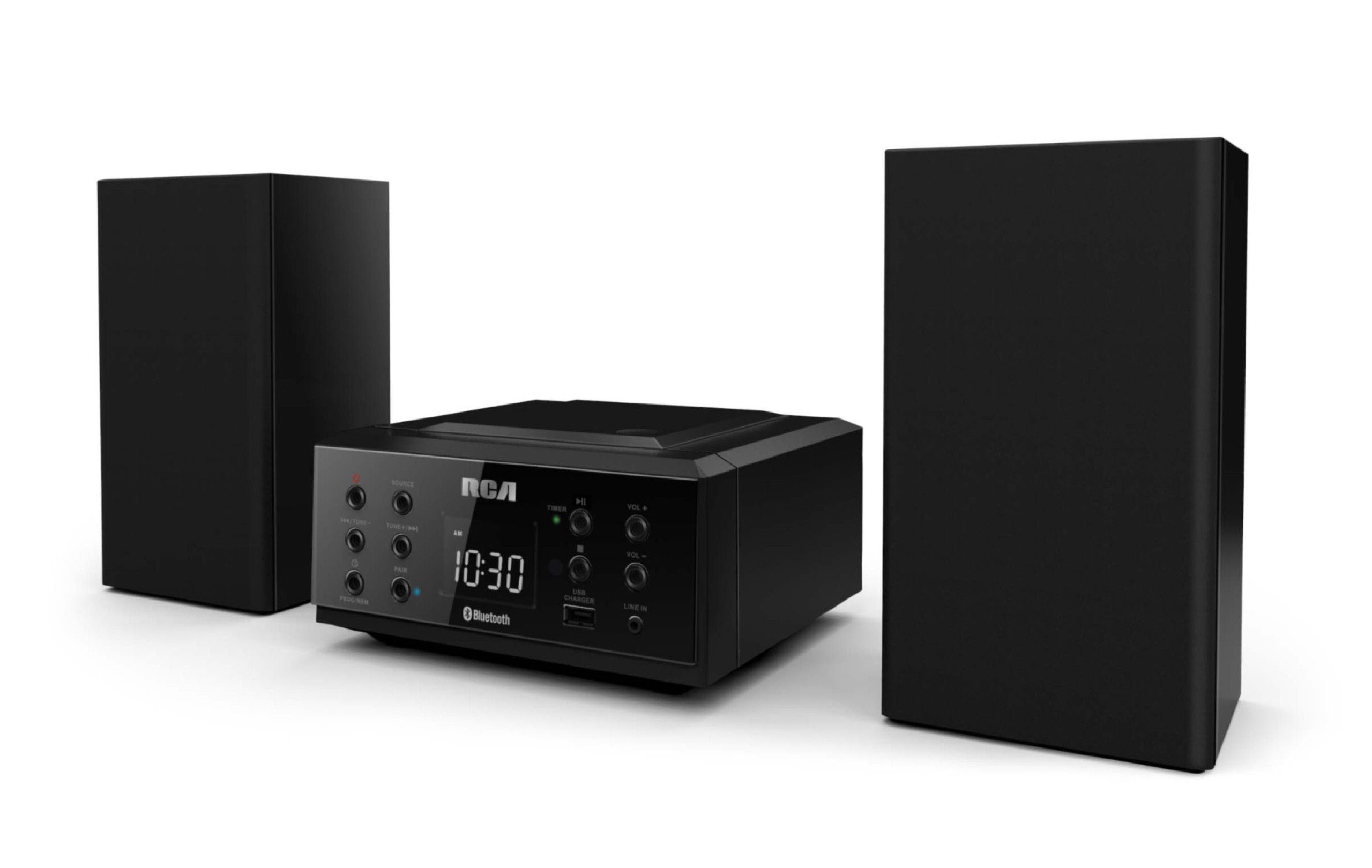
This image displays the front of the RCA RS2928B CD Music System, showing the central display screen, various control buttons for playback and mode selection, and the top-loading CD compartment. The two detachable speakers are visible on either side of the main unit.
Key Features Diagram

This diagram illustrates the primary functionalities of the system, emphasizing its Bluetooth connectivity for wireless audio streaming, the integrated CD player for disc playback, and the digital FM radio tuner.
Connectivity and Power Diagram

This image details the system's connectivity options, specifically highlighting the USB charging port for external devices and the power input connection for the AC adapter.
Setup
1. Placement
Place the main unit and speakers on a stable, flat surface. Ensure adequate ventilation around the unit to prevent overheating. Avoid placing near heat sources or in direct sunlight.
2. Connecting Speakers
Connect the speaker wires from each speaker to the corresponding speaker terminals on the rear of the main unit. Ensure correct polarity (red to red, black to black) for optimal sound quality.
3. Power Connection
Plug the AC power adapter into the DC IN jack on the back of the main unit, then plug the other end into a standard wall outlet (AC 120V ~ 60Hz).
Operating Instructions
Power On/Off
Press the POWER button on the front panel or remote control to turn the unit on or off.
Bluetooth Operation
- Press the SOURCE button repeatedly until "BT" (Bluetooth) appears on the display.
- The unit will enter pairing mode automatically, indicated by a flashing Bluetooth icon or message.
- On your Bluetooth-enabled device (smartphone, tablet), enable Bluetooth and search for available devices.
- Select "RCA RS2928B" from the list.
- Once paired, the unit will emit a confirmation tone, and the Bluetooth indicator will stop flashing. You can now stream audio wirelessly.
CD Playback
- Press the SOURCE button to select "CD" mode.
- Open the CD compartment cover located on top of the main unit.
- Place a CD with the label side facing up.
- Close the CD compartment cover. The system will read the disc and begin playback automatically.
- Use the PLAY/PAUSE, STOP, SKIP (|<< / >>|) buttons to control playback.
FM Radio Operation
- Press the SOURCE button to select "FM" mode.
- Extend the FM antenna fully for best reception.
- Press and hold the TUNE +/- buttons to automatically scan for the next available station. Briefly press to manually tune.
- To save a station as a preset, press the MEM button, then use PRESET +/- to select a preset number, and press MEM again to confirm.
Clock and Timer Function
Refer to the detailed instructions in the full manual for setting the clock and programming the timer/alarm functions. These functions are typically accessed via dedicated buttons on the remote control or by pressing and holding specific buttons on the main unit.
USB Charging Port
Connect your smartphone or tablet to the USB port on the front of the unit using a compatible USB cable. This port provides power for charging your device. Note that this port is for charging only and does not support media playback.
Maintenance
Cleaning the Unit
Wipe the exterior of the unit with a soft, dry cloth. Do not use abrasive cleaners, waxes, or solvents. For the CD lens, use a specialized CD lens cleaner disc.
Storage
If storing the unit for an extended period, unplug it from the power outlet and store it in a cool, dry place away from direct sunlight and extreme temperatures.
Troubleshooting
| Problem | Possible Cause | Solution |
|---|---|---|
| No power | Power cord not connected; Power outlet not active. | Ensure power cord is securely plugged in; Try a different outlet. |
| No sound | Volume too low; Speakers not connected; Incorrect source selected. | Increase volume; Check speaker connections; Select correct source (CD, BT, FM). |
| CD not playing | CD inserted incorrectly; Disc scratched/dirty; CD mode not selected. | Insert CD with label side up; Clean or replace disc; Select CD source. |
| Bluetooth pairing failure | Device too far; Bluetooth not enabled on device; Unit not in pairing mode. | Move device closer; Enable Bluetooth; Ensure unit is in BT pairing mode. |
| Poor FM reception | Antenna not extended; Weak signal. | Extend FM antenna fully; Reposition unit for better signal. |
Specifications
| Feature | Detail |
|---|---|
| Brand | RCA |
| Model | RS2928B |
| Connectivity Technology | Bluetooth, USB |
| Speaker Type | Stereo |
| Item Dimensions (L x W x H) | 8.1 x 4.1 x 7.4 inches |
| Item Weight | 1.8 Pounds |
| Power Source | Corded Electric |
| Supported Standards | CD |
| Bluetooth Support | Yes |
| Supported Audio Format | CD, MP3 |
| Number of Speakers | 2 |
| Audio Output Mode | Stereo |
Warranty and Support
This product is covered by a limited manufacturer's warranty. Please refer to the warranty card included in your package for specific terms and conditions, including warranty duration and coverage details. For technical support or service inquiries, please contact RCA customer service through their official website or the contact information provided with your purchase documentation.


