
1. Introduction
The White-Rodgers 8A18Z-2 is an evaporative cooling control panel designed to manage single-stage evaporative cooling systems. This control panel is intended for use in conjunction with the White-Rodgers 1F51N-619 thermostat. It features an integral transformer for 120 VAC or 240 VAC to 24 VAC operation, separate fan and pump relays, and options for high or low fan speed selection. Its lightweight, weather-resistant plastic case meets relevant code requirements.
2. Safety Information
WARNING: Installation and servicing of this control panel must be performed by a qualified technician. Disconnect all power to the unit before installing or servicing to prevent electrical shock or equipment damage.
- Always follow local electrical codes and ordinances.
- Ensure proper grounding of the control panel.
- Do not operate the unit with damaged wiring.
- Keep children away from electrical components.
- This control panel is designed for evaporative cooling applications only.
3. Package Contents
Verify that all components are present before beginning installation:
- White-Rodgers 8A18Z-2 Evaporative Cooling Control Panel
- Installation Instructions (this manual)
- Note: The White-Rodgers 1F51N-619 thermostat, required for operation, is sold separately.
4. Setup and Installation
The 8A18Z-2 control panel is designed for wall mounting. Ensure the mounting location is protected from direct weather exposure and allows for proper ventilation.
4.1 Mounting the Control Panel
- Select a suitable wall location near the evaporative cooler unit and a power source.
- Open the control panel cover.
- Secure the control panel to the wall using appropriate fasteners through the designated mounting holes.
4.2 Wiring Instructions
The relay panel is removable for easier field wiring. Refer to the wiring diagram provided inside the control panel cover for specific connections. Ensure all connections are secure and comply with local electrical codes.
- Power Supply: Connect the 120 VAC or 240 VAC power supply to the integral transformer terminals as indicated.
- Thermostat Connection: Connect the White-Rodgers 1F51N-619 thermostat to the low voltage terminals (24 VAC) on the control panel.
- Fan Connections: Connect the evaporative cooler fan motor wires to the fan relay terminals. Select either high or low fan speed as desired.
- Pump Connections: Connect the evaporative cooler pump motor wires to the pump relay terminals.
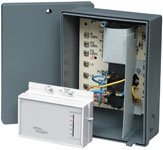
Figure 1: White-Rodgers 8A18Z-2 Evaporative Cooling Control Panel. This image shows the compact, grey plastic enclosure of the control panel, designed for wall mounting and housing the internal relays and transformer for evaporative cooler operation.
5. Operating Instructions
Once properly installed and wired, the 8A18Z-2 control panel operates in conjunction with the connected 1F51N-619 non-programmable thermostat.
- Power On: After installation, restore power to the control panel.
- Thermostat Control: Use the connected 1F51N-619 thermostat to set the desired temperature and operating mode (e.g., Cool, Fan Only).
- Fan Speed Selection: The control panel allows for selection between high and low fan speeds. This setting is typically configured during installation via wiring connections or jumpers on the relay board. Consult the wiring diagram for details.
- Evaporative Cooling Cycle: When the thermostat calls for cooling, the control panel will activate the pump to saturate the cooler pads and then activate the fan to circulate cooled air.
6. Maintenance
The White-Rodgers 8A18Z-2 control panel requires minimal maintenance. Regular inspection is recommended to ensure optimal performance.
- Annual Inspection: Annually, or before the cooling season, inspect the control panel for any signs of wear, damage, or loose connections.
- Cleaning: Keep the exterior of the control panel clean and free of dust and debris. Use a soft, dry cloth. Do not use abrasive cleaners or solvents.
- Wiring Check: Periodically check all wiring connections to ensure they are tight and free from corrosion.
7. Troubleshooting
Before troubleshooting, ensure all power to the unit is disconnected.
| Problem | Possible Cause | Solution |
|---|---|---|
| No power to control panel or thermostat |
|
|
| Fan not operating |
|
|
| Pump not operating |
|
|
If problems persist after attempting these solutions, contact a qualified HVAC technician.
8. Specifications
| Model | 8A18Z-2 |
| Type | Evaporative Cooling Control Panel |
| Compatibility | Designed for use with White-Rodgers 1F51N-619 thermostat |
| Input Voltage | 120 VAC or 240 VAC |
| Output Voltage (Thermostat) | 24 VAC |
| Combined Relay Loads (Full Load) | 16.0 A @ 120 VAC, 8.0 A @ 240 VAC |
| Combined Relay Loads (Locked Rotor) | 96.0 A @ 120 VAC, 48.0 A @ 240 VAC |
| Fan Relay (Full Load) | 12.0 A @ 120 VAC, 6.0 A @ 240 VAC |
| Fan Relay (Locked Rotor) | 72.0 A @ 120 VAC, 36.0 A @ 240 VAC |
| Pump Relay (Full Load) | 10.0 A @ 120 VAC, 5.0 A @ 240 VAC |
| Pump Relay (Locked Rotor) | 60.0 A @ 120 VAC, 30.0 A @ 240 VAC |
| Material | Weather-resistant plastic case |
| Color | Gray |
| Mounting Type | Wall Mount |
| Item Weight | 8 pounds (approx. 3.6 kg) |
9. Warranty and Support
For warranty information and technical support, please contact White-Rodgers customer service or visit their official website. Keep your purchase receipt for warranty claims.
White-Rodgers Contact Information:
- Website: www.emerson.com/en-us/automation/commercial-residential-solutions/white-rodgers
- Refer to product packaging or the White-Rodgers website for current contact numbers and support hours.


