
Introduction
The Plantronics Blackwire 500 Series C520-M is a corded USB binaural headset designed for PC calls and multimedia use. It features Smart Sensor™ technology for intuitive call management and provides premium hi-fi stereo audio. This manual provides instructions for setting up, operating, maintaining, and troubleshooting your headset.
Package Contents
Verify that your package contains the following items:
- Plantronics Blackwire C520-M Headset
- Carrying Case
Setup
Connecting the Headset
- Locate an available USB port on your computer (laptop or desktop).
- Plug the USB connector of the Blackwire C520-M headset into the USB port.
- Allow your computer to automatically detect and install the necessary drivers. This process may take a few moments.
- Once installed, the headset will be ready for use. You may need to select it as the default audio device in your computer's sound settings or within your communication software (e.g., Microsoft Teams, Skype).
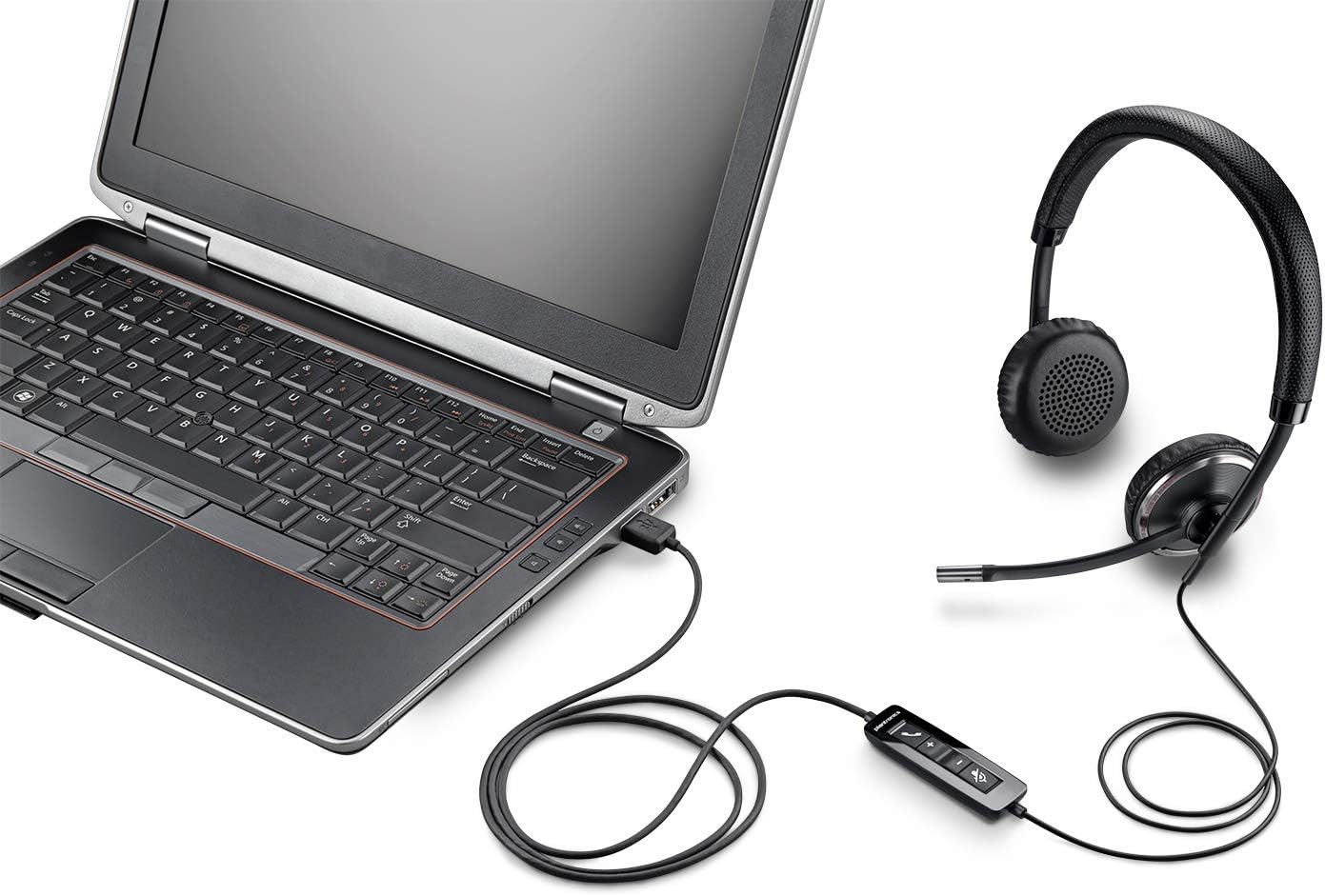
Image: The Plantronics Blackwire C520-M headset with its inline control unit and USB connector, plugged into the side of a laptop.
Operating the Headset
Wearing the Headset
- Place the headset over your head with the ear cushions covering both ears.
- Adjust the headband for a comfortable and secure fit.
- Position the microphone boom so that the microphone is approximately two finger-widths from the corner of your mouth.
Using the Inline Controls
The Blackwire C520-M features an inline control unit on the cable for easy access to common functions:
- Volume Up/Down: Press the + or - buttons to adjust the listening volume.
- Mute/Unmute: Press the microphone icon button to mute or unmute your microphone during a call. An audio alert may indicate the mute status.
- Call Answer/End: Press the phone icon button to answer an incoming call or end an active call.

Image: The Plantronics Blackwire C520-M headset, showing the binaural earcups, adjustable headband, microphone boom, and the inline control unit with volume, mute, and call buttons.
Smart Sensor™ Technology
The headset is equipped with Smart Sensor™ technology. This feature allows the headset to detect when it is being worn. For example, it can automatically answer a call when you put on the headset, or pause media when you take it off. Refer to your communication software settings for specific Smart Sensor™ functionalities and customization options.
Maintenance
Cleaning
- Wipe the headset with a soft, dry cloth.
- For ear cushions (faux leather) and plastic surfaces, a slightly damp cloth can be used. Avoid excessive moisture.
- Do not use harsh chemicals, cleaning solvents, or abrasive materials.
Storage
- When not in use, store the headset in its provided carrying case to protect it from dust and damage.
- Avoid storing the headset in extreme temperatures or direct sunlight.
Troubleshooting
| Problem | Solution |
|---|---|
| No audio from headset |
|
| Microphone not working |
|
| Smart Sensor™ not functioning |
|
Specifications
- Model: Blackwire C520-M (88861-02)
- Connectivity: USB (Corded)
- Headphones Jack: USB
- Ear Placement: Over Ear (Binaural)
- Form Factor: Closed-back
- Material: Faux Leather, Plastic
- Color: Black
- Frequency Range: 100 Hz–8kHz
- Special Feature: Noise Cancellation (Microphone), Smart Sensor™ Technology
- Control Type: Volume Control, Mute, Call Answer/End (Inline Remote)
- Compatible Devices: Laptops, Desktops, Tablets, Cellphones, Gaming Consoles (via USB)
- Item Weight: Approximately 0.7 pounds (11.2 ounces)
- Product Dimensions: 8.8 x 8.1 x 2.1 inches
- Included Components: Headset, Carrying Case
- Manufacturer: Plantronics
Support
For further assistance, technical support, or warranty information, please visit the official Plantronics (now Poly) support website or contact their customer service. Keep your purchase receipt for warranty claims.
Online Support: www.poly.com/us/en/support


