
1. Introduction
The Optoma HD25-LV delivers outstanding high-definition 1080p video and graphics with unsurpassed color accuracy and incredibly sharp detail. The Optoma HD25-LV will dazzle your audience with its stunning image clarity. Its 3200 ANSI lumens and 20,000:1 contrast ratio provide the brightness you need for your most demanding home theater installation. It offers full 3D compatibility for seamless integration with your favorite Blu-ray 3D player, Xbox, PS3 and other gaming consoles. Designed for maximum performance and reliability, the Optoma HD25-LV features industry-leading energy saving features and whisper quiet operation to help you create the most magnificent home theater.
2. What's in the Box
- Optoma HD25-LV Projector
- WHD200 Wireless HDMI System (if included in package)
- AC power cord
- Remote control
- Batteries for remote
- Lens cap
- Multilingual CDROM
- User's manual
- Quick start card
- Warranty card
3. Product Overview

Figure 1: Front angled view of the Optoma HD25-LV Projector.
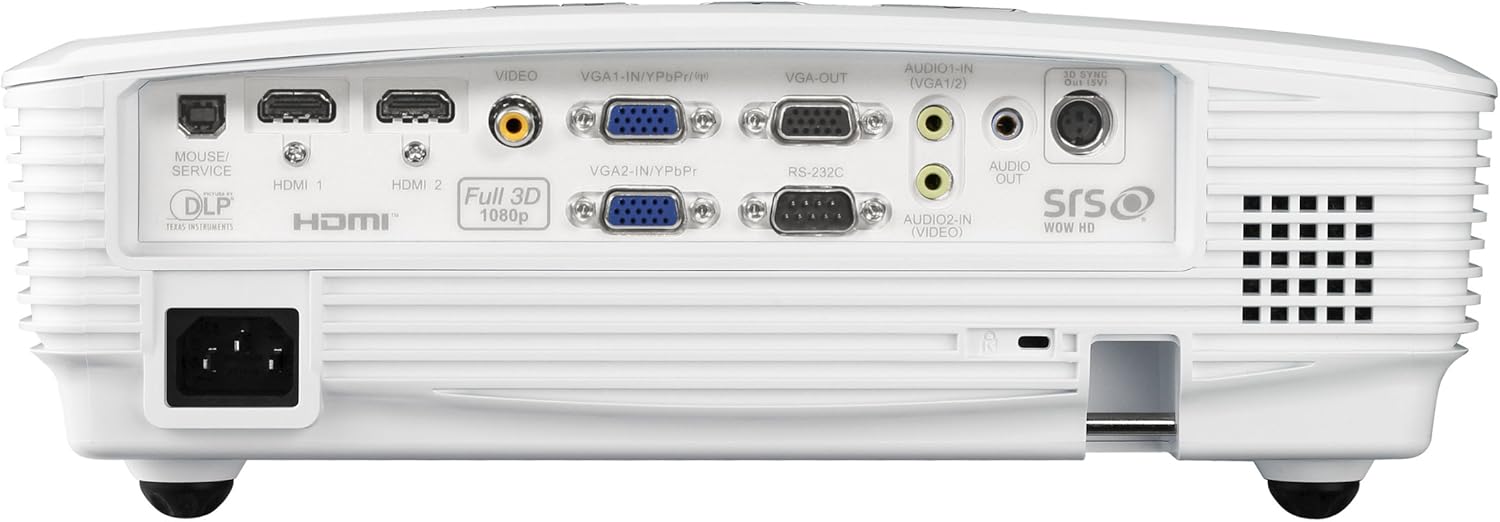
Figure 2: Rear view of the projector, highlighting the various input and output ports.
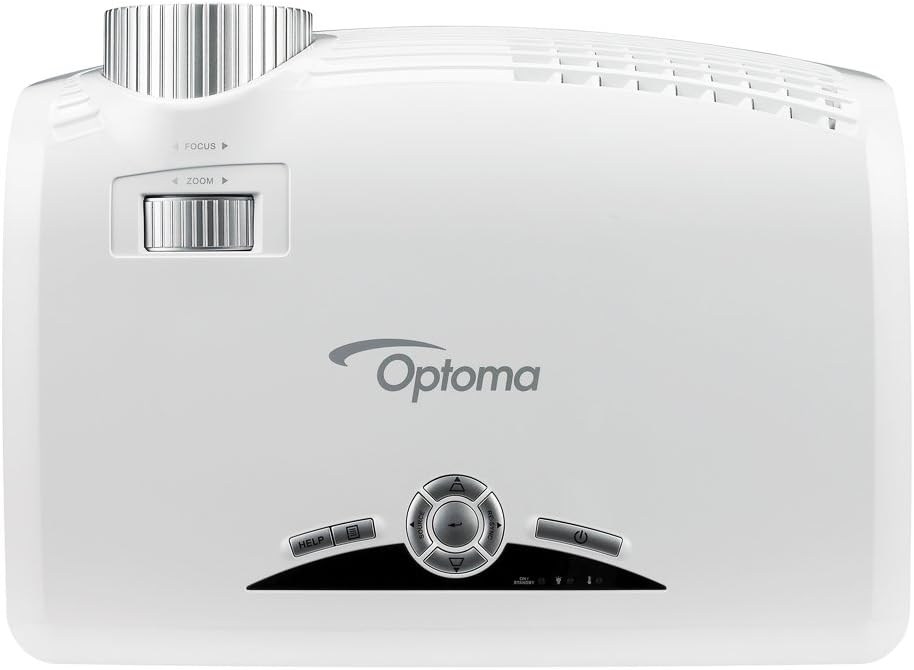
Figure 3: Top view of the projector, showing the control panel and lens adjustment rings.
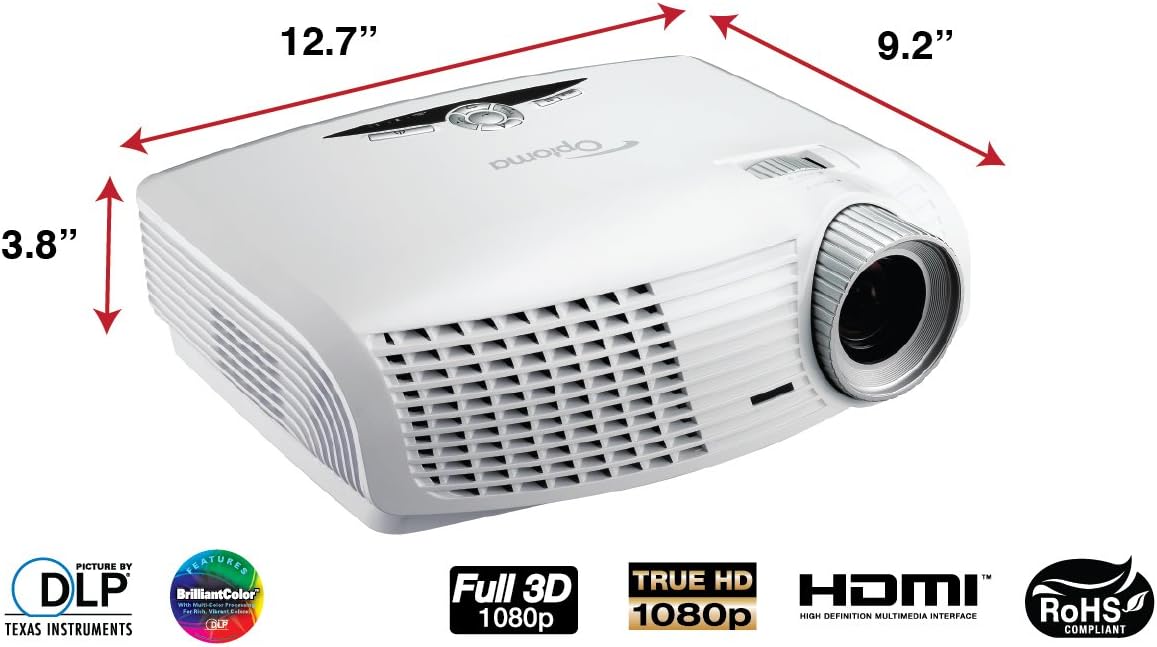
Figure 4: Dimensions of the Optoma HD25-LV Projector (12.7 x 9.2 x 3.8 inches).

Figure 5: Diagram illustrating various devices that can be connected to the projector, including game consoles, digital cameras, smartphones, tablets, computers, Blu-ray/DVD players, set-top boxes, camcorders, and Apple TV.
4. Key Features
- Resolution: Native 1080p (1920 x 1080) for high-definition clarity.
- Brightness: 3500 ANSI Lumens for vibrant images in various lighting conditions.
- Contrast Ratio: 20,000:1 for deep blacks and bright whites.
- 3D Compatibility: Full 3D support for immersive viewing with compatible sources.
- Connectivity: Two HDMI v1.4a, two VGA-in, VGA-out, 3D VESA Port, composite video, two audio-in, audio-out, RS-232C, USB-B.
- Screen Size Range: Projects a 67-inch image from 8 feet, or a 101-inch image from 12 feet.
- Keystone Correction: Yes, for adjusting image shape.
- Lens Shift: No.
5. Specifications
| Feature | Detail |
|---|---|
| Brand | Optoma |
| Model Number | HD25-LV |
| Item Weight | 6.8 pounds |
| Product Dimensions | 12.7 x 9.2 x 3.8 inches |
| Output Wattage | 16 Watts |
| Color Name | White |
| Special Features | 3D-Ready |
| Connectivity Technology | HDMI |
| Display Resolution | 1920 x 1080 |
| Recommended Uses | Gaming |
6. Setup and Installation
Before beginning installation, ensure you have all components listed in the 'What's in the Box' section. For ceiling mounting, use a compatible projector mount (not included unless specified in your package variant). Connect your video sources (e.g., Blu-ray player, gaming console) to the projector's HDMI or VGA inputs using appropriate cables. Connect audio output if using external speakers. Ensure the projector is placed at an optimal distance from your screen to achieve the desired image size and clarity. Refer to the quick start guide for initial power-up and basic image adjustments.
7. Operation
To power on the projector, press the power button on the unit or the remote control. Select the desired input source using the 'Source' button. Adjust focus and zoom using the rings around the lens. Use the keystone correction feature to square the image if the projector is not perfectly perpendicular to the screen. For 3D content, ensure your source device is outputting 3D, and use compatible 3D glasses (sold separately) for viewing. The remote control provides access to various menu options for advanced settings, color calibration, and picture modes.
8. Maintenance
Regular maintenance ensures optimal performance and extends the lifespan of your projector. Keep the projector clean by gently wiping the exterior with a soft, dry cloth. Periodically clean the lens using a lens cleaning cloth and solution designed for optical surfaces. Ensure the air vents are free from dust and obstructions to prevent overheating. It is recommended to vacuum the air filters monthly to maintain proper airflow. Avoid operating the projector in excessively hot or dusty environments.
9. Troubleshooting
- No Image/Poor Image Quality: Check all cable connections. Ensure the correct input source is selected. Adjust focus and zoom. Verify the lamp is functioning correctly.
- Rainbow Effect: Some users may perceive a 'rainbow effect' with DLP projectors. This is a characteristic of the technology and not a defect.
- Fan Noise: The projector's fan noise is normal, especially during extended use or in high-brightness modes, as it dissipates heat. Ensure vents are clear.
- Focus Issues (Corners vs. Center): Slight focus differences between the center and corners can occur. Try adjusting focus to a middle ground for overall clarity.
- 3D Not Working: Ensure your 3D source, content, and glasses are all compatible and correctly configured.
10. Warranty Information
The Optoma HD25-LV Projector comes with a 1-Year Limited Parts and Labor Warranty. The projector lamp is covered by a 90-Day Warranty. Please refer to the warranty card included in your package for full terms and conditions, or contact Optoma customer support for further assistance.


