
1. Introduction
Thank you for choosing the Einhell TC-RH 800 E Rotary Hammer. This powerful tool is designed for drilling, hammer drilling, and chiseling in concrete, masonry, wood, and metal. It features an 800W motor, 2.5 Joules of impact energy, and an SDS Plus chuck for quick and secure bit changes. Please read this manual thoroughly before operating the tool to ensure safe and efficient use.
2. General Safety Instructions
Always observe the following safety precautions when using power tools:
- Work Area Safety: Keep the work area clean and well-lit. Cluttered or dark areas invite accidents. Do not operate power tools in explosive atmospheres, such as in the presence of flammable liquids, gases, or dust.
- Electrical Safety: Power tool plugs must match the outlet. Never modify the plug in any way. Avoid body contact with earthed or grounded surfaces such as pipes, radiators, ranges, and refrigerators.
- Personal Safety: Always wear eye protection. Use hearing protection when operating noisy tools. Wear a dust mask if operations create dust. Dress properly; avoid loose clothing or jewelry. Secure long hair.
- Tool Use and Care: Do not force the power tool. Use the correct power tool for your application. Disconnect the plug from the power source before making any adjustments, changing accessories, or storing power tools.
- Service: Have your power tool serviced by a qualified repair person using only identical replacement parts. This will ensure that the safety of the power tool is maintained.
3. Product Components
Familiarize yourself with the main components of your Einhell TC-RH 800 E Rotary Hammer:
- SDS Plus Chuck
- Auxiliary Handle
- Depth Stop
- Mode Selector Switch (Drill, Hammer Drill, Chisel)
- Rotation Direction Switch (Forward/Reverse)
- On/Off Trigger with Speed Control
- Lock-on Button (for continuous operation)

Figure 1: Overview of the Einhell TC-RH 800 E Rotary Hammer.

Figure 2: The rotary hammer in use, demonstrating its application for drilling into a wall.

Figure 3: Close-up view of the SDS Plus chuck, designed for quick and secure bit changes.
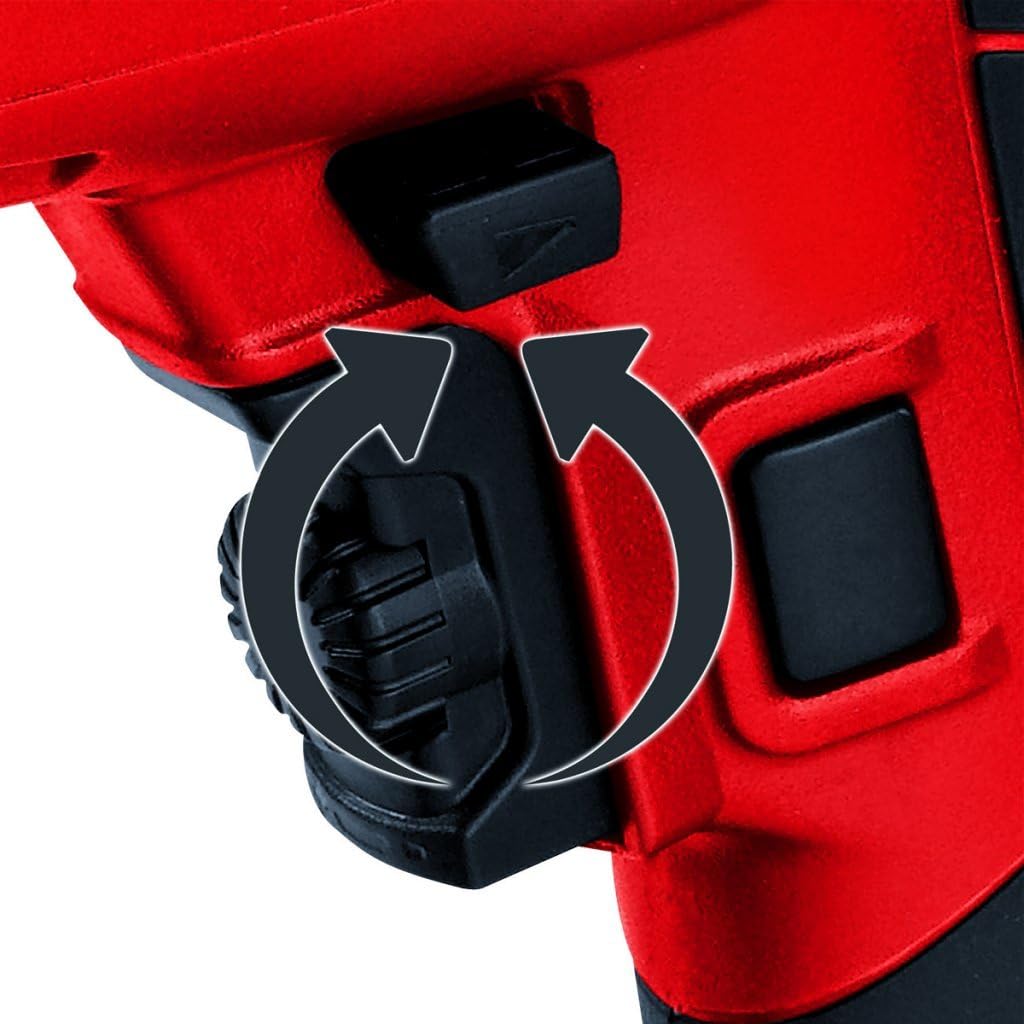
Figure 4: Detail of the rotation direction switch, allowing selection between forward and reverse rotation.

Figure 5: The ergonomic main handle designed for comfortable and secure grip.

Figure 6: The adjustable depth stop, used to set a precise drilling depth.

Figure 7: Einhell brand logo prominently displayed on the tool body, indicating authenticity.
4. Setup
4.1 Attaching the Auxiliary Handle
The auxiliary handle provides additional grip and control. Loosen the auxiliary handle by turning it counter-clockwise. Slide it onto the tool body to the desired position and tighten it clockwise.
4.2 Installing the Depth Stop
Insert the depth stop rod into the designated hole on the auxiliary handle. Adjust the depth stop to the required drilling depth by sliding it in or out. Secure it by tightening the auxiliary handle.

Figure 8: The SDS Plus chuck with the depth stop rod correctly installed.
4.3 Inserting SDS Plus Drill Bits/Chisels
- Clean the shank of the drill bit or chisel and apply a thin layer of grease.
- Pull back the chuck sleeve and insert the bit into the chuck, rotating it slightly until it engages.
- Release the chuck sleeve. Pull the bit to check if it is securely locked. The bit should have a small amount of axial play, which is normal for SDS Plus systems.
5. Operating Instructions
5.1 Mode Selection
The mode selector switch allows you to choose the appropriate operating mode:
- Drilling (Rotation Only): For drilling in wood, metal, or plastics.
- Hammer Drilling (Rotation with Impact): For drilling in concrete and masonry.
- Chiseling (Impact Only): For light chiseling work, such as removing tiles or plaster.
To change the mode, rotate the selector switch to the desired symbol. Ensure the tool is unplugged before changing modes, especially for chiseling, to prevent accidental activation.
5.2 Powering On/Off and Speed Control
Press the On/Off trigger to start the tool. The speed is variable depending on how far you press the trigger. For continuous operation, press the lock-on button while the trigger is fully depressed. To switch off, release the trigger or press it again if the lock-on button is engaged.
5.3 Rotation Direction
Use the rotation direction switch (Figure 4) to select forward or reverse rotation. Forward rotation is for drilling and hammer drilling. Reverse rotation is primarily for unscrewing or freeing jammed drill bits. Change the rotation direction only when the tool is switched off.
6. Maintenance
Regular maintenance ensures the longevity and optimal performance of your rotary hammer.
- Cleaning: Keep the ventilation slots clean to prevent overheating. Wipe the tool housing with a soft, damp cloth. Do not use harsh cleaning agents or solvents.
- Chuck Maintenance: Regularly clean the SDS Plus chuck and apply a small amount of special grease to the bit shanks to ensure smooth operation and prevent wear.
- Cord Inspection: Periodically inspect the power cord for any damage. If damaged, have it replaced by a qualified technician.
- Storage: Store the tool in its original case in a dry, secure place, out of reach of children.
7. Troubleshooting
| Problem | Possible Cause | Solution |
|---|---|---|
| Tool does not start. | No power supply. Power cord damaged. On/Off switch faulty. | Check power outlet and circuit breaker. Have cord replaced by a qualified technician. Contact customer support. |
| Reduced drilling/hammering performance. | Worn drill bit/chisel. Incorrect mode selected. Chuck dirty or dry. | Replace with a sharp, appropriate bit. Select the correct operating mode. Clean and grease the chuck and bit shank. |
| Tool overheats. | Blocked ventilation slots. Overloading the tool. | Clean ventilation slots. Reduce pressure and allow the tool to cool. Avoid continuous heavy use. |
8. Technical Specifications
| Feature | Specification |
|---|---|
| Brand | Einhell |
| Model Number | TC-RH 800 E (4257920) |
| Power Source | Corded Electric |
| Maximum Power | 800 W |
| Impact Energy | 2.5 J |
| Voltage | 230 V |
| Current Intensity | 3.33 A |
| Maximum Rotation Speed | 1000 RPM |
| Impact Rate | 5180 BPM |
| Chuck Type | SDS Plus |
| Maximum Chuck Size | 26 mm |
| Drilling Capacity (Concrete) | 26 mm |
| Drilling Capacity (Wood) | 26 mm |
| Drilling Capacity (Metal) | 26 mm |
| Maximum Torque | 30 Nm |
| Number of Speeds | 1 |
| Product Dimensions (L x W x H) | 40 x 10.5 x 35.5 cm |
| Item Weight | 3.27 kg |
| Color | Red |
| Material Type | Metal, Plastic |
| Included Components | Carrying case, Depth stop |
9. Warranty Information
Einhell products are manufactured to high-quality standards and are subject to strict quality controls. This product is covered by the manufacturer's warranty in accordance with the country-specific legal provisions. For detailed warranty terms and conditions, please refer to the warranty card included with your product or visit the official Einhell website.
10. Support
Should you have any questions regarding the operation, maintenance, or troubleshooting of your Einhell TC-RH 800 E Rotary Hammer, please contact Einhell customer service or visit our official website for further assistance and resources.
Official Website: www.einhell.com


