1. Introduction
Thank you for choosing the Ibiza Cube1812 2.1 Sound System. This system is designed to deliver powerful and clear audio for various applications. It comprises a 1200-watt bi-amplified active subwoofer, two 700-watt 3-way passive satellite speakers, two speaker stands, and all necessary speaker cables. The system features independent volume controls for the subwoofer and satellites, along with bass and treble adjustments for precise sound tuning.
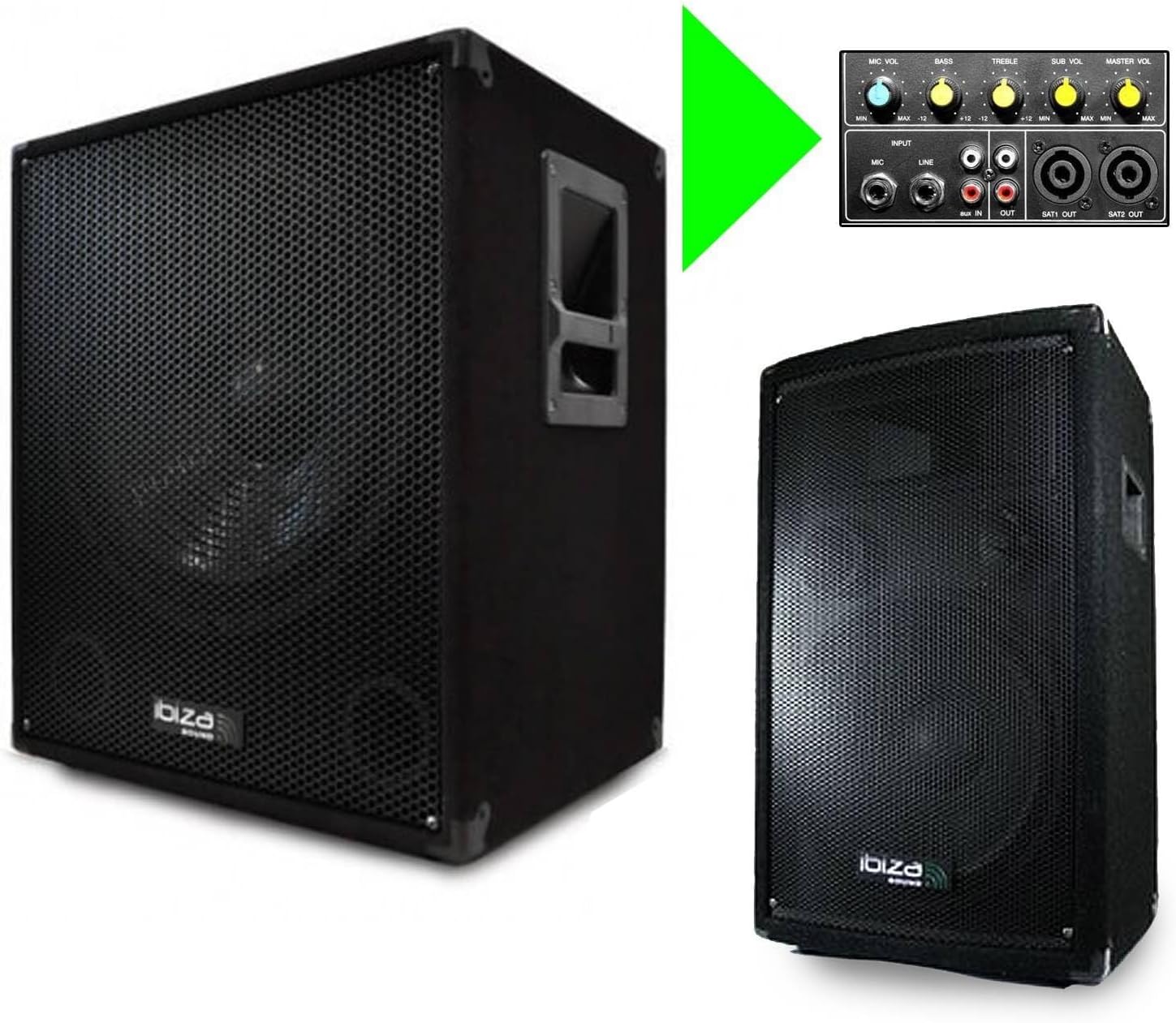
Figure 1: Overview of the Ibiza Cube1812 Sound System, showing the active subwoofer and one passive satellite speaker.
2. Safety Instructions
Please read these safety instructions carefully before operating the unit. Keep this manual for future reference.
- Power Supply: Ensure the power supply voltage matches the requirements specified on the unit (220V). Always connect the unit to a grounded power outlet.
- Moisture: Do not expose the unit to rain or moisture to prevent fire or electric shock.
- Ventilation: Ensure adequate ventilation. Do not block ventilation openings.
- Heat: Keep the unit away from heat sources such as radiators, heat registers, stoves, or other apparatus (including amplifiers) that produce heat.
- Cleaning: Clean only with a dry cloth.
- Servicing: Do not attempt to service this unit yourself. Refer all servicing to qualified service personnel.
- Speaker Stands: Ensure speaker stands are properly assembled and stable before mounting speakers. Do not exceed the maximum load capacity of 30 kg per stand.
3. Package Contents
Carefully unpack the box and check that all the following items are included:
- 1 x Ibiza Cube1812 Active Subwoofer
- 2 x Ibiza DISCO 12 Passive Satellite Speakers
- 2 x Speaker Stands with Carrying Bag
- Speaker Cables (for connecting satellites to subwoofer)
- Power Cable
- User Manual (this document)

Figure 2: Speaker stands and their carrying bag, included with the system.
4. Setup Instructions
Follow these steps to correctly set up your Ibiza Cube1812 Sound System:
4.1. Subwoofer Placement and Connections
- Place the active subwoofer on a stable, flat surface. Ensure there is enough space around it for proper ventilation.
- Locate the rear control panel of the subwoofer.
- Power Connection: Connect the power cable to the subwoofer's power input and then to a grounded 220V AC outlet. Do not switch on the power yet.
- Audio Input: Connect your audio source (e.g., DJ mixer, laptop, smartphone) to the subwoofer's input jacks. You can use the RCA Line Input or the 6.35mm Line Inputs.
- Microphone Input: If using a microphone, connect it to the MIC input.

Figure 3: Rear panel of the active subwoofer, detailing input/output connections and control knobs.
4.2. Satellite Speaker Setup
- Assemble the two speaker stands according to their instructions. Ensure they are stable and securely locked at the desired height (adjustable from 130 cm to 195 cm).
- Mount each passive satellite speaker onto the 35mm pole of the speaker stands. Ensure they are firmly seated.
- Connect the satellite speakers to the subwoofer using the provided Speakon cables. Connect one end of the Speakon cable to the "SAT1 OUT" on the subwoofer and the other end to the Speakon input on one satellite speaker. Repeat for the second satellite speaker using "SAT2 OUT".
5. Operating Instructions
Once the system is set up, follow these steps to operate it:
- Power On: Ensure all connections are secure. Switch the POWER button on the subwoofer to the "ON" position. The power indicator light should illuminate.
- Initial Volume Settings:
- Set the "MASTER VOL" knob to its minimum position.
- Set the "SUB VOL" knob to its minimum position.
- Set the "MIC VOL" knob to its minimum position.
- Set the "BASS" and "TREBLE" knobs to their center (0 dB) positions.
- Play Audio: Start playing audio from your connected source.
- Adjust Master Volume: Slowly increase the "MASTER VOL" knob until you reach a comfortable listening level.
- Adjust Subwoofer Volume: Use the "SUB VOL" knob to balance the bass level with the satellite speakers.
- Tone Control: Use the "BASS" and "TREBLE" knobs to fine-tune the overall sound to your preference.
- Microphone Volume: If using a microphone, slowly increase the "MIC VOL" knob to the desired level.
- Power Off: Before powering off, turn down all volume controls. Then, switch the POWER button to the "OFF" position.
6. Maintenance
Proper maintenance ensures the longevity and optimal performance of your sound system.
- Cleaning: Use a soft, dry cloth to clean the exterior surfaces of the subwoofer and speakers. Do not use liquid cleaners or aerosols.
- Ventilation: Regularly check that the ventilation openings on the subwoofer are clear of dust and debris.
- Storage: When not in use for extended periods, store the system in a dry, dust-free environment. Use the provided carrying bag for the speaker stands.
- Cables: Inspect all cables periodically for any signs of wear or damage. Replace damaged cables immediately.
7. Troubleshooting
If you encounter issues with your Ibiza Cube1812 Sound System, refer to the following common problems and solutions:
| Problem | Possible Cause | Solution |
|---|---|---|
| No power | Power cable not connected; Power switch off; Blown fuse; Power outlet fault. | Ensure power cable is securely connected. Turn power switch ON. Check the fuse (refer to specifications for fuse type). Test the power outlet with another device. |
| No sound from speakers | Volume controls too low; Input source not connected or playing; Speaker cables disconnected; Incorrect input selected. | Increase MASTER VOL, SUB VOL, and MIC VOL. Ensure audio source is connected and playing. Check Speakon cable connections to satellites and subwoofer. Verify the correct input is selected on your source device. |
| Distorted sound | Volume too high (clipping); Input signal too strong; Damaged speaker or cable. | Reduce MASTER VOL or input source volume. Check input signal level. Inspect speakers and cables for damage. |
| Humming or buzzing noise | Ground loop issue; Loose cable connections; Interference from other electronic devices. | Ensure all components are connected to the same grounded power strip. Check all cable connections. Move the system away from other electronic devices. |
8. Specifications
8.1. Ibiza Cube1812 Active Subwoofer
- Amplification: Bi-amplified
- Max Power: 1200 Watts
- Woofer: 18 inches (46 cm)
- Bass Reflex: 2 vents
- Controls: Separate volume for Subwoofer & Satellites, Bass & Treble, Microphone Volume
- Bandwidth: 20 - 180 Hz
- SPL: 103 dB
- Max SPL: 129 dB
- Impedance: 8 Ohm
- Inputs: 1 x RCA Line Input, 2 x 6.35mm Line Inputs, 1 x Microphone Input
- Outputs: 1 x RCA Line Output, 2 x Speakon Outputs for Satellite Speakers
- Features: Carrying handles, 35mm pole mount, Anthracite matte finish, Metal reinforced corners
- Dimensions (H x W x D): 62 x 55.5 x 60.5 cm
- Weight: 33 kg
- Power Supply: 220 V
8.2. Ibiza DISCO 12 Passive Satellite Speakers (x2)
- Max Power: 700 Watts each
- System: 3-way Bass Reflex
- Woofer: 12 inches (30 cm)
- Midrange: 25.5 x 10 cm
- Tweeter: 10 x 10 cm
- Vent: 1
- Protection: PTC filter
- Bandwidth: 30 - 20,000 Hz
- SPL: 105 dB (+/- 3 dB)
- Impedance: 8 Ohm
- Input: Speakon
- Features: 35mm pole mount, Anthracite matte finish, Metal reinforced corners
- Dimensions (H x W x D): 67.5 x 43 x 34 cm
- Unit Weight: 14.5 kg
8.3. Speaker Stands (x2)
- Material: Aluminum
- Mounting: Standard 35mm bore
- Max Load Capacity: 30 kg
- Tube Diameter: 35 mm
- Adjustable Height: 130 to 195 cm (6 positions)
- Included: Carrying bag
8.4. General Product Specifications
- Manufacturer: Ibiza Sound
- Connectivity Technology: RCA
- Color: Black
- Compatible Devices: Laptop, Smartphone, MP3 player, DJ Mixer, Guitar, Keyboard, Microphone, Headphones
- Mounting Type: Floor Standing
- Item Weight (Total System): Approximately 132.72 Pounds (60.2 kg)
- Number of Channels: 2.1
- Audio Input: RCA
- Recommended Product Uses: For music players, PA applications
9. Warranty and Support
Ibiza Sound products are manufactured to high-quality standards. For warranty information and technical support, please refer to the documentation provided with your purchase or visit the official Ibiza Sound website. Keep your proof of purchase for any warranty claims.
For further assistance, please contact your retailer or the authorized service center.


