
Hisonic HS227
Hisonic SH-227 Portable PA System User Manual
Model: HS227
Introduction
The Hisonic SH-227 is a versatile, self-contained portable PA system designed for various sound amplification needs. It integrates a powerful 65-watt speaker with a 100-channel UHF wireless microphone system, a multi-functional music player, and a voice recorder. Its built-in rechargeable lithium battery makes it ideal for both indoor and outdoor use, providing convenience and portability without the need for constant access to a wall outlet.
What's in the Box
- HS227 Portable Amplifier Unit
- Power Cord
- UHF Cordless Microphone (1 unit)
- AA Batteries (2 units, for microphone)
- Shoulder Strap
- Remote Control
- User Manual (this document)
Product Overview
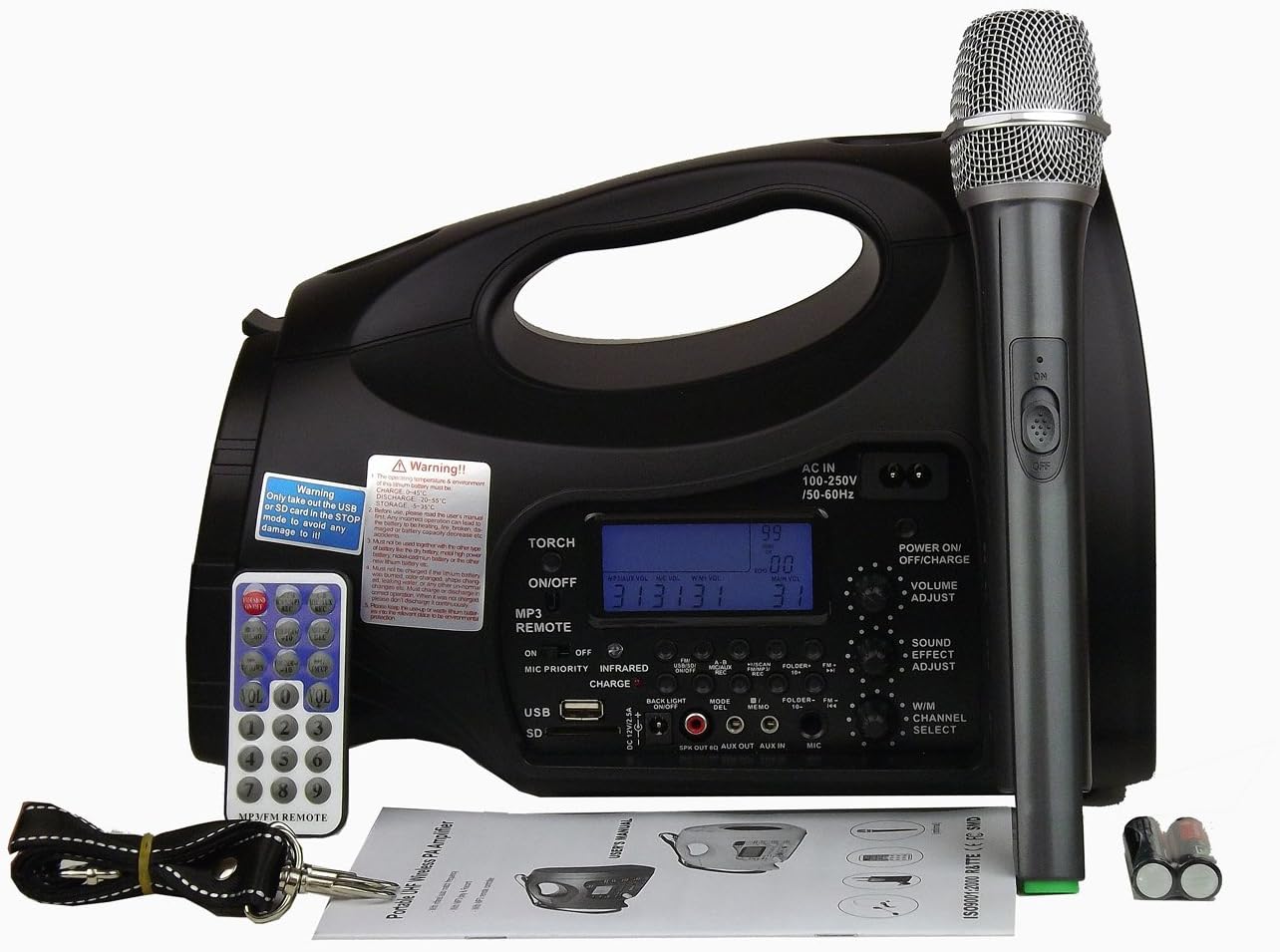
This image displays the Hisonic SH-227 portable PA system, showcasing its main unit, the UHF wireless microphone, and the remote control. The power cord, shoulder strap, and user manual are also visible, indicating all components included in the package.

This image provides a detailed top-down view of the Hisonic SH-227's control panel. Key features visible include the digital display, various control buttons for the music player and recorder, volume adjustment knobs, microphone input, AUX input, USB port, and SD card reader. The power switch and charging indicator are also clearly shown.
Component Identification:
- Main Speaker Unit: Houses the amplifier, speaker, battery, and control panel.
- Control Panel: Located on the top surface, featuring display, buttons, and input/output ports.
- UHF Wireless Microphone: For vocal amplification.
- Remote Control: For convenient operation of the music player and other functions.
- USB Port: For playing audio from USB drives.
- SD Card Reader: For playing audio from SD cards.
- AUX In: 3.5mm jack for connecting external audio devices (e.g., smartphones, CD players).
- Microphone Input: 6.35mm jack for connecting additional wired microphones.
- AC Input: For charging the internal battery and powering the unit.
- Shoulder Strap Mounts: For attaching the included shoulder strap for portability.
Setup
- Unpacking: Carefully remove all components from the packaging. Retain packaging for future storage or transport.
- Battery Installation (Microphone): Open the battery compartment of the UHF cordless microphone and insert the two AA batteries provided, observing correct polarity (+/-).
- Initial Charging: Before first use, fully charge the internal lithium battery of the main PA unit.
- Connect the supplied power cord to the AC input on the PA system and then to a standard wall outlet (AC 100-250V, 50-60Hz).
- The charging indicator light will illuminate. Charging typically takes several hours. The indicator will change or turn off when fully charged.
- The unit can be used while charging.
- Attaching Shoulder Strap (Optional): If desired, attach the shoulder strap to the designated mounts on the PA system for easier portability.
Operating Instructions
Power On/Off and Volume Control:
- To power on the unit, turn the "POWER ON/OFF/CHARGE" knob clockwise. The display will light up.
- Adjust the overall volume using the "VOLUME ADJUST" knob.
- To power off, turn the "POWER ON/OFF/CHARGE" knob counter-clockwise until it clicks off.
UHF Wireless Microphone Operation:
- Ensure the microphone has fresh AA batteries installed.
- Turn on the wireless microphone using its power switch.
- The PA system will automatically detect and connect to the microphone. If interference occurs, use the channel selection function on the PA system to switch to a different UHF channel (100 available channels).
- Adjust the microphone volume using the dedicated "MIC" knob on the control panel.
- For optimal sound, speak directly into the microphone head.
Music Player Functions (USB/SD/AUX/FM Radio):
- USB/SD Playback:
- Insert a USB flash drive or SD card into the respective port. The system will automatically switch to USB/SD mode and begin playing compatible audio files.
- Use the "PLAY/PAUSE", "PREV/VOL-", and "NEXT/VOL+" buttons on the control panel or remote control to manage playback.
- The "FOLDER+/-" buttons allow navigation through folders on the storage device.
- AUX Input:
- Connect an external audio device (e.g., smartphone, tablet, CD player) to the "AUX IN" jack using a 3.5mm audio cable.
- The system will automatically switch to AUX mode. Play audio from your connected device.
- Volume is controlled by both the PA system's "VOLUME ADJUST" and the connected device's volume.
- FM Radio:
- Press the "MODE" button on the control panel or remote until "FM" is displayed.
- Press and hold the "PLAY/PAUSE" button to auto-scan and save available FM stations.
- Use the "PREV/VOL-" and "NEXT/VOL+" buttons to switch between saved stations.
Voice Recorder Function:
- Ensure a USB drive or SD card is inserted for recording storage.
- Press the "REC" button on the control panel or remote control to start recording.
- Press "REC" again to stop recording. Recordings are saved to the inserted storage device.
Tone Control:
- Use the "BASS" and "TREBLE" knobs under "SOUND ADJUST" to fine-tune the audio output to your preference.
Maintenance
- Cleaning: Wipe the unit with a soft, dry cloth. Do not use liquid cleaners or abrasive chemicals.
- Battery Care:
- To prolong battery life, avoid completely draining the battery frequently.
- Charge the unit regularly, even if not in use, to maintain battery health.
- If storing for an extended period, charge the battery to about 50% and recharge every 3-6 months.
- Storage: Store the unit in a cool, dry place away from direct sunlight and extreme temperatures.
- Microphone Batteries: Replace AA batteries in the wireless microphone when performance degrades or the low battery indicator (if present) illuminates.
Troubleshooting
| Problem | Possible Cause | Solution |
|---|---|---|
| No power / Unit does not turn on. | Battery is depleted; Power cord not connected; Power switch off. | Charge the unit using the power cord; Ensure power cord is securely connected; Turn the "POWER ON/OFF/CHARGE" knob clockwise. |
| No sound from wireless microphone. | Microphone off; Microphone batteries low/dead; Microphone out of range; Channel interference. | Turn on microphone; Replace microphone batteries; Move closer to PA unit; Change UHF channel on PA system. |
| Music player (USB/SD/AUX) not working. | Incorrect mode selected; USB/SD not inserted correctly or corrupted; AUX cable faulty; External device volume low. | Press "MODE" button to select correct input; Re-insert USB/SD or try another; Check AUX cable and external device volume. |
| Sound distortion or feedback. | Volume too high; Microphone too close to speaker; Bass/Treble settings incorrect. | Reduce master volume; Increase distance between microphone and speaker; Adjust Bass/Treble knobs. |
Specifications

This image shows the rear label of the Hisonic SH-227 portable PA amplifier, detailing key specifications such as model number (SH-227), power supply requirements (AC 100-250V, DC 12V), peak music power (65W Max), UHF service range, and wireless channel information. It also includes FCC compliance information.
| Feature | Detail |
|---|---|
| Model Number | HS227 |
| Output Wattage | 65 Watts (Peak Music Power) |
| Power Source | Battery Powered (Built-in Lithium Battery), AC 100-250V / 50-60Hz |
| Wireless Microphone System | UHF, 100 selectable channels |
| Connectivity Technology | USB, 3.5mm Audio (AUX), Secure Digital Card |
| Built-in Functions | Music Player (USB/SD), Voice Recorder, FM Radio |
| Material | ABS plastic |
| Item Weight | 4.7 Pounds (approx. 2.13 kg) |
| Product Dimensions (L x W x H) | 12.52 x 6.89 x 8.39 inches (approx. 31.8 x 17.5 x 21.3 cm) |
| Color | Black |
Warranty and Support
For warranty information and technical support, please refer to the warranty card included with your product or contact Hisonic customer service directly. Keep your purchase receipt as proof of purchase.
For further assistance, you may visit the official Hisonic website or contact their support channels. Specific contact details are typically provided in the product packaging or on the manufacturer's website.
Ask a question about this manual
Ask about setup, troubleshooting, compatibility, parts, safety, or missing instructions. Manuals+ will review the question and use this page’s manual context to help answer it.