Important Safety Instructions
Please read and save these important safety instructions before using this fan. Failure to follow these instructions may result in electric shock, fire, or serious personal injury.
- Always unplug the fan before cleaning or servicing.
- Do not operate any fan with a damaged cord or plug.
- Keep the fan away from water and moisture.
- Ensure the fan is placed on a stable, level surface to prevent tipping.
- Do not insert fingers or any objects through the grille when the fan is operating.
- This fan is for indoor use only.
Product Overview
The PELONIS FS40-8JR is a 16-inch oscillating pedestal fan designed to provide efficient airflow and cooling in various indoor environments. Its adjustable height and wide-angle oscillation ensure comprehensive air distribution.
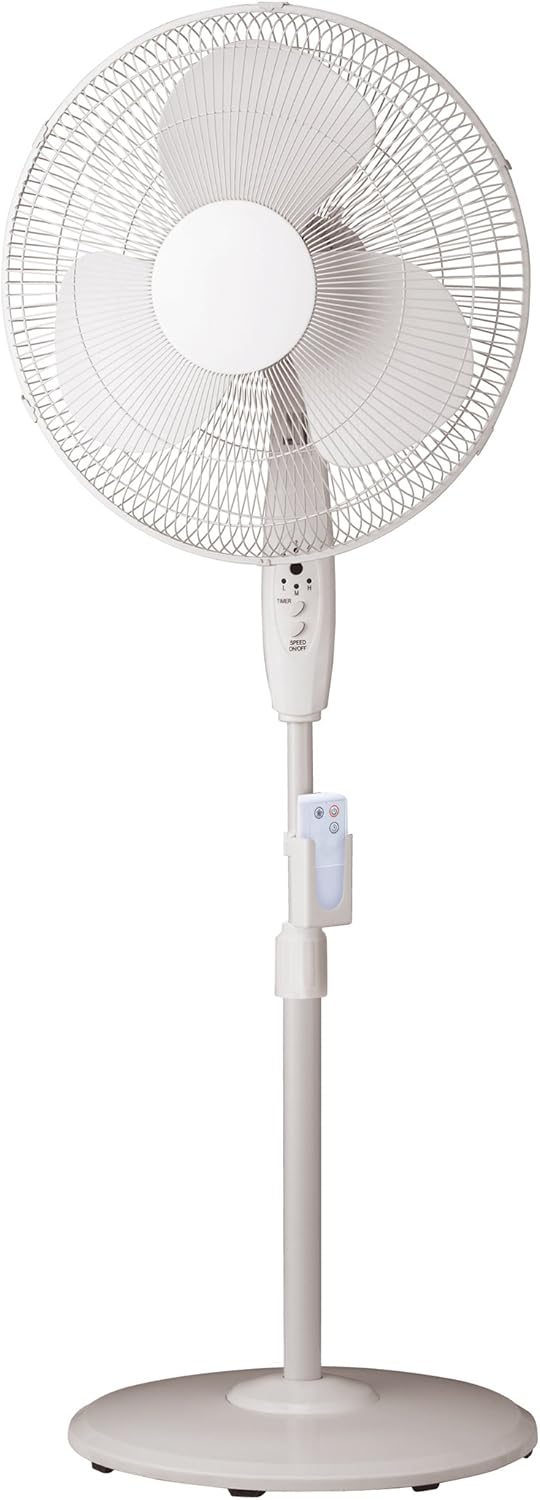
Figure 1: PELONIS FS40-8JR Pedestal Fan. This image displays the complete fan assembly, highlighting its white finish, the protective grille, fan blades, central control panel, the adjustable stand with a remote control holder, and the stable round base.
Key Features:
- Wide-angle oscillation and tilt for broad air coverage.
- Convenient 4-hour timer function.
- Remote control with a dedicated holder for easy access.
- Adjustable height to suit different cooling needs.
- Stable round base for secure placement.
- Three-speed settings (Low, Medium, High).
Parts List
Before assembly, ensure all parts are present and undamaged. Refer to the diagram in the Product Overview section for visual identification.
- Front Grille
- Rear Grille
- Fan Blades
- Motor Housing
- Control Panel
- Adjustable Stand Pole
- Round Base
- Remote Control
- Remote Control Holder
- Fasteners (nuts, screws, washers - specific types may vary)
Setup and Assembly
Minimal assembly is required to set up your PELONIS pedestal fan. Follow these steps carefully:
- Assemble the Base: Attach the adjustable stand pole securely to the round base using the provided fasteners. Ensure it is stable and upright.
- Attach Motor Housing: Mount the motor housing onto the top of the adjustable stand pole. Secure it firmly.
- Install Rear Grille: Place the rear grille onto the motor housing, aligning it correctly.
- Mount Fan Blades: Carefully slide the fan blades onto the motor shaft. Secure them with the retaining cap or nut.
- Attach Front Grille: Position the front grille over the fan blades and secure it to the rear grille using the clips or screws provided. Ensure the grille is fully closed and locked for safety.
- Insert Remote Batteries: Open the battery compartment on the remote control and insert 3 AAA batteries (not included), observing polarity.
- Attach Remote Holder: Clip the remote control holder onto the adjustable stand pole at a convenient height.
Once assembled, place the fan on a firm, level surface and plug it into a standard electrical outlet.
Operating Instructions
Your PELONIS fan can be operated using the control panel on the fan unit or the included remote control.
Control Panel Functions:
- Power On/Off: Press the "ON/OFF" button to turn the fan on or off.
- Speed Control: Press the "SPEED" button repeatedly to cycle through Low (L), Medium (M), and High (H) speed settings.
- Timer: Press the "TIMER" button to set the fan to operate for a specific duration (e.g., 1, 2, 4 hours). The fan will automatically turn off after the set time.
- Oscillation: Press the "OSC" button (if present on the panel, otherwise use remote) to activate or deactivate the oscillation function, allowing the fan head to sweep from side to side.
Remote Control Functions:
The remote control provides convenient operation from a distance. Ensure the remote is pointed towards the fan's control panel for optimal response.
- Power Button: Turns the fan on or off.
- Speed Buttons: Separate buttons for Low, Medium, and High speeds, or a single button to cycle through them.
- Timer Button: Sets the operating timer.
- Oscillation Button: Activates or deactivates the oscillation feature.
Adjusting Height and Tilt:
- Height: Loosen the height adjustment knob on the stand pole, raise or lower the fan to the desired height, and then tighten the knob securely.
- Tilt: Gently push the fan head up or down to adjust the vertical angle of airflow.
Maintenance and Cleaning
Regular cleaning and maintenance will help ensure the longevity and optimal performance of your fan.
- Always unplug the fan from the power outlet before cleaning.
- Exterior Cleaning: Use a soft, damp cloth to wipe down the exterior surfaces of the fan. Do not use abrasive cleaners or solvents.
- Grille Cleaning: Dust and lint can accumulate on the grilles and blades. Periodically remove the front grille (refer to assembly instructions in reverse) to clean the fan blades and inside of the grilles with a soft cloth or vacuum cleaner. Ensure all parts are dry before reassembling.
- Storage: When not in use for extended periods, store the fan in a cool, dry place, preferably in its original packaging, to protect it from dust and damage.
Troubleshooting
If you experience issues with your fan, consult the following table for common problems and solutions.
| Problem | Possible Cause | Solution |
|---|---|---|
| Fan does not turn on. | Not plugged in; Power outlet not working; Fan switch off. | Ensure fan is securely plugged into a working outlet; Check household circuit breaker; Press the power button on the fan or remote. |
| Weak airflow. | Fan speed set too low; Grilles or blades are dirty. | Increase fan speed; Clean the fan grilles and blades as per maintenance instructions. |
| Fan is noisy. | Loose parts; Fan not on a level surface; Obstruction. | Check for loose screws or components and tighten; Place fan on a stable, level surface; Ensure nothing is obstructing the fan blades. |
| Remote control not working. | Batteries are dead or incorrectly inserted; Obstruction between remote and fan. | Replace batteries (3 AAA); Ensure correct polarity; Remove any obstructions and point remote directly at the fan's control panel. |
Specifications
| Attribute | Detail |
|---|---|
| Model Number | FS40-8JR |
| Brand | PELONIS |
| Fan Type | Pedestal Fan |
| Fan Size | 16 Inches |
| Number of Speeds | 3 (Low, Medium, High) |
| Special Features | Oscillating, Adjustable Height, Timer, Remote Control |
| Timer | Up to 4 hours |
| Power Source | Corded Electric |
| Wattage | 60 watts |
| Color | White |
| Item Weight | 8.16 Pounds (approx. 3.7 kg) |
| Product Dimensions (L x W x H) | 57.71 x 11.99 x 46.41 cm |
| Assembly Required | Minimal Assembly |
| Batteries for Remote | 3 x AAA (not included) |
Warranty and Support
For warranty information or technical support, please refer to the warranty card included with your product or visit the official PELONIS website. You may also contact customer service for assistance with product operation, parts, or troubleshooting beyond this manual.
Customer Service Contact: Please refer to the contact information provided on the product packaging or the manufacturer's official website.


