
1. Introduction
The Romoss Sofun 1 PH10 is a compact and portable external battery designed to provide emergency power for various electronic devices via a USB port. This manual provides essential information for the safe and efficient use of your power bank.
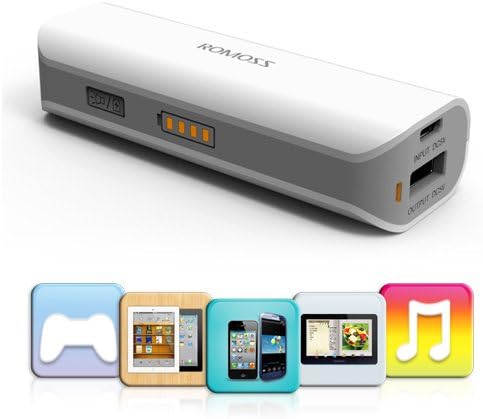
Image 1.1: Romoss Sofun 1 PH10 Portable Power Bank with various device icons indicating compatibility.
2. Safety Information
- Read all instructions before using the product.
- Do not expose the power bank to extreme temperatures (above 60°C / 140°F) or direct sunlight.
- Avoid exposing the device to moisture or liquids.
- Do not disassemble, modify, or attempt to repair the power bank. This may void the warranty and pose safety risks.
- Keep the power bank out of reach of children.
- Dispose of the power bank according to local regulations. Do not dispose of it in household waste.
3. Package Contents
Verify that all items are present in the package:
- 1 x Romoss Sofun 1 PH10 2600mAh Portable Power Bank
- 1 x Romoss Micro USB Charging/Data Cable
- 1 x User Manual (this document)

Image 3.1: Illustration of the Romoss Sofun 1 PH10 power bank, micro USB cable, and user manual included in the box.
4. Product Overview
Familiarize yourself with the components of your Romoss Sofun 1 PH10 power bank:
- Power Button: Used to check battery level and activate the flashlight.
- LED Power Indicators: Four LED lights indicate the remaining battery capacity.
- Input Port (Micro USB): For charging the power bank itself.
- Output Port (USB-A): For charging external devices.
- Flashlight: Integrated LED light for illumination.

Image 4.1: Close-up view highlighting the power button and LED power indicators on the Romoss Sofun 1 PH10.
5. Specifications
| Feature | Specification |
|---|---|
| Model | PH10 |
| Capacity | 2600mAh |
| Input | DC5V 1.5A MAX |
| Output | DC5V 1A MAX |
| Charging Time (via PC-USB) | Approximately 4 hours |
| Dimensions (L*W*H) | 89.5 x 30 x 21 mm (3.52 x 1.18 x 0.82 inches) |
| Weight | Approximately 68g (2.4ozs) |
| Recharge Cycles | 500+ |

Image 5.1: Diagram illustrating the dimensions of the Romoss Sofun 1 PH10 power bank.
6. Setup
6.1 Charging the Power Bank
- Connect the included Micro USB charging cable to the Input port of the Romoss Sofun 1 PH10.
- Connect the other end of the Micro USB cable to a USB power source, such as a computer's USB port or a compatible USB wall adapter.
- The LED power indicators will illuminate and flash to show the charging progress. When all four LEDs are solid, the power bank is fully charged.
- Charging the power bank from empty to full typically takes approximately 4 hours when connected to a PC-USB port.
6.2 Checking Battery Level
To check the remaining battery capacity of the power bank, briefly press the power button once. The LED indicators will light up to display the current charge level:
- 1 LED: 0-25% charge
- 2 LEDs: 25-50% charge
- 3 LEDs: 50-75% charge
- 4 LEDs: 75-100% charge
The LEDs will automatically turn off after approximately 3 minutes to conserve power.
7. Operation
7.1 Charging Your Device
The Romoss Sofun 1 PH10 is compatible with a wide range of devices, including most smartphones, tablets, and other USB-powered gadgets. Use your device's original charging cable for optimal performance.
- Connect your device's USB charging cable to the Output port of the Romoss Sofun 1 PH10.
- Connect the other end of the cable to your electronic device.
- The power bank will automatically detect the connected device and begin charging. The LED indicators will show the power bank's remaining charge.
- To stop charging, simply disconnect the cable from either the power bank or your device.
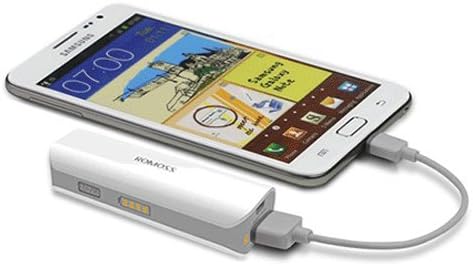
Image 7.1: The Romoss Sofun 1 PH10 power bank connected via a USB cable to charge a smartphone.
7.2 Using the Flashlight
The Romoss Sofun 1 PH10 includes an integrated flashlight function:
- To turn the flashlight on, double-press the power button.
- To turn the flashlight off, double-press the power button again.

Image 7.2: The Romoss Sofun 1 PH10 power bank with its integrated flashlight illuminated.
8. Maintenance
- Keep the power bank clean and dry. Use a soft, dry cloth to wipe the surface.
- Avoid dropping the device or subjecting it to strong impacts.
- Store the power bank in a cool, dry place away from direct sunlight and corrosive materials when not in use.
- For optimal battery life, fully charge the power bank at least once every three months if it is not used regularly.
9. Troubleshooting
If you encounter issues with your Romoss Sofun 1 PH10, refer to the following common problems and solutions:
- Power bank not charging:
- Ensure the Micro USB cable is securely connected to both the power bank's input port and the power source.
- Try using a different Micro USB cable or a different USB power adapter/port.
- Device not charging from power bank:
- Verify that the power bank has sufficient charge (check LED indicators).
- Ensure your device's charging cable is securely connected to both the power bank's output port and your device.
- Try using a different charging cable for your device.
- Confirm your device is compatible with 5V/1A charging.
- Flashlight not working:
- Ensure you are double-pressing the power button quickly.
- Check if the power bank has sufficient charge.
10. Warranty and Support
For detailed warranty information, technical support, or service inquiries regarding your Romoss Sofun 1 PH10 Portable Power Bank, please refer to the warranty card or documentation included with your purchase. You may also visit the official Romoss website for further assistance and contact information.
Online Resources: For additional support and product information, please visit the Romoss Brand Store.


