
Introduction
The Sony STR-DH740 is a 7.2 channel 4K AV receiver designed to integrate into your home entertainment system. It provides 1015 watts of total system power (145W x 7 @ 6 ohms 1kHz 0.9% THD) and offers iPod/iPhone connectivity. The receiver features 4 HDMI inputs with 4K resolution pass-through and 3D pass-through capabilities. Audio technologies include HD Digital Cinema Sound and advanced Blu-ray Disc audio decoding (LPCM, Dolby TrueHD, ProLogic IIz, DTS-HD Master Audio codecs). Setup is facilitated by Digital Cinema Auto Calibration and an on-screen graphical user interface. Additional features include Audio Return Channel, Standby pass-through of Audio & Video, and BRAVIA Sync compatibility.
This manual provides essential information for the proper installation, operation, and maintenance of your STR-DH740 receiver. Please read it thoroughly before using the product.
Product Overview
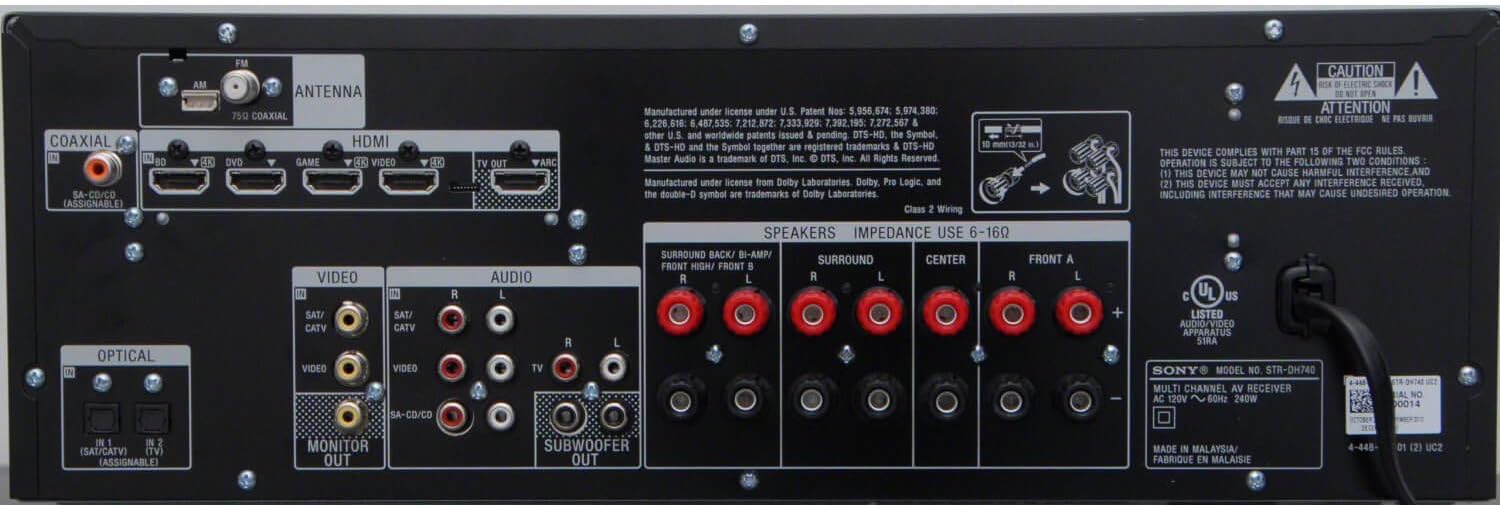
Figure 1: Front Panel
This image displays the front panel of the Sony STR-DH740 AV Receiver, showing the display, input selector, master volume knob, and front-facing ports like headphones, auto calibration mic, and USB input.

Figure 2: Rear Panel Connections
This image illustrates the rear panel of the Sony STR-DH740, highlighting various input and output ports including HDMI, coaxial, optical, video, audio, and speaker terminals.

Figure 3: Remote Control
This image shows the included remote control for the Sony STR-DH740, featuring various buttons for input selection, volume control, sound field adjustments, and menu navigation.
Setup
1. Initial Connection
Before connecting any devices, ensure the receiver is powered off and unplugged from the wall outlet.
- HDMI Connections: Connect your source devices (e.g., Blu-ray player, gaming console, cable box) to the HDMI IN ports on the rear panel. Connect your TV or projector to the HDMI OUT (TV ARC) port. The STR-DH740 features 4 HDMI inputs and supports 4K pass-through and 3D pass-through.
- Audio Return Channel (ARC): If your TV supports ARC, connect the HDMI OUT (TV ARC) port on the receiver to the ARC-compatible HDMI input on your TV. This allows audio from your TV to be sent back to the receiver through the same HDMI cable.
- Speaker Connections: Connect your speakers to the corresponding terminals on the rear panel. The receiver supports a 7.2 channel configuration. Ensure correct polarity (+ to + and - to -) for all speakers.
- Antenna Connection: Connect the FM and AM antennas for radio reception.
- USB Connection: For iPod/iPhone music and video playback, connect your device to the USB input on the front panel.
2. Digital Cinema Auto Calibration (DCAC)
The Digital Cinema Auto Calibration (DCAC) system automatically optimizes sound settings based on your room acoustics and speaker placement. This ensures the best possible sound experience.
- Connect the supplied auto calibration microphone to the AUTO CAL MIC jack on the front panel.
- Place the microphone at your primary listening position.
- Follow the on-screen instructions (via the graphical user interface) to start the calibration process. The receiver will emit test tones to measure speaker distances, levels, and frequency responses.
- Once calibration is complete, disconnect the microphone.
3. Power On and Initial Settings
After all connections are made, plug in the receiver and power it on. Use the on-screen graphical user interface to adjust initial settings such as input assignments, audio modes, and network settings (if applicable).
Operating Instructions
1. Basic Operation
- Power On/Off: Press the POWER button on the front panel or remote control.
- Input Selection: Use the INPUT SELECTOR knob on the front panel or the input buttons on the remote control (e.g., BD, DVD, GAME, VIDEO, TV) to switch between connected devices.
- Volume Control: Adjust the MASTER VOLUME knob on the front panel or the VOLUME +/- buttons on the remote control.
- On-Screen Graphical User Interface: Access the receiver's settings and menus by pressing the HOME button on the remote control. Navigate using the arrow keys and ENTER button.
2. Audio Features
- HD Digital Cinema Sound (HD DCS): This technology optimizes your receiver to mimic the sound characteristics of movie theaters, providing a true, theater-like experience.
- Front Height Speakers: The HD DCS supports Front Height mode, which enhances vocal height and 3D effects, making action sequences and movies more theatrical.
- Advanced Blu-ray Disc Audio Decoding: Experience sound closer to its original recording with LPCM, Dolby TrueHD, ProLogic IIz, and DTS-HD Master Audio codecs.
3. Video Features
- 4K Pass-through: The STR-DH740 allows native 4K video content to pass through to a 4K television or projector without compromising image quality.
- 3D Pass-through: Connect your compatible 3D Blu-ray player, PS3 system, cable box, or satellite receiver to enjoy 3D entertainment. The HDMI inputs are also compatible with standard 2D devices.
- 24p True Cinema: Watch Blu-ray Disc movies in their native frame rate (24 frames per second) when paired with a 24p HDTV and playback device via HDMI.
4. System Integration
- BRAVIA Sync: Conveniently operate and control select Sony BRAVIA Sync devices (e.g., Sony Blu-ray Disc Players, BRAVIA HDTVs) with a single remote control.
- Standby Pass-through of Audio & Video: Access all your HDMI-connected devices without needing to power on the receiver.
Maintenance
To ensure the longevity and optimal performance of your Sony STR-DH740 AV Receiver, follow these maintenance guidelines:
- Cleaning: Gently wipe the exterior surfaces with a soft, dry cloth. Do not use abrasive pads, scouring powder, or solvents such as alcohol or benzene.
- Ventilation: Ensure adequate ventilation around the receiver. Do not block ventilation openings. Overheating can lead to malfunctions.
- Power Cord: Regularly check the power cord for any damage. If damaged, contact qualified service personnel for replacement.
- Storage: If storing the receiver for an extended period, unplug it from the power outlet and store it in a cool, dry place.
Troubleshooting
If you encounter issues with your STR-DH740 receiver, refer to the following common troubleshooting steps. For more detailed solutions, consult the comprehensive user manual available on the Sony support website.
- No Power:
- Check if the power cord is securely plugged into the wall outlet and the receiver.
- Ensure the power outlet is functional.
- No Sound:
- Verify that the correct input source is selected.
- Check all speaker connections for proper polarity and secure fit.
- Ensure the volume is not muted or set too low.
- Confirm that the audio cables (HDMI, optical, coaxial) are correctly connected.
- Run the Digital Cinema Auto Calibration again.
- No Video:
- Ensure the correct input source is selected on both the receiver and the TV.
- Check all HDMI cable connections between the source, receiver, and TV.
- Try a different HDMI cable.
- Remote Control Not Working:
- Replace the batteries in the remote control.
- Ensure there are no obstructions between the remote and the receiver's IR sensor.
- Automatic Shutdown:
- The receiver may have an auto-off timer. Check the system settings in the on-screen menu to disable or adjust this feature if desired.
- Ensure proper ventilation to prevent overheating, which can trigger automatic shutdown.
Specifications
| Feature | Specification |
|---|---|
| Brand | Sony |
| Model Number | STR-DH740 |
| Surround Sound Channel Configuration | 7.2 Channels |
| Output Power | 142 Watts (per channel) |
| Total HDMI Ports | 5 (4 In, 1 Out with ARC) |
| Connectivity Technology | HDMI |
| Special Features | Sleep Timer, 3D Compatibility, 4K Pass-through |
| Compatible Devices | Speaker, Smartphone, iPhone, iPod |
| Audio Output Mode | Stereo |
| Video Encoding | H.264, H.265/HEVC |
| Control Method | Touch, Smartphone App (via compatible devices) |
| Item Weight | 15 Pounds |
| Color | Black |
Official Product Video
Video 1: Sony STR-DH740 7.2 Channel 4K AV Receiver Overview
This video provides a visual overview of the Sony STR-DH740 AV Receiver, demonstrating its key features, connectivity options, and sound capabilities. It highlights the ease of setup, 4K pass-through, and HD Digital Cinema Sound technology.
Warranty Information
Sony provides a limited warranty for this product. For specific warranty terms, conditions, and registration details, please refer to the warranty card included in the product packaging or visit the official Sony support website. Keep your proof of purchase for warranty claims.
Support
For further assistance, technical support, or to download the full user manual, please visit the official Sony support website. You can also find FAQs and contact information for customer service there.
Sony Support Website: www.sony.com/electronics/support


