
Snap-on 028907406251
Snap-on 4-in-1 Electric Stapler & Brad Nailer User Manual
Model: 028907406251
1. Introduction
Thank you for choosing the Snap-on 4-in-1 Electric Stapler & Brad Nailer. This versatile tool is designed for various fastening tasks, offering both electric and manual operation for staples and brad nails. Please read this manual thoroughly before operation to ensure safe and efficient use.
2. Safety Information
Always follow basic safety precautions when using electric tools to reduce the risk of fire, electric shock, and personal injury.
- Read all instructions: Familiarize yourself with the tool's operation and safety warnings.
- Wear eye protection: Always wear safety goggles that comply with ANSI Z87.1.
- Wear hearing protection: Use ear protection during extended operation.
- Keep work area clean: Cluttered areas invite accidents.
- Do not operate in explosive atmospheres: Do not use in the presence of flammable liquids, gases, or dust.
- Secure workpiece: Use clamps or a vise to hold the workpiece.
- Avoid accidental starting: Ensure the switch is off before plugging in.
- Disconnect power: Unplug the tool before making adjustments, changing accessories, or storing.
- Use the right tool: Do not force small tools or attachments to do the job of a heavy-duty tool.
- Maintain tools with care: Keep tools sharp and clean for better and safer performance.
- Check for damaged parts: Before use, check for misalignment or binding of moving parts, breakage of parts, and any other condition that may affect the tool’s operation.
- Keep children away: Do not let children handle the tool.
3. Package Contents
Your Snap-on 4-in-1 Electric Stapler & Brad Nailer set includes the following items:
- 1 x Heavy Duty Electric Stapler / Brad Nailer
- 1 x Manual Stapler / Brad Nailer
- 800 x Assorted Staples and Nails
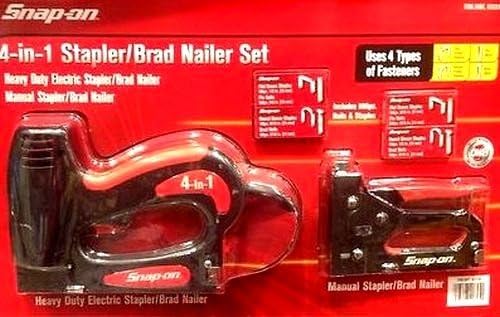
Figure 3.1: The Snap-on 4-in-1 Electric Stapler and Manual Stapler as packaged, showing the electric tool on the left and the manual tool on the right, along with various fasteners.
4. Product Features
This Snap-on fastening system offers versatility and ease of use for a variety of projects.
- 4-in-1 Functionality: Capable of using four different types of staples and nails.
- Dual Tools: Includes both a heavy-duty electric stapler/brad nailer and a manual stapler/brad nailer for different applications and power requirements.
- Comprehensive Fastener Set: Comes with 800 pieces of assorted staples and nails to get you started immediately.
- AC Powered (Electric Tool): Ensures consistent power for demanding tasks.
- Compact Design: Both tools feature a modern, compact design for easy handling and storage.
5. Setup
5.1 Loading Fasteners (Electric Stapler/Nailer)
- Disconnect Power: Ensure the electric stapler/nailer is unplugged from the power source before loading fasteners.
- Open Magazine: Locate the magazine release latch, typically at the bottom or rear of the tool. Press or slide it to open the fastener magazine.
- Insert Fasteners: Place the strip of appropriate staples or brad nails into the magazine with the points facing forward. Ensure they are seated correctly. This tool uses 4 types of fasteners. Refer to the tool markings for compatible fastener types and sizes.
- Close Magazine: Slide the magazine cover back until it clicks securely into place. Do not force it.
5.2 Loading Fasteners (Manual Stapler/Nailer)
- Open Magazine: Locate the magazine release mechanism, usually a push-button or lever at the rear. Open the magazine.
- Insert Fasteners: Insert the strip of staples or brad nails into the magazine, ensuring the points are facing the front of the tool.
- Close Magazine: Push the magazine follower or cover back into place until it locks.
6. Operating Instructions
6.1 Using the Electric Stapler/Nailer
- Connect Power: Plug the tool into a standard AC power outlet.
- Position Tool: Place the nose of the tool firmly against the workpiece where you want to drive the fastener. Ensure the tool is perpendicular to the surface.
- Activate Trigger: Press the trigger to drive the fastener. The tool will automatically reset for the next fastener.
- Adjust Depth (if applicable): Some models may have a depth adjustment knob or lever. Adjust as needed for different material densities.
- Clear Jams: If a fastener jams, unplug the tool immediately and refer to the Troubleshooting section.
6.2 Using the Manual Stapler/Nailer
- Position Tool: Place the nose of the tool firmly against the workpiece.
- Apply Pressure: Apply firm, even downward pressure on the handle.
- Drive Fastener: Squeeze the handle completely to drive the fastener. Release the handle to prepare for the next fastener.
- Clear Jams: If a fastener jams, open the magazine and carefully remove the jammed fastener.
7. Maintenance
- Cleaning: Keep the tool clean and free of dust and debris. Use a dry cloth to wipe down the exterior. Do not use solvents.
- Lubrication: The electric tool is generally maintenance-free regarding lubrication. For the manual tool, a drop of light machine oil on pivot points may be beneficial periodically.
- Storage: Store the tools in a dry, secure place, out of reach of children.
- Inspection: Regularly inspect the power cord of the electric tool for damage. Check both tools for loose screws or worn parts.
8. Troubleshooting
| Problem | Possible Cause | Solution |
|---|---|---|
| Electric tool does not fire. | No power; Fastener magazine empty; Safety contact not fully depressed. | Check power connection; Reload fasteners; Ensure tool nose is firmly pressed against workpiece. |
| Fasteners jam frequently. | Incorrect fastener type/size; Damaged fasteners; Magazine dirty or damaged. | Use correct fasteners; Inspect fasteners for damage; Clean magazine; Inspect magazine for damage. |
| Fasteners not driven flush. | Insufficient power (electric); Insufficient pressure (manual); Incorrect depth setting (electric). | Ensure stable power supply; Apply more firm pressure; Adjust depth setting if available. |
| Tool overheats (electric). | Continuous heavy use; Blocked ventilation. | Allow tool to cool down; Ensure ventilation slots are clear. |
9. Specifications
| Attribute | Detail |
|---|---|
| Brand | Snap-on |
| Model Number | 028907406251 |
| Product Dimensions | 50.29 x 50.29 x 1.02 cm (19.8 x 19.8 x 0.4 inches) |
| Item Weight | 1.97 kg (4.35 pounds) |
| Power Source (Electric) | AC |
| Operation Mode | Electric / Manual |
| Fastener Compatibility | Uses 4 types of staples and nails fasteners |
| Batteries Required | No |
10. Warranty and Support
For warranty information, technical support, or service inquiries regarding your Snap-on 4-in-1 Electric Stapler & Brad Nailer, please contact Snap-on customer service or visit the official Snap-on website. Keep your purchase receipt as proof of purchase.
Online Support: www.snapon.com
Related documents028907406251


Ask a question about this manual
Ask about setup, troubleshooting, compatibility, parts, safety, or missing instructions. Manuals+ will review the question and use this page’s manual context to help answer it.