
1. Product Overview
The Noctua NF-S12A PWM is a premium 120mm quiet case fan designed for highly efficient and near-silent ventilation of PC cases and other chassis. It features a 4-pin PWM connector for automatic speed control, ensuring optimal balance between cooling performance and noise levels. This fan incorporates advanced technologies such as Anti-Stall Knobs and an Advanced Acoustic Optimisation (AAO) frame to enhance airflow efficiency and reduce noise.

Image 1.1: Angled view of the Noctua NF-S12A PWM 120mm fan.
2. Package Contents
Verify that all items listed below are included in your package:
- Noctua NF-S12A PWM 120mm Fan
- Low-Noise Adaptor (LNA)
- 4-pin Y-cable
- 30cm Extension Cable
- 4x Anti-Vibration Mounts
- 4x Fan Screws

Image 2.1: The Noctua NF-S12A PWM fan along with its complete set of accessories.
3. Installation
Follow these steps to properly install your Noctua NF-S12A PWM fan:
- Prepare Mounting Location: Identify the desired mounting location within your PC case (e.g., front intake, rear exhaust, top exhaust). Ensure there is sufficient clearance for the fan.
- Choose Mounting Hardware: You can use either the provided fan screws for a rigid installation or the anti-vibration mounts for reduced vibration transfer. To use anti-vibration mounts, pull them through the fan's mounting holes and then through the case's mounting holes.
- Mount the Fan: Secure the fan to the chosen location using your preferred mounting hardware. Ensure the fan's airflow direction is correct for your system's cooling strategy (indicated by arrows on the fan frame).
- Connect Power: Connect the fan's 4-pin PWM cable to an available 4-pin fan header on your motherboard. If you wish to run two PWM fans from a single header, use the included 4-pin Y-cable.
- Optional: Low-Noise Adaptor (LNA): For reduced maximum fan speed and even quieter operation, connect the Low-Noise Adaptor between the fan and the motherboard header. This will reduce the maximum speed from 1200 RPM to 900 RPM.

Image 3.1: The 4-pin PWM connector for motherboard connection.

Image 3.2: Anti-vibration mounts for flexible and quiet installation.
4. Operation
The NF-S12A PWM fan is designed for automatic speed control via your motherboard's 4-pin PWM fan headers. The motherboard's BIOS or fan control software will regulate the fan speed based on system temperatures, providing optimal cooling performance while minimizing noise.
- Automatic Speed Control: The fan's speed will dynamically adjust between 300 RPM and 1200 RPM (or 900 RPM with LNA) based on the PWM signal from your motherboard.
- Low-Noise Adaptor (LNA): When the LNA is used, the maximum speed of the fan is capped at 900 RPM, resulting in even quieter operation, suitable for noise-sensitive applications.
- Airflow Direction: Ensure the fan is oriented to push air in the desired direction (intake or exhaust) for effective system cooling. Arrows on the side of the fan indicate the direction of airflow and blade rotation.
5. Features and Technologies
The NF-S12A PWM incorporates several advanced features to deliver its premium quiet cooling performance:
- Anti-Stall Knobs: These small protrusions on the suction side of the fan blades reduce flow separation phenomena, improving the fan's performance at lower rotational speeds and in challenging environments.
- Advanced Acoustic Optimisation (AAO) Frame: Noctua's AAO frames feature integrated anti-vibration pads, as well as Stepped Inlet Design and Inner Surface Microstructures, all contributing to further noise reduction and improved efficiency.
- SSO2 Bearing: The second generation of Noctua's renowned SSO-Bearing (Self-Stabilising Oil-pressure Bearing) provides superior long-term stability and quiet operation.
- Custom Designed PWM IC with SCD: The NE-FD1 PWM IC integrates Smooth Commutation Drive (SCD) technology, which suppresses torque variations and ensures smoother, quieter operation.

Image 5.1: Close-up view of the Anti-Stall Knobs on the fan blades.

Image 5.2: Detail of the Advanced Acoustic Optimisation (AAO) frame design.

Image 5.3: Diagram showing the internal structure of the SSO2 bearing.
6. Specifications
| Feature | Specification |
|---|---|
| Model | NF-S12A PWM |
| Dimensions | 120x120x25 mm (4.72"L x 4.72"W x 0.98"H) |
| Bearing Type | SSO2 |
| Rotational Speed (Max) | 1200 RPM (900 RPM with LNA) |
| Airflow Capacity | 107.5 CMPH |
| Noise Level (Max) | 17.8 dB(A) |
| Voltage | 12 V |
| Power Connector | 4-Pin PWM |
| Material | Fibre-glass reinforced PBT |
| MTTF (Mean Time To Failure) | >150,000 h |
| Item Weight | 6.4 ounces |
| Date First Available | March 15, 2013 |
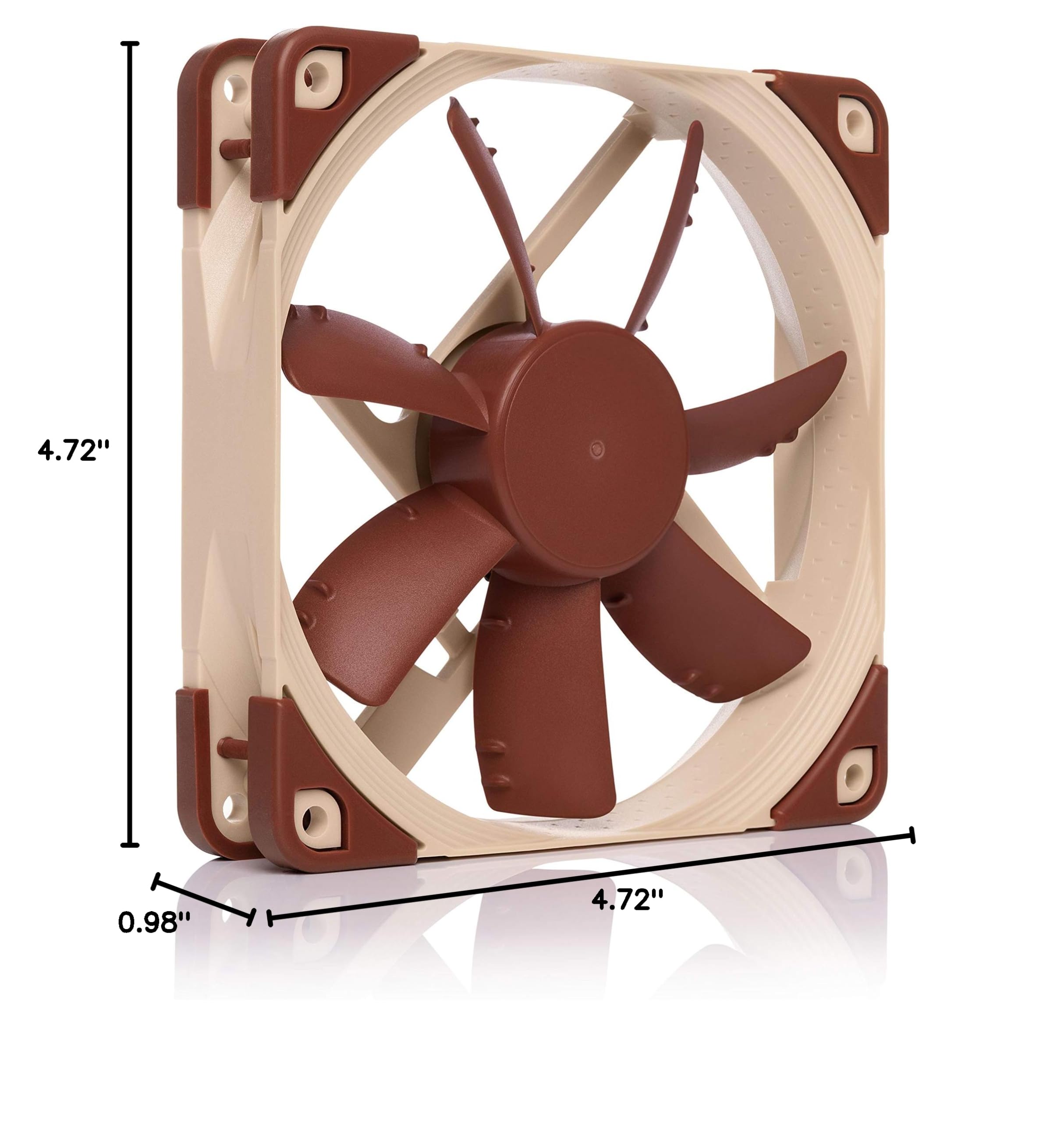
Image 6.1: Dimensional drawing of the Noctua NF-S12A PWM fan.
7. Maintenance
To ensure optimal performance and longevity of your Noctua NF-S12A PWM fan, periodic maintenance is recommended:
- Dust Removal: Regularly inspect the fan blades and frame for dust accumulation. Use compressed air or a soft brush to gently remove dust. Avoid using harsh chemicals or abrasive materials.
- Cable Management: Ensure fan cables are neatly routed and secured to prevent them from interfering with fan blades or other components.
- No User-Serviceable Parts: The fan's bearing system is sealed and does not require lubrication or disassembly. Attempting to disassemble the fan may void the warranty.
8. Troubleshooting
If you encounter issues with your NF-S12A PWM fan, refer to the following common troubleshooting steps:
- Fan Not Spinning:
- Check if the 4-pin PWM connector is securely plugged into the motherboard header.
- Verify that the fan header on the motherboard is enabled in the BIOS/UEFI settings.
- Ensure the system is powered on and receiving power.
- Excessive Noise:
- Check for any cables or obstructions touching the fan blades.
- Ensure the fan is securely mounted and not vibrating against the case.
- If not already in use, try connecting the Low-Noise Adaptor (LNA) to reduce maximum speed.
- Verify fan speed settings in your motherboard's BIOS/UEFI or fan control software.
- Insufficient Airflow:
- Confirm the fan's airflow direction is correct for its intended purpose (intake or exhaust).
- Remove any dust buildup from the fan blades and surrounding areas.
- Ensure there are no obstructions blocking the fan's intake or exhaust path.
9. Warranty and Support
Noctua provides a 6-year manufacturer's warranty for the NF-S12A PWM fan, covering defects in materials and workmanship. For warranty claims or technical assistance, please visit the official Noctua website or contact their customer support directly. Keep your proof of purchase for warranty validation.
For further information and detailed support resources, please visit the Noctua official website.


