
Introduction
The Sangean PS-300 Pillow Speaker is designed to provide a comfortable and private listening experience. Its extra-flat design allows it to be placed under a pillow, enabling users to listen to audio from various devices without disturbing others. This manual provides essential instructions for the setup, operation, and maintenance of your PS-300.

The Sangean PS-300 Pillow Speaker, shown in its retail packaging, highlights its compact design and in-line controls.
Product Features
- Universal Compatibility: Connects to any audio device equipped with a standard 3.5mm headphone output, including smartphones, MP3 players, radios, and TVs.
- Built-in Amplifier: Features an on/off switchable amplifier to boost audio output. Requires one AAA battery (not included) for amplifier function.
- In-line Volume Control: Conveniently adjust the listening volume directly from the control unit.
- Extra-Flat Design: The speaker's slim profile (0.5 inches high) allows for comfortable placement under a pillow.
- Long Cable: A 6.5-foot (approximately 1.98 meters) cord provides ample length to reach your audio source.
- Durable Construction: Designed for regular use with a robust speaker and housing.
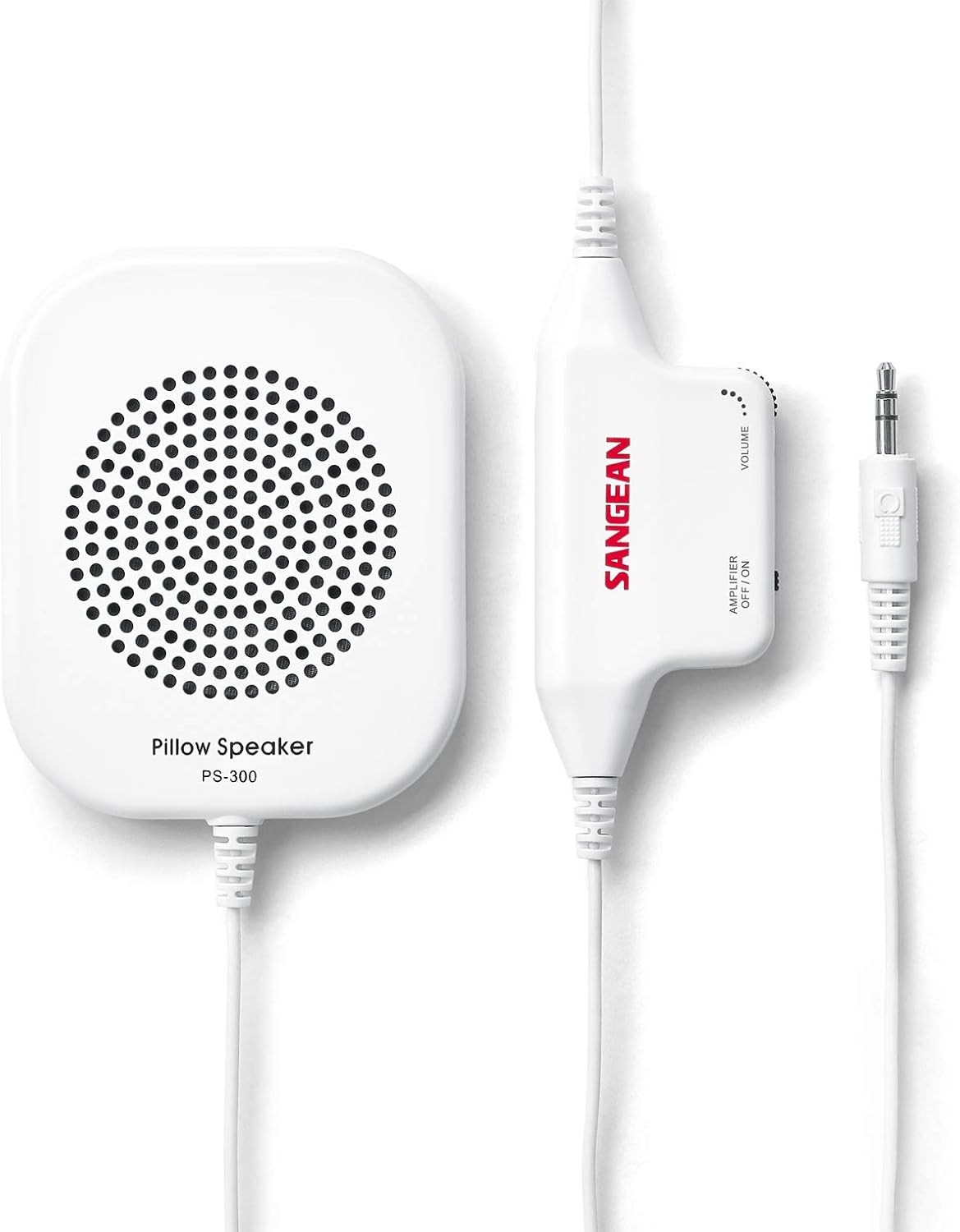
A close-up view of the Sangean PS-300 Pillow Speaker and its attached in-line control unit, featuring the volume dial and amplifier switch.
Package Contents
Verify that all items are present in the package:
- Sangean PS-300 Pillow Speaker
- Integrated 6.5-foot cord with in-line volume control and amplifier unit
Setup
- Install Battery (for Amplifier function): If you intend to use the built-in amplifier for enhanced volume, open the battery compartment on the control unit and insert one AAA battery. Ensure correct polarity. The amplifier can be switched off to conserve battery life or if amplification is not desired.
- Connect to Audio Device: Plug the 3.5mm audio connector from the PS-300's cable into the headphone output jack of your audio source (e.g., radio, smartphone, MP3 player).
- Position the Speaker: Slide the flat pillow speaker under your pillow or place it in a convenient location near your ear.

This diagram illustrates the components of the Sangean PS-300, including the 3.5mm input connector, amplifier switch, volume control, battery compartment, and pillow speaker.
Operation
- Power On Audio Source: Turn on your connected audio device and begin playback.
- Adjust Amplifier: Locate the 'AMPLIFIER OFF/ON' switch on the in-line control unit. Switch it to 'ON' for amplified sound (requires AAA battery) or 'OFF' for passive listening.
- Control Volume: Use the 'VOLUME' dial on the in-line control unit to adjust the speaker's output level to your comfort. You may also need to adjust the volume on your audio source device.

The Sangean PS-300 Pillow Speaker and its control unit are shown resting on a white bedsheet, demonstrating its intended use for bedside listening.
Maintenance
- Cleaning: Wipe the speaker and control unit with a soft, dry cloth. Avoid using harsh chemicals or abrasive cleaners.
- Battery Replacement: If the amplifier's performance diminishes, replace the AAA battery in the control unit. Remove the battery if the speaker will not be used for an extended period to prevent leakage.
- Storage: Store the speaker in a cool, dry place when not in use. Avoid extreme temperatures.
- Cable Care: Handle the cable gently to prevent kinks or damage, which can affect audio quality or device functionality.
Troubleshooting
If you encounter issues with your Sangean PS-300, refer to the following common solutions:
- No Sound:
- Ensure the 3.5mm audio connector is fully inserted into both the speaker's control unit and your audio source device.
- Check that your audio source device is powered on and playing audio.
- Verify the volume on both the PS-300's in-line control and your audio source device is turned up.
- Low Volume:
- Confirm the 'AMPLIFIER OFF/ON' switch is set to 'ON'.
- If using the amplifier, ensure the AAA battery is fresh and correctly installed. Replace if necessary.
- Increase the volume on both the PS-300's in-line control and your audio source device.
- Distorted Sound:
- Reduce the volume on both the PS-300 and your audio source device. Excessive volume can cause distortion.
- Check the audio cable for any visible damage or kinks.
Specifications
| Model Name | PS-300 |
| Speaker Type | 2.25" 16ohm Full-range Speaker |
| Speaker Size | 2.25 Inches (57mm) |
| Impedance | 16 Ohm |
| Amplifier Output Power | 50mW (16 ohm) |
| Frequency Response | 100Hz - 20 kHz (as per feature bullets, 1 GHz in specs seems like an error) |
| Connectivity Technology | Auxiliary (3.5mm) |
| Power Source | Battery Powered (1 AAA battery for amplifier) |
| Product Dimensions (D x W x H) | 2.75" x 3.5" x 0.5" (7cm x 8.9cm x 1.3cm) |
| Item Weight | 0.3 Pounds (approx. 136g) |
| Cable Length | 6.5 feet (approx. 1.98 meters) |
Warranty and Support
The Sangean PS-300 Pillow Speaker comes with a One Year Manufacturer's Warranty. For warranty claims or technical support, please contact Sangean America, Inc. directly.
You can also find additional information and support resources on Sangean's official channels:
- Official User Manual (PDF): Download PDF
- Facebook: Sangean Radio on Facebook
- Instagram: Sangean Radio on Instagram


