
1. Introduction
This manual provides instructions for the Beyution Universal Remote Control, model 705TZ9SK10A. This remote is designed as a replacement for various Hannspree TV models and requires no programming or setup. Please read this manual thoroughly to ensure proper use and longevity of your remote control.
2. Product Features
- Compatibility: Designed for a wide range of Hannspree TV models, including HSG1051, HSG1066, HSG1067, HSG1074, HSG1075, HSG1076, HSG1101, HSG1113, HSG1114, HSG1116, HSG1117, HSG1139, HSG1141, HSG1142, SJ28DMBB, and others.
- No Setup Required: Operates immediately after battery installation; no programming or pairing is necessary.
- Infrared Connectivity: Utilizes infrared technology for reliable communication with your television.
- Operating Range: Effective control distance of up to 10 meters (approximately 33 feet).
- Durable Construction: Made from high-quality ABS plastic for durability and resistance to drops.
- Ergonomic Design: Lightweight and comfortable to hold, reducing the chance of accidental slips.
3. Setup
3.1 Battery Installation
The remote control requires two AAA batteries (not included). Follow these steps to install them:
- Locate the battery compartment cover on the back of the remote control.
- Press down on the latch and slide the cover downwards to open the compartment.
- Insert two AAA batteries, ensuring the positive (+) and negative (-) terminals align correctly with the markings inside the compartment.
- Slide the battery compartment cover back into place until it clicks securely.
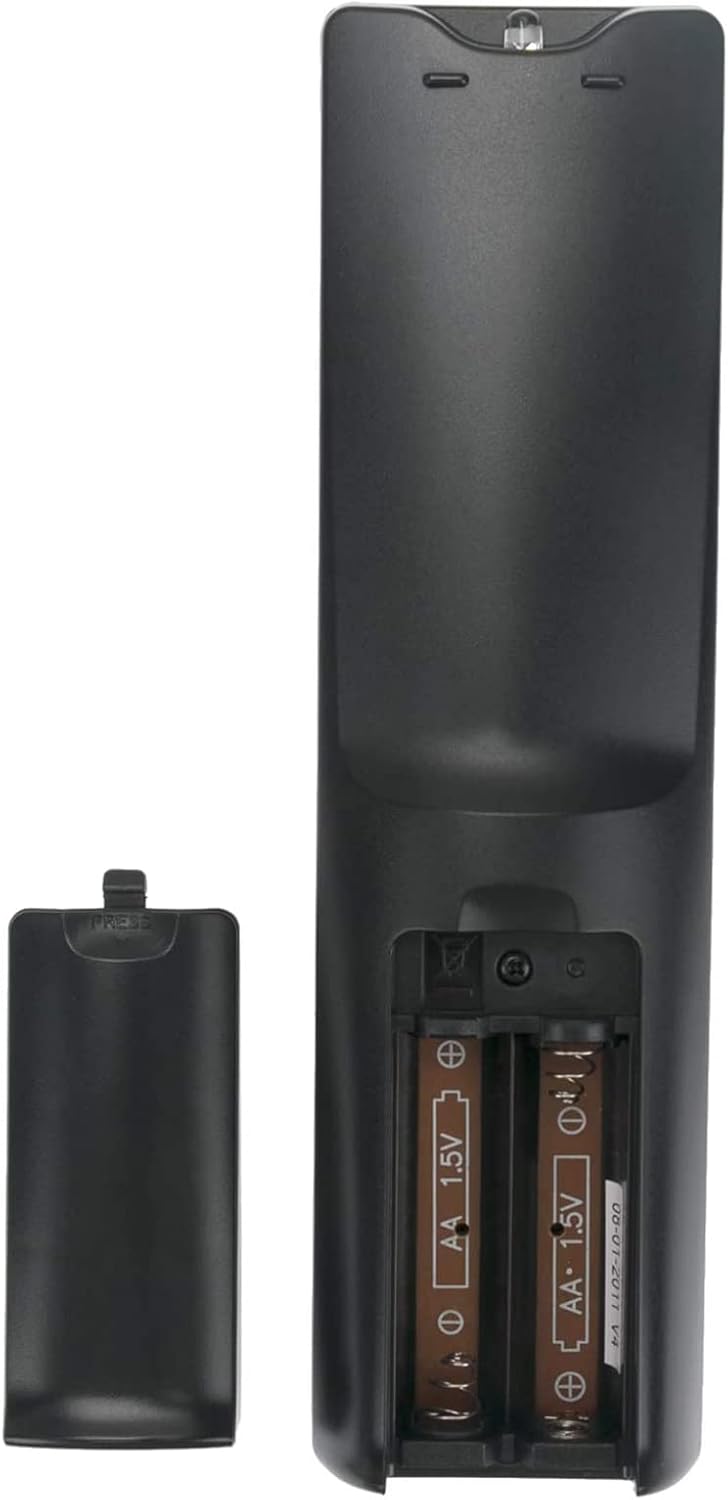
Figure 1: Battery compartment with AAA batteries. Ensure correct polarity when inserting batteries.
3.2 Initial Use
Once batteries are installed, the remote control is ready for immediate use. No programming or pairing with your Hannspree TV is required. Simply point the remote at your television and begin operating it.
4. Operating Instructions
The Beyution Universal Remote Control features a standard layout for easy navigation and control of your Hannspree TV. Below is an overview of common button functions:

Figure 2: Front view of the remote control with button layout.
- Power Button (●): Turns the TV on or off.
- Input: Selects the video input source (e.g., HDMI 1, AV).
- Number Buttons (0-9): Directly select channels.
- VOL +/-: Adjusts the volume level.
- CH P +/-: Changes channels up or down.
- MUTE: Silences the TV audio.
- Navigation Pad (Up, Down, Left, Right, OK): Used for menu navigation and selection.
- MENU: Accesses the TV's main menu.
- INFO: Displays information about the current program or input.
- EPG: Opens the Electronic Program Guide (if supported by your TV).
- TEXT: Accesses teletext functions (if supported by your TV).
- Colored Buttons (Red, Green, Yellow, Blue): Functionality varies depending on the TV model and current menu.
- Subtitle: Toggles subtitles on or off.
- Aspect: Changes the screen aspect ratio.
- Sleep: Sets a sleep timer for the TV.
For specific functions not listed, refer to your Hannspree TV's original instruction manual, as button functionality can sometimes vary slightly between TV models.
5. Maintenance
5.1 Cleaning
To clean the remote control, use a soft, dry cloth. For stubborn dirt, lightly dampen the cloth with water or a mild, non-abrasive cleaner. Avoid using harsh chemicals or abrasive materials, as these can damage the remote's surface or internal components.
5.2 Battery Care
- Replace batteries when the remote's response becomes sluggish or stops working.
- Always replace both batteries at the same time with new ones of the same type (AAA).
- If the remote will not be used for an extended period, remove the batteries to prevent leakage and potential damage.
- Dispose of used batteries according to local regulations.
6. Troubleshooting
- Remote not responding:
- Check if the batteries are correctly installed with the correct polarity.
- Replace old batteries with new AAA alkaline batteries.
- Ensure there are no obstructions between the remote control and the TV's infrared sensor.
- Make sure you are within the effective operating range (up to 10 meters).
- Some buttons not working:
- Verify that the button is clean and not stuck.
- Confirm that the function is supported by your specific Hannspree TV model.
If issues persist after following these troubleshooting steps, please contact customer support for further assistance.
7. Specifications
| Model Number | 705TZ9SK10A |
| Brand | Beyution |
| Connectivity Technology | Infrared |
| Compatible Devices | Television (Various Hannspree models) |
| Power Source | 2 x AAA Batteries (not included) |
| Product Dimensions | 8 x 2 x 0.7 inches (20.3 x 5.1 x 1.8 cm) |
| Item Weight | 2.47 ounces (70 grams) |
| Material | ABS Plastic |
8. Warranty and Support
8.1 Warranty Information
This Beyution Universal Remote Control comes with a 6-month warranty period from the date of purchase, covering manufacturing defects. Additionally, a 1-year return policy is offered for customer satisfaction.
8.2 Customer Support
For any questions, concerns, or assistance with your remote control, please contact Beyution customer support. Provide your product model number (705TZ9SK10A) and a detailed description of the issue for prompt service.